AI Daily Update Format Examples for Team Leaders
Discover effective AI daily update format examples to streamline team communication. Improve decision-making in minutes with our easy-to-use templates.
ClaudeDrive
A Yungsten Tech product

AI Daily Update Format Examples for Team Leaders

AI daily update formats are structured templates that organize key information from multiple sources into a single, scannable briefing a leader or team can act on in minutes. The right format depends on your role, your team’s size, and how decisions get made. This article covers practical ai daily update format examples drawn from executive briefings, team standups, and cross-team intelligence digests. Tools like ClaudeDrive, Microsoft 365 Copilot, and open-source frameworks like the DailyOps AI Digest Toolkit each take a different approach. The goal is the same: less time reading, better decisions made.
1. AI daily update format examples: what makes them work
A good AI daily update format does one thing before anything else. It puts the most important information where the reader’s eye lands first. Every format covered here follows that principle, but each applies it differently depending on who reads it and what they need to do next.
The three main categories are executive briefings, team standup updates, and cross-team intelligence digests. Each has a distinct structure, a target reader, and a recommended reading time. Choosing the wrong format for your audience is the most common mistake. A CEO reading a standup-style update wastes time on granular task lists. A developer reading an executive digest misses the specific ticket context they need.

Named entities matter here. ClaudeDrive, Microsoft 365 Copilot, and Gitmore each produce structured daily updates, but they differ in where data comes from, who controls access, and how output is formatted. The sections below break down each format with enough detail to replicate or adapt it.
2. Executive AI briefing: the 7-section format
The executive daily briefing is the most structured of all AI report format examples. An effective version contains seven sections designed for comprehension in under three minutes: top three priorities, urgent emails, delegation tasks, FYI items, meeting prep with suggested questions, schedule risks, and quick wins. Each section is short. Each section answers a single question the executive would otherwise have to ask.
The logic behind this structure is that executives prefer decision-ready priority sections over activity logs. A briefing that opens with “here is what you must decide today” outperforms one that opens with “here is what happened yesterday.” Microsoft’s Executive Briefing Agent in Microsoft 365 Copilot applies this principle directly. The agent pulls from Microsoft Graph, integrating calendars, key emails, and deadlines into a short, scan-able summary that favors clarity over completeness.
The format works best when delivered before 7:30 a.m. and kept to one screen of reading. Any longer and it competes with the inbox rather than replacing it.
- Top 3 priorities: Decisions or actions that must happen today, ranked by consequence
- Urgent emails: Messages requiring a response within 24 hours, with a one-line summary
- Delegation tasks: Items the executive should assign, with suggested owners
- FYI items: Context the executive needs but does not need to act on
- Meeting prep: One or two smart questions per scheduled meeting
- Schedule risks: Conflicts, overruns, or gaps that need attention
- Quick wins: Small actions that take under five minutes and close open loops
Pro Tip: Connect your calendar and email to the briefing tool before anything else. The quality of an executive AI briefing is directly proportional to the quality of its inputs. A briefing built from three connected sources beats one built from one source every time.
3. Team standup AI update: the 4-section template
The AI-generated standup update is the most widely used daily update template in engineering and product teams. The ideal version is scannable, specific, and takes under two minutes to write. The four sections are Yesterday/Completed, Today/Planned, Blockers/Risks, and Context/FYI.
Specificity is what separates a useful standup update from a useless one. Generic, non-actionable updates are the main failure mode. “Worked on the API” tells a team lead nothing. “Closed PR #412, merged feature branch for user auth, unblocked by DevOps at 4 p.m.” tells them everything. AI tools that pull directly from GitHub, Jira, or Linear produce this level of specificity automatically.
- Yesterday/Completed: List closed tickets, merged PRs, and finished tasks with reference numbers
- Today/Planned: Name the specific items on the schedule, again with ticket or PR references
- Blockers/Risks: Flag anything that prevents progress, with the name of who can unblock it
- Context/FYI: Share anything the team needs to know that does not require action
Timing matters. Post standup updates before 9:30 a.m. so the team lead can read them before the first meeting. AI tools connected to Slack, email, and issue trackers can draft these automatically, reducing the time each team member spends writing from ten minutes to under two.
Async updates provide status; synchronous meetings resolve blockers and preserve team cohesion. The standup format works best as a complement to a short weekly sync, not a replacement for it.
Pro Tip: If your team uses GitHub, connect your AI update tool to the commit log. An AI that reads your commits drafts a more accurate standup than one that reads your memory of what you did.
4. Cross-team AI intelligence digest: the full-snapshot format
The cross-team intelligence digest is the most data-intensive of all structured AI update examples. It synthesizes inputs from Slack, email, project boards, and meeting notes into a single urgency-sorted report. Urgency ordering and separating morning full snapshots from afternoon delta updates prevent information overload and keep teams aligned across departments.
The morning update delivers a full snapshot: every open item, every deadline, every flagged risk. The afternoon update delivers only what changed. This two-cadence approach means readers never re-read information they already have. Color-coded urgency badges, action tables with named owners, and deadline columns make the digest operational rather than informational.
Hard formatting rules are critical in this format. Avoid message truncation. Preserve long verbatim transcripts when they contain decisions. Include action and deadline tables. Flag emails unanswered for 48 hours or more. These rules prevent the digest from becoming a summary that loses the context a team needs to act.
| Format element | Morning snapshot | Afternoon delta |
|---|---|---|
| Scope | All open items and risks | Changes since morning only |
| Length | Full report, no truncation | Short, changes-only list |
| Urgency badges | Full color-coded set | New urgencies flagged only |
| Action table | Complete with owners and deadlines | Updated rows only |
| Delivery method | Gmail draft to Slack channel | Direct Slack post |
Automated delivery via Gmail draft to Slack reduces the friction of switching between tools. Readers get the digest where they already work.
5. Format comparison: which AI daily briefing fits your team
Choosing the right AI progress report format requires matching the update’s scope to the reader’s role and decision-making speed.
| Format | Length | Audience | Frequency | Primary inputs | Key advantage |
|---|---|---|---|---|---|
| Executive briefing | Under 3 min read | CEO, COO, founder | Once daily, pre-7:30 a.m. | Calendar, email, deadlines | Decision-ready priorities |
| Team standup | Under 2 min write | Engineers, PMs, designers | Once daily, pre-9:30 a.m. | GitHub, Jira, Slack | Specificity and ticket traceability |
| Intelligence digest | 5-10 min read | Chiefs of staff, ops leads | Twice daily | Slack, email, boards, notes | Cross-team alignment |
The executive briefing optimizes for speed and decision clarity. The standup optimizes for specificity and accountability. The intelligence digest optimizes for completeness and cross-functional visibility. Most organizations need at least two of these running in parallel.
6. How to choose and customize your AI update format
Selecting the right daily ai briefing template starts with one question: what does the reader need to do after reading it? If the answer is “make a decision,” use the executive format. If the answer is “know what the team is working on,” use the standup format. If the answer is “understand everything that changed across three departments,” use the digest format.
Customization matters as much as format selection. Tone, urgency thresholds, and section ordering should reflect how your organization actually communicates. A team that escalates everything loses the signal in the noise. A team that under-flags risks misses the point of the update entirely.
- Match section depth to reader role. Executives need one sentence per item. Operations leads need full context.
- Set urgency thresholds explicitly. Define what “urgent” means in your organization before the AI decides for you.
- Connect the right data sources. An update built from email alone misses what happened in Slack and GitHub.
- Schedule delivery at a fixed time. Consistency builds the habit of reading. Irregular delivery breaks it.
- Start with simple templates and iterate based on feedback from the people reading them.
Trusted AI daily updates require fixed output schemas and automated verification to confirm key sections are present before delivery. Open-source tools like the Slack-Daily-Digest AI Skill use a watchdog mechanism for exactly this purpose. The principle applies regardless of which tool you use: verify before you send.
Audit trail sections with change logs and deadline tables improve operational clarity and prevent information from siloing inside individual inboxes. This is especially important for organizations where decisions are made asynchronously across time zones.
Key takeaways
The most effective AI daily update format matches the reader’s role to the update’s scope, uses fixed schemas for consistency, and connects to the data sources where work actually happens.
| Point | Details |
|---|---|
| Match format to reader role | Executives need decision-ready priorities; teams need ticket-level specificity. |
| Use fixed schemas | Consistent section ordering builds reader trust and speeds comprehension. |
| Connect real data sources | Updates built from GitHub, Slack, and calendar outperform memory-based drafts. |
| Separate cadences by purpose | Morning full snapshots and afternoon delta updates prevent information overload. |
| Start simple and iterate | Launch with a minimal template and refine based on what readers actually use. |
What I’ve learned from watching teams adopt AI daily updates
Most teams that fail with AI daily updates fail at the format selection step, not the technology step. They pick the most sophisticated template they can find, connect it to every data source available, and send a five-section digest to an executive who wanted three bullet points. The executive stops reading after day two. The team concludes that AI updates don’t work.
The formats that stick are the ones that respect the reader’s time budget before anything else. I’ve seen a chief of staff at a 200-person company replace a 45-minute weekly status meeting with a daily two-minute briefing built from meeting notes, GitHub, and the calendar. The meeting disappeared. Decisions got faster. The briefing worked because it was built for one reader, not for the organization in the abstract.
The harder problem is trust. An AI update that contains one wrong fact loses credibility for the next thirty. The teams that build lasting trust in their AI progress reports are the ones that make every line traceable to a source. Not because readers check every citation, but because knowing they could check creates confidence that they don’t need to.
The practical advice I give every leader starting this process: pick one format, connect two data sources, and send it to yourself for a week before sending it to anyone else. You will find the gaps faster than any feedback session will.
— Paul
See how ClaudeDrive delivers your daily briefing inside Claude
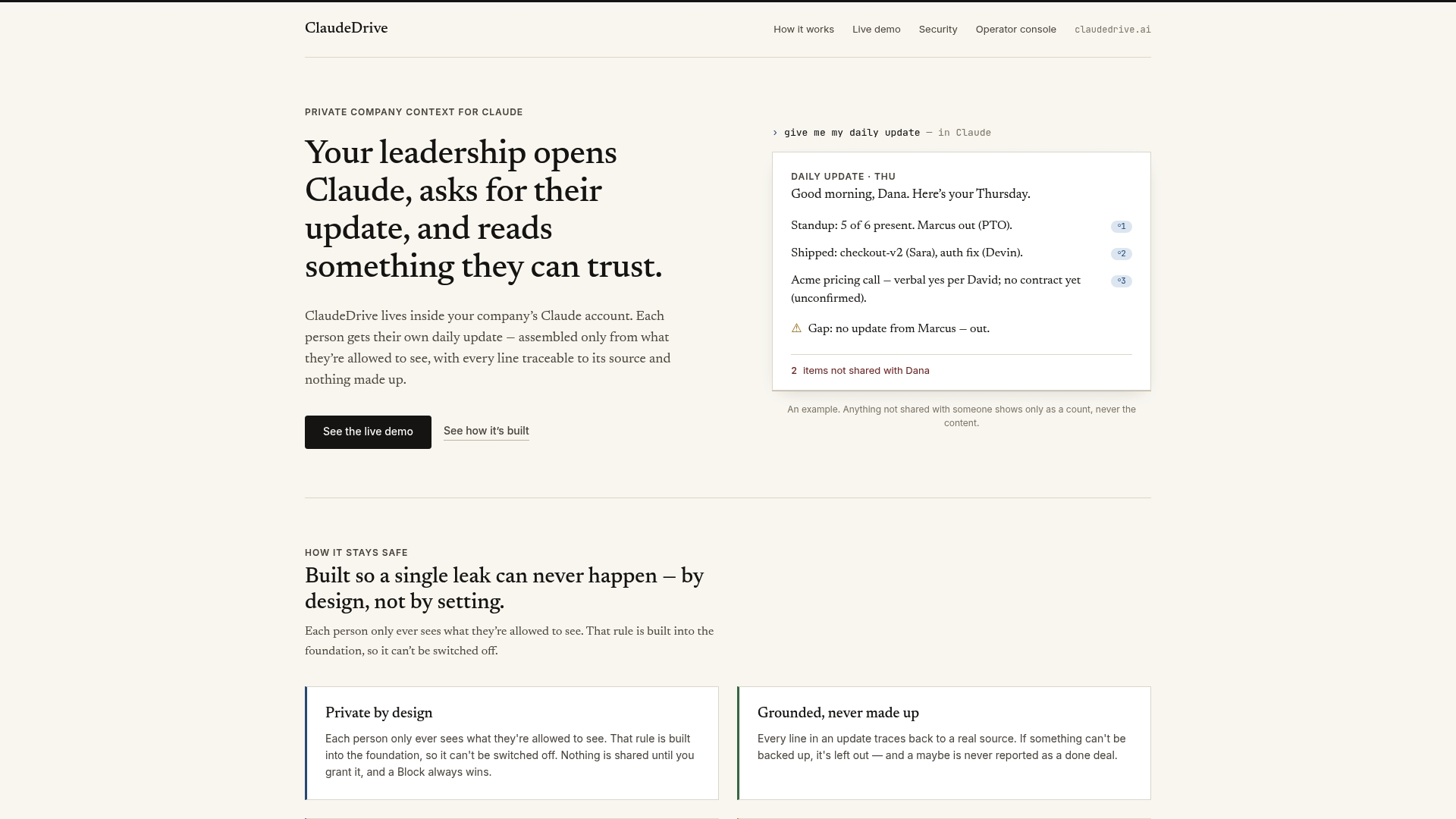
ClaudeDrive builds your daily update directly inside the Claude account your leadership team already uses. Connect meeting notes, GitHub, and your calendar, and each leader gets a private briefing built only from what they are authorized to see. Every line traces back to a real source. Nothing is fabricated. Nothing crosses a permission boundary it shouldn’t.
There is no new app to roll out and no dashboard to configure. The ClaudeDrive Console handles the format, the sourcing, and the delivery. Your team reads one clear briefing and moves on. See the live demo or talk to us about a pilot.
FAQ
What is an AI daily update format?
An AI daily update format is a structured template that organizes information from tools like email, Slack, and project boards into a single briefing. The format defines which sections appear, in what order, and at what level of detail.
How long should an AI daily briefing be?
Executive briefings should take under three minutes to read. Team standup updates should take under two minutes to write. Cross-team digests run longer but separate morning full snapshots from shorter afternoon delta updates to control reading time.
What data sources should I connect to my AI update tool?
The most useful sources are calendar, email, Slack, and your issue tracker (GitHub, Jira, or Linear). Updates built from multiple connected sources are more accurate and complete than those built from a single input.
How do I prevent my AI update from being ignored?
Deliver at a fixed time, keep the format consistent, and match the update’s scope to the reader’s role. Iterative refinement based on reader feedback is the most reliable way to improve adoption over time.
What makes an AI standup update trustworthy?
Specificity and traceability. Updates that reference ticket numbers, PR links, and named owners are harder to dismiss than vague summaries. Fixed output schemas with a verification step before delivery prevent missing sections and build consistent reader trust.