Why AI Briefings Beat Email Updates for Leaders
Why a daily AI briefing — pre-filtered, source-cited, and decision-framed — replaces inbox triage for leaders, and how to evaluate one.
ClaudeDrive
A Yungsten Tech product

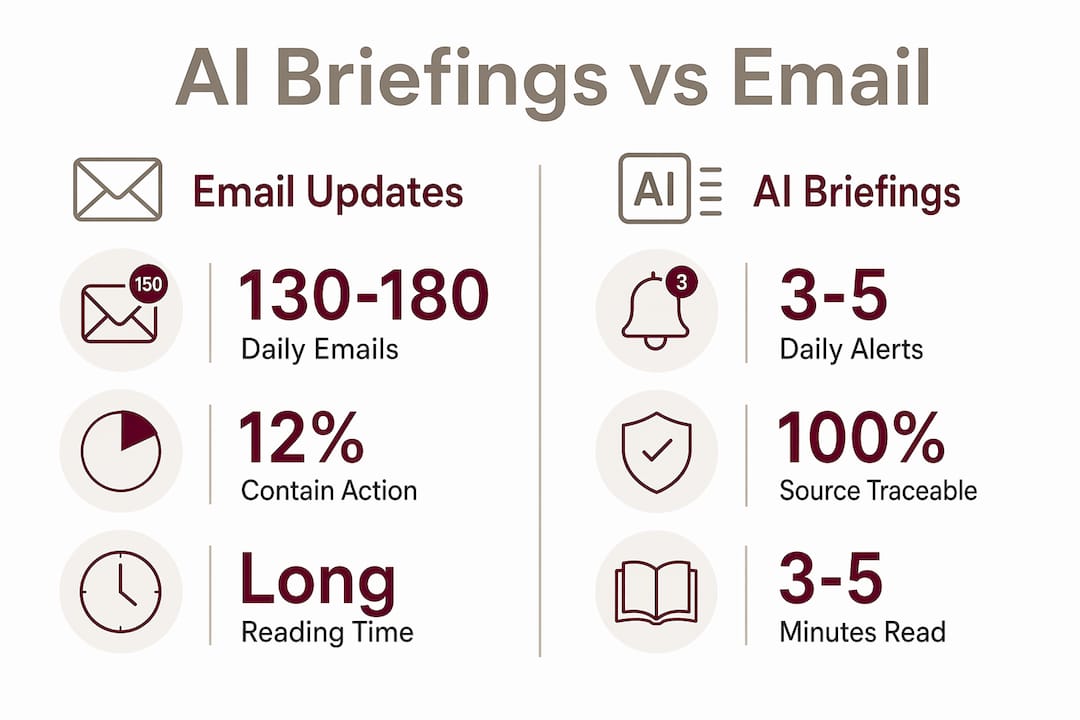
AI briefings are concise, prioritized executive intelligence updates that synthesize information from multiple sources into a single, decision-ready document delivered daily. Executives at high-growth companies now receive over 120 emails daily, yet only 12% of those messages contain genuine action items. The math is brutal: your inbox is 88% noise. Why AI briefings beat email updates comes down to one principle. Decision-makers need signal, not volume. Tools like ClaudeDrive are built on exactly that premise, feeding governed company context directly into a structured daily update so nothing irrelevant, and nothing unauthorized, ever reaches your screen.
Why AI briefings beat email updates: the core difference
The formal term for what AI briefings deliver is decision-support intelligence. Unlike a standard email update, which dumps information and expects the reader to sort it, an AI briefing pre-filters by relevance, urgency, and responsibility. The format is fixed: what changed, why it matters, what to do next.
The advantages of AI briefings over email become concrete when you look at reading time. AI briefings take 3 to 5 minutes to consume, compared to 45 to 90 minutes for a conventional monthly report. That is not a marginal improvement. It is a structural change in how leadership attention gets spent.
Three features separate AI briefings from email updates at the format level:
- Prioritization cap. Briefings surface 3 to 5 items per delivery, matching the realistic attention window of a senior executive before the first meeting of the day.
- Source citations. Every claim links back to its origin. Briefings gain trust when they separate “what changed” from “action implied” with linked sources. Without that, they read as unverified summaries.
- Cross-app synthesis. AI briefings synthesize information across Slack, Gmail, and Asana, surfacing only relevant actions. Executives stop manually checking five tools before 9 a.m.
Pro Tip: When evaluating any AI briefing tool, ask whether each line in the output is traceable to a specific source. Untraceable summaries erode trust faster than no briefing at all.
Email updates, by contrast, carry no inherent prioritization logic. A message flagged “important” by a sender carries the same visual weight as a vendor newsletter. The reader does all the triage work. AI briefings move that triage upstream, into the system, before the executive ever opens the document.
How do AI briefings reduce information overload?
Executives face 130 to 180 emails daily, of which only 18 to 24 actually require a decision. That ratio creates a decision bottleneck. Every morning spent scanning an inbox is a morning spent reacting rather than leading.
AI briefings solve this through two mechanisms: notification budgets and continuous background monitoring.
Notification budgets
Capping AI briefings to 3 to 5 notifications per user daily prevents alert fatigue. This is not a soft recommendation. It is an architectural constraint built into well-designed briefing systems. When every update feels urgent, nothing is. A hard cap forces the system to rank and select, which is exactly the filtering work that email cannot do.
Continuous background monitoring
Google’s AI information agents run continuously in the background, monitoring specific topics and sending synthesized updates rather than raw feeds. This 24/7 scanning model means a briefing delivered at 7 a.m. reflects what happened at 11 p.m. the night before. A monthly email report reflects what someone remembered to include two weeks ago.

The behavioral shift this creates is significant. When executives start the day with a briefing rather than an inbox, the first 20 minutes shift from reactive triage to proactive decision readiness. That is not a productivity tip. It is a change in cognitive posture for the entire leadership team.
| Dimension | Email update workflow | AI briefing workflow |
|---|---|---|
| Daily volume | 130 to 180 messages requiring manual triage | 3 to 5 prioritized items, pre-filtered |
| Reading time | 45 to 90 minutes for comprehensive reports | 3 to 5 minutes per briefing |
| Timeliness | Often days or weeks old at delivery | Current within 24 hours of delivery |
| Source traceability | Rarely cited; sender is the only reference | Every claim linked to its origin |
| Decision framing | Reader must infer next steps | Explicit action triggers included |
Pro Tip: Schedule your AI briefing delivery for 30 minutes before your first standing meeting. That window is when the briefing’s decision prompts have the most immediate application.
What challenges do AI briefings solve that email updates cannot?
Email was designed for correspondence, not intelligence delivery. Applying it to executive communication creates four specific failures that AI briefings are built to address.
Routing inefficiency. Executives receive messages intended for their awareness that require no action from them personally. AI briefings pre-filter by decision relevance and individual responsibility. Nothing lands in a briefing unless it maps to that reader’s role and authority.
Staleness. Monthly or weekly email updates are stale by design. A briefing with a shelf life within 24 hours of delivery forces the system to stay current. When a competitor moves, a regulatory filing drops, or a key metric shifts, the briefing reflects it the next morning. The email report reflects it next month.
Hallucination risk in automated summaries. Automated email digests generated by AI without human review are prone to fabrication. Combining AI synthesis with human review enhances briefing trustworthiness and improves decision quality. The synthesis handles volume; the human review handles accuracy. Neither alone is sufficient.
Inbox gatekeeping. Gmail’s AI Inbox prioritizes relevant messages and deprioritizes bulk updates. Traditional email reports are increasingly filtered before the executive ever sees them. A dedicated briefing channel, outside the inbox entirely, bypasses this problem.
The benefits of AI updates over email are not theoretical. They are structural. Email was never designed to deliver executive intelligence. AI briefings were.
How can business leaders implement AI briefings?
Replacing or complementing email updates with AI briefings requires a deliberate rollout. Moving too fast creates distrust. Moving too slow means the old system fills the gap.
- Run the briefing in parallel first. For the first two to four weeks, deliver AI briefings alongside existing reports. Executives compare the two formats and build confidence in the briefing’s accuracy before relying on it exclusively.
- Audit your current reports for decision content. Pull the last three monthly reports and mark every sentence that prompted a decision or action. That content belongs in a briefing. Everything else is archive material that can live in a shared document.
- Map briefing content to leadership responsibilities. A CFO’s briefing should not contain the same items as a Chief Revenue Officer’s. Effective briefing design requires explicit mapping between content categories and individual roles.
- Use a tool that combines AI synthesis with human review. ClaudeDrive’s architecture feeds a governed pool of company context into Claude, then renders one access-scoped daily update per person. Every line is traceable to its source, and nothing the reader is not authorized to see ever appears.
- Enforce notification caps from day one. Set a hard limit of 3 to 5 items per briefing before launch. Resist the temptation to include “just one more” item. The cap is the product.
Adoption follows trust, and trust follows accuracy. The fastest way to kill an AI briefing program is to deliver one item that turns out to be wrong without a clear source citation. Build the traceability layer before you build the distribution layer.
Key takeaways
AI briefings outperform email updates because they deliver pre-filtered, source-cited, decision-framed intelligence in under five minutes, replacing hours of inbox triage with a single daily read.
| Point | Details |
|---|---|
| Signal over volume | Only 12% of executive emails contain action items; AI briefings surface only those items. |
| Time efficiency | AI briefings take 3 to 5 minutes versus 45 to 90 minutes for conventional reports. |
| Notification caps | Limiting briefings to 3 to 5 items daily prevents alert fatigue and forces genuine prioritization. |
| Source traceability | Every briefing claim must link to its origin; untraceable summaries are treated as unverified. |
| Human plus AI review | Combining AI synthesis with human oversight prevents hallucination and builds executive trust. |
The shift nobody talks about
The conversation about AI briefings almost always focuses on efficiency. Three minutes versus ninety. Eighteen actionable emails out of 180. Those numbers are real, and they matter. But the deeper change is cultural, and most implementation guides skip it entirely.
When a leadership team moves from email updates to AI briefings, they stop treating communication as a passive archive and start treating it as an active decision tool. That sounds like a small reframe. It is not. I have watched organizations where the weekly status email was essentially a liability shield. People sent it to prove they had communicated, not to prompt action. Nobody read it carefully. Nobody was supposed to.
AI briefings break that dynamic because they are built around explicit decision prompts. If a briefing item does not connect to a decision or a risk, it does not belong in the briefing. That standard forces the people feeding the system to think harder about what actually matters. The briefing becomes a forcing function for organizational clarity, not just a faster delivery mechanism.
The trust issue is real, and it takes longer to resolve than most leaders expect. The first time a briefing contains an error, the credibility of the entire format is on trial. This is why the combination of AI synthesis and human review is not optional for high-stakes environments. It is the minimum viable standard. ClaudeDrive’s model of access-scoped, source-traceable daily updates reflects exactly this principle. Every line is accountable.
My honest advice: commit to the format for 90 days before evaluating it. The first month, executives will still check their inboxes out of habit. The second month, they will start trusting the briefing to surface what matters. By the third month, the inbox becomes what it should have always been: a correspondence tool, not an intelligence platform.
— Paul
See how ClaudeDrive delivers this for your team
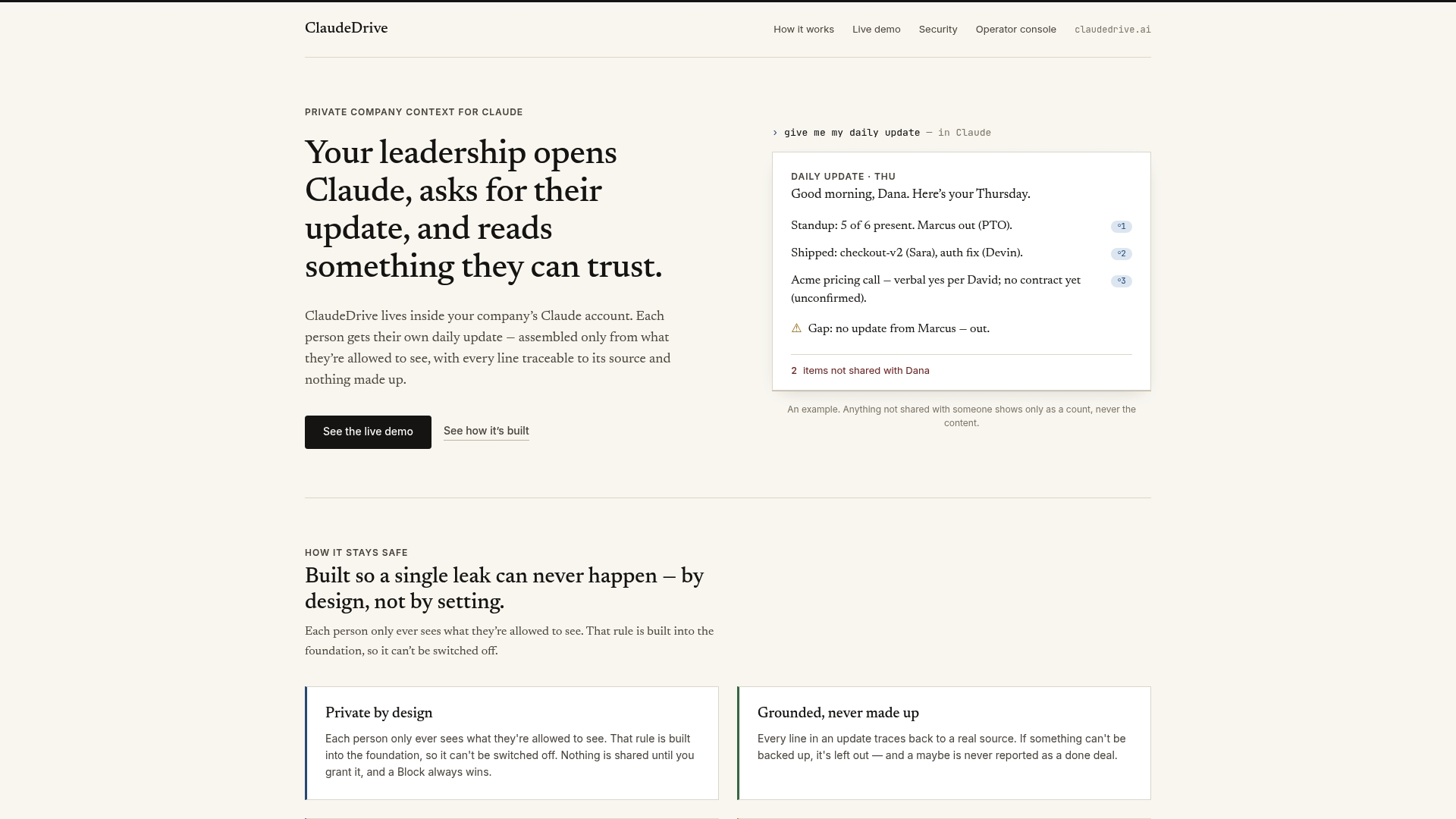
ClaudeDrive is built for exactly the communication problem this article describes. It operates as a permission-aware context layer inside your company’s Claude account, feeding a governed pool of company context through MCP and Skills, then rendering one access-scoped daily update per person. Every line in the briefing is traceable to its source. Nothing the reader is not authorized to see ever appears. If you lead a high-growth team and your executives are still starting the day with inbox triage, ClaudeDrive Console is the direct alternative. Built by Yungsten Tech for organizations where accuracy and accountability are not negotiable.
FAQ
What is an AI briefing?
An AI briefing is a concise, prioritized executive update that synthesizes information from multiple sources into a single daily document focused on decisions, risks, and actions. It replaces the need to manually triage email updates or read lengthy monthly reports.
How many emails do executives receive daily?
Executives receive 130 to 180 emails daily, but only 12% contain genuine action items. AI briefings pre-filter that volume down to 3 to 5 decision-relevant items per day.
Are AI briefings reliable enough for executive decisions?
Reliability depends on source traceability and human review. AI briefings that cite every claim and combine AI synthesis with human oversight are trusted by executives. Automated summaries without citations or review are not.
How long does it take to read an AI briefing?
AI briefings are designed to take 3 to 5 minutes to read, compared to 45 to 90 minutes for a conventional monthly report. The format prioritizes brevity and decision framing over comprehensiveness.
Can AI briefings replace email updates entirely?
AI briefings work best when run in parallel with existing reports for the first month, then gradually replacing status-style email updates. Correspondence and direct communication still belong in email. Intelligence delivery does not.