AI Use Case Categories Every Business Leader Should Know
Unlock AI’s potential by understanding crucial use cases that drive efficiency, improve decision-making, and boost your business success.
ClaudeDrive
A Yungsten Tech product

AI Use Case Categories Every Business Leader Should Know

An AI use case is a specific business problem solved by applying AI to a defined task, with a measurable outcome attached. That’s it. Not a technology. Not a vendor. A problem, a method, and a result you can point to.
Before you scan a single vendor deck, sort every candidate into three buckets: customer-facing (chat, personalization, service automation), internal operations (forecasting, document processing, HR workflows), and generative or agentic (multi-step assistants that act across your existing tools). Most leaders waste months evaluating tools before they’ve even sorted their problems this way.
The urgency is real. As of 2026, 66% of businesses report using AI to improve productivity and efficiency, with 53% citing better insights and decision-making and 40% pointing to cost reduction. If you’re still deciding whether to pilot anything, you’re behind two-thirds of your peers.
- Customer-facing: virtual agents, personalization, sentiment routing
- Internal operations: forecasting, reconciliation, document automation
- Generative/agentic: multi-step assistants that connect to your existing systems
Start by auditing what tools and data you already have, not what a vendor is selling you this quarter.
Key Takeaways
The highest-value AI use cases combine a well-scoped business problem, traceable outputs, and permissioned access, not the most sophisticated model available.
| Point | Details |
|---|---|
| Define the problem first | Sort candidates into customer-facing, operations, or generative/agentic buckets before evaluating tools. |
| Prioritize by value and feasibility | Score data readiness, technical complexity, and regulatory risk before greenlighting a pilot. |
| Start with structured data | Document processing and reconciliation pilots show ROI fastest because the data already exists. |
| Require traceability | Every business-critical output should link back to a verifiable source before leaders act on it. |
| Govern before you scale | Name an owner, a data steward, and a sponsor, and set rollback criteria before launch. |
Table of Contents
- Why AI Use Cases Deserve More Attention Than AI Tools
- What Are the Top AI Use Cases by Business Function?
- How Do Industries Apply AI Use Cases Differently?
- How Should Leaders Prioritize Which Use Case to Pilot First?
- What Implementation Practices Turn Pilots Into Production?
- What Risks Should Leaders Require Mitigation Plans For?
- Why Traceable, Permission-Aware Updates Matter for Adoption
- What the Data Actually Tells Leaders to Do Differently
- Frequently Asked Questions
- Sources
Why AI Use Cases Deserve More Attention Than AI Tools
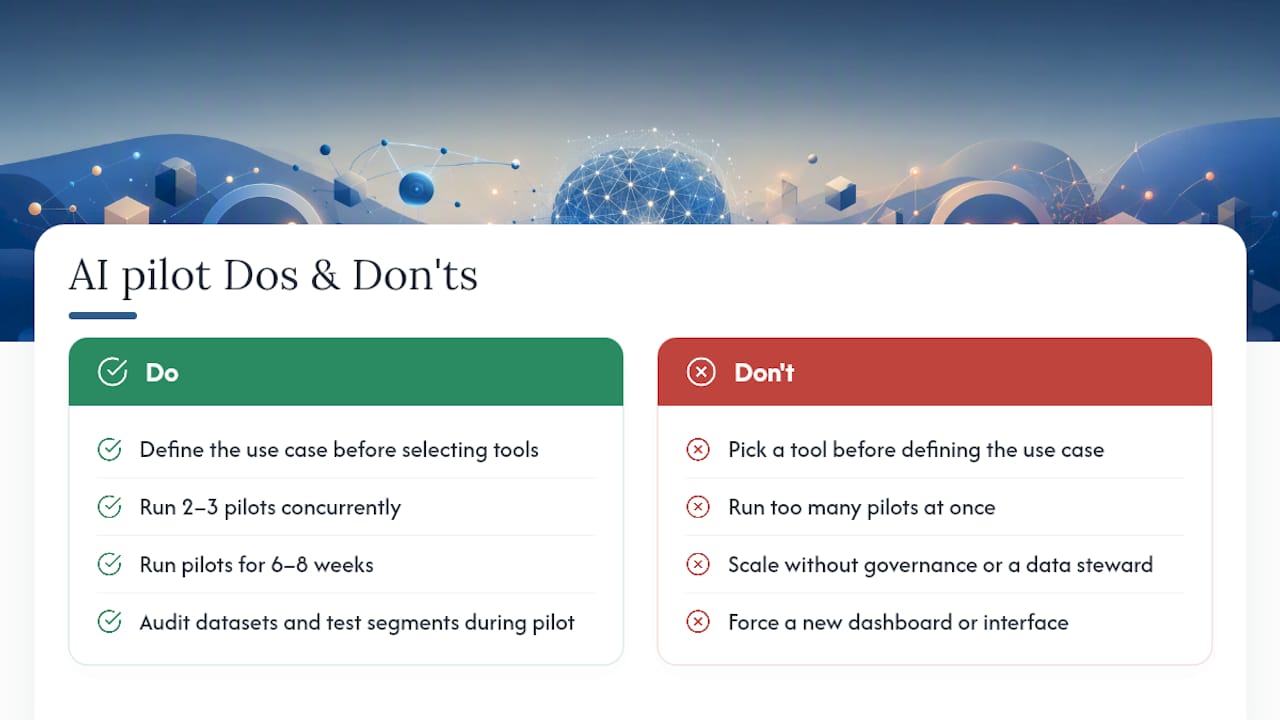
Picking the tool before picking the problem is the single most common reason pilots stall. Leaders get pitched a platform, run a proof of concept, and then discover nobody agreed on what success looks like. Use cases fix that, because they force a definition of the business outcome before anyone touches a contract.
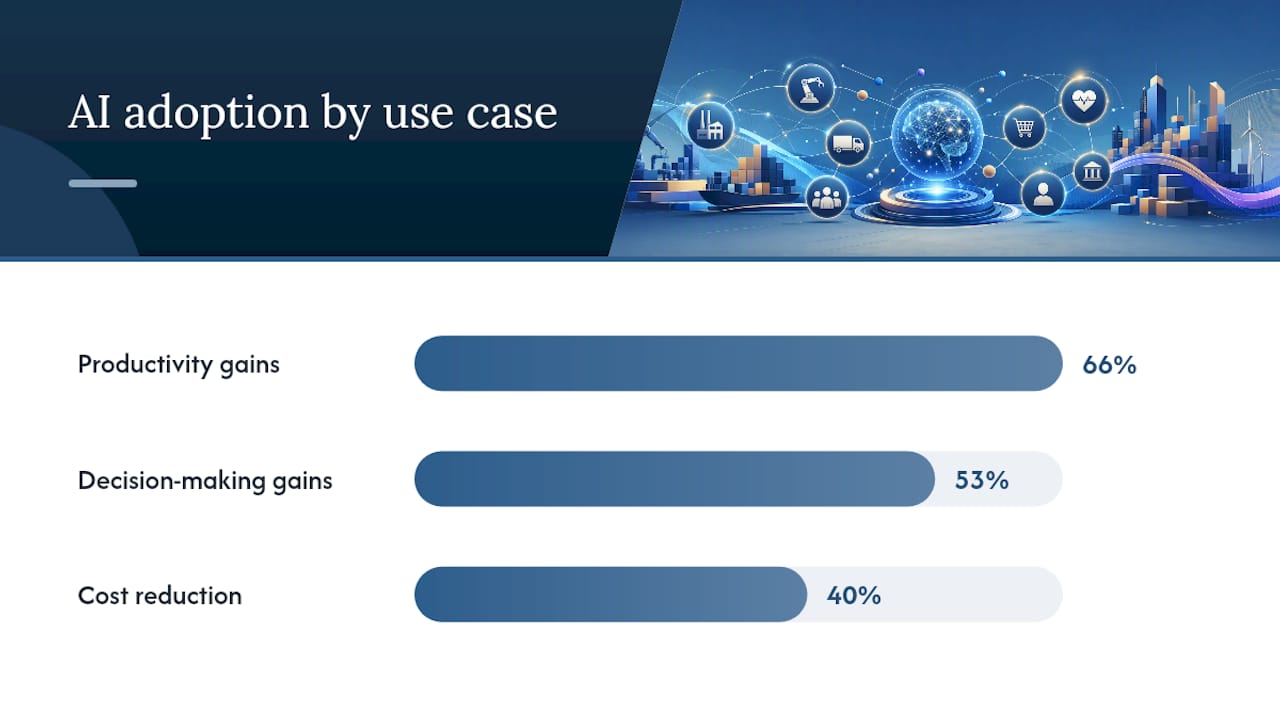
The adoption numbers back up the urgency. Deloitte’s State of AI in the Enterprise report found 66% of businesses now use AI for productivity gains, 53% for better decision-making, and 40% to cut operational costs. Those three levers, output, judgment, and cost, map directly onto the three buckets from the opening: customer-facing work improves output, internal operations cut cost, and generative tools improve judgment by surfacing information faster.
Generative and agentic AI are reshaping what a “use case” even means. Instead of a single-response chatbot, you’re now looking at multi-step workflows that plan, execute, and check their own work across several systems. Google Cloud’s review of real-world deployments found this shift moving use cases from isolated assistants toward agent workflows that orchestrate tasks and talk to legacy systems directly.
- Productivity gains: automating repetitive, structured work
- Decision-making gains: surfacing patterns humans miss at scale
- Cost reduction: replacing manual reconciliation and lookup work
The practical takeaway: evaluate the problem’s value and your data readiness first. The tool comes second.
What Are the Top AI Use Cases by Business Function?
Every department has at least one AI use case worth piloting this year. Here’s a function-by-function scan you can hold up against your own org chart.
- Customer service: Virtual agents handle tier-one inquiries, personalization engines tailor offers in real time, and sentiment automation flags at-risk accounts before churn. Mature adopters integrating AI into customer service reported a 17% increase in customer satisfaction, a benchmark worth holding your own pilot against.
- Marketing and sales: Content generation cuts campaign production time, and lead-scoring models prioritize outreach based on behavior rather than gut feel. Google Cloud’s use-case collection documents large reductions in creative timelines paired with personalization at a scale manual teams can’t match.
- HR: Resume summarization and interview synthesis speed up early-stage screening, while attrition prediction flags flight risk before an exit interview. Keep the first pilot narrow, one job family, one region, before expanding.
- Operations and supply chain: Demand forecasting, route optimization, and predictive maintenance are the three most common entry points because they run on data you already collect.
- Finance and legal: Automated reconciliation, fraud detection, and document processing reduce manual review hours and catch anomalies faster than quarterly audits ever could.
- IT and development: AIOps, automated testing, and code-assist tools speed delivery, but only when paired with governance guardrails on what code ships without human review.
- Security: Automated threat detection paired with agentic remediation can shorten response windows from hours to minutes, provided the agent’s action scope is tightly defined.
Pro Tip: Pick one function with structured, well-labeled data, most often finance or operations, for your first pilot. Messy data kills more AI projects than weak models ever do.
How Do Industries Apply AI Use Cases Differently?
The function catalog above holds across sectors, but the constraints change. A hospital and a bank both want fraud detection or document automation, yet the compliance bar and data sensitivity look nothing alike.
- Healthcare: Chat-based triage support and clinical documentation automation cut administrative burden, while diagnostic support tools require careful validation and clear compliance review before any patient-facing use.
- Retail and e-commerce: Visual search and personalized merchandising drive conversion, and supply-demand sync tools reduce the stockouts that used to require manual forecasting spreadsheets.
- Banking and finance: Real-time fraud detection and anti-money-laundering automation catch patterns that rule-based systems miss, often in milliseconds rather than end-of-day batch reviews.
- Manufacturing: Vision-based quality control catches defects that human inspectors miss on high-speed lines, and predictive maintenance pilots typically show ROI within a single quarter once sensor data is in place.
- Energy: Grid forecasting and asset maintenance pilots help utilities balance load and schedule repairs before failure rather than after.
- Public sector: Document intake automation and citizen-service assistants cut processing backlogs. The U.S. Department of Labor’s AI Use Case Inventory is a useful public reference for how a large institution maps existing tools to administrative tasks rather than deploying a general-purpose assistant from scratch.
The pattern across every sector: the highest-ROI pilots sit where data is already structured and the task is already repetitive. Novelty is not the goal. Speed and accuracy on existing work is.
How Should Leaders Prioritize Which Use Case to Pilot First?
Score every candidate use case on two axes: value and feasibility. Value asks what the outcome is worth in dollars, hours, or risk avoided. Feasibility asks whether your data is clean enough, the technical lift is reasonable, and the regulatory exposure is manageable.
A use case with high value but low feasibility, say, an agentic system that approves loans autonomously, should wait. A use case with modest value but high feasibility, like automating expense report categorization, is where you build organizational trust in AI before tackling harder problems.
| Factor | What to check |
|---|---|
| Data readiness | Is the data structured, labeled, and accessible without a multi-month cleanup? |
| Technical complexity | Does this require custom model training or does an existing tool cover it? |
| Regulatory risk | Does the use case touch health, financial, or legal decisions requiring compliance review? |
| Owner and KPIs | Is there a named owner and two or three measurable success metrics? |
Run this scoring checklist before greenlighting anything:
- Name a single accountable owner, not a committee.
- Define two to three KPIs upfront (accuracy, time saved, error rate).
- Set a pilot duration of six to eight weeks, no longer.
- Confirm the data access level required and who approves it.
For your first three pilots, favor a document-processing trial, a contact-center agent test, or a data-query assistant that answers internal questions from existing sources. Document processing pilots tend to show ROI fastest because they run on data your teams already produce.
What Implementation Practices Turn Pilots Into Production?
The gap between a promising pilot and a scaled deployment usually comes down to governance, not technology. Four practices separate the two consistently.
- Require every output line in a business-critical report to trace back to a real source. Pilots that enforce this see materially higher stakeholder trust and faster rollout approval, because reviewers can verify a claim in seconds instead of re-checking the entire output.
- Name three roles before you start: an owner accountable for outcomes, a data steward who manages access, and an executive sponsor who removes blockers.
- Connect to tools your team already uses, meeting notes, code repositories, calendars, rather than asking people to learn a new dashboard. Adoption drops sharply whenever a new interface is required.
- Set a measurement cadence: weekly KPI checks during the pilot window, a hard rollback trigger if accuracy or error rate misses target by week four.
Pro Tip: Write your rollback criteria before launch, not after. Teams that define “what failure looks like” upfront kill bad pilots faster and protect budget for the ones worth scaling.
What Risks Should Leaders Require Mitigation Plans For?
Every AI use case carries four recurring risks, and each has a concrete mitigation a leader can mandate rather than hope for.
- Hallucination: Require source attribution and human review on any briefing that informs a decision above a defined dollar or risk threshold.
- Bias: Run dataset audits before launch and test pilot outcomes across demographic segments, not just aggregate accuracy.
- Privacy and access control: Enforce per-person permissioning so each user sees only what they’re authorized to see, with a full audit trail behind every output.
- Security: Commission red-team testing and maintain an incident runbook before any agentic system gets write access to production systems or external communications.
None of these risks should block a pilot outright. They should shape its scope. A narrow pilot with tight guardrails moves faster than a broad one stuck in legal review.
Why Traceable, Permission-Aware Updates Matter for Adoption
The single factor that predicts whether leaders trust an AI output enough to act on it is traceability. If every line in a briefing links back to a real meeting note, a GitHub commit, or a calendar entry, a leader can verify it in seconds. If it can’t be traced, it gets ignored, no matter how accurate it actually is.
ClaudeDrive builds on this principle directly. It connects to the tools your team already runs, meeting notes, GitHub, the calendar, and delivers a daily update inside the Claude account your leaders already use. No new dashboard. No wiki to maintain. Each person’s update reflects only what they’re permitted to see, with every line traceable to a real source and an audit trail behind it. When someone leaves the team, access shuts off instantly.
The real objective for most leaders isn’t enterprise search. It’s a context-driven, permissioned update that hands them decision-ready lines they can act on without a verification step.
- Daily briefings delivered inside Claude, no new app required
- Every line traceable to a real source, nothing fabricated
- Per-person permissions enforced at retrieval, not bolted on after
- Full audit trails and instant offboarding when a person leaves
Pro Tip: Before piloting any AI use case that touches sensitive company data, ask the vendor one question: can a leader trace every line of output back to its source in under thirty seconds? If the answer is no, the trust problem will outlast the technology problem.
See the live demo or talk to us about a pilot to see how a permission-aware update layer fits into your first ninety days.
What the Data Actually Tells Leaders to Do Differently
Most AI advice tells leaders to “start small and scale fast.” That’s not wrong, but it’s incomplete. The data suggests something sharper: start with the use case that requires the least new infrastructure and the most existing data, because that combination is what actually predicts pilot survival, not ambition or budget size.
The conventional wisdom overrates model selection and underrates governance. Nobody’s pilot fails because they picked the wrong large language model. Pilots fail because nobody named an owner, nobody defined a rollback trigger, or nobody could trace an output back to its source when a skeptical board member asked a hard question.
If you take one thing from this article, make it this: treat traceability as a launch requirement, not a nice-to-have you’ll add later. Every AI use case that survives past its first ninety days is one where a leader could verify the output without calling in an engineer. That’s a governance decision, not a technology one, and it’s the cheapest fix available to you right now.
Frequently Asked Questions
What is an AI use case in simple terms? An AI use case is a specific, well-defined business problem where applying AI produces a measurable outcome, whether that’s faster document processing, better fraud detection, or improved customer satisfaction.
What’s the difference between an AI use case and an AI tool? A use case defines the problem and the outcome you want. A tool is the technology you choose to solve it. Leaders who pick the tool first, before defining the use case, tend to build pilots nobody can measure success against.
How many AI use cases should a company pilot at once? Two to three is realistic for most 15 to 80 person teams. Running more than that spreads governance attention too thin and makes it hard to name accountable owners for each one.
What industries benefit most from AI use cases right now? Finance, healthcare, retail, and manufacturing show the clearest early ROI because they combine structured data, repetitive tasks, and measurable outcomes, the three conditions that predict a successful pilot.
How long should an AI pilot run before deciding whether to scale it? Six to eight weeks is a workable window for most document-processing or contact-center pilots, enough time to gather meaningful KPI data without stalling momentum.
What is agentic AI and how does it differ from a chatbot? Agentic AI executes multi-step workflows across tools rather than answering a single question. It plans, acts, and checks its own work, which is why it needs tighter governance guardrails than a simple chatbot.
What KPIs should leaders track during an AI pilot? Accuracy, time saved, and downstream error rate cover most pilots. Customer-facing pilots should also track satisfaction scores, since mature adopters have seen measurable CSAT gains.
How does bias get mitigated in an AI use case? Run dataset audits before launch and test outcomes across demographic segments during the pilot, not just after a problem surfaces in production.
What’s the biggest risk in scaling an AI pilot too fast? Skipping governance. Pilots that scale without a named data steward or clear rollback criteria tend to lose stakeholder trust the first time an output can’t be verified.
Does every AI use case require a new dashboard or app? No, and requiring one is often a sign of unnecessary complexity. The strongest implementations connect to tools your team already uses rather than asking people to learn a new interface.
How does permission-aware AI reduce data privacy risk? It enforces access controls at the point of retrieval, so each person only sees information they’re authorized to see, with an audit trail behind every output and instant offboarding when access needs to end.
What’s a low-risk first AI use case for a small leadership team? A document-processing pilot on a single document type is typically the lowest-risk entry point, since it relies on data you already have and produces measurable time savings quickly.
How do you measure ROI on a customer service AI use case? Track CSAT changes alongside resolution time and escalation rate. Mature adopters integrating AI into customer service reported meaningful satisfaction gains within their first year.
What role does a data steward play in an AI pilot? The data steward manages what data the pilot can access, approves permission changes, and ensures the pilot doesn’t exceed its defined scope.
Can AI use cases work without clean, structured data? Not well. Pilots on messy, unlabeled data tend to stall regardless of the model’s quality, which is why data readiness is one of the two core factors in any prioritization framework.
How do generative and agentic AI use cases overlap with traditional automation? Traditional automation follows fixed rules. Generative and agentic AI adapts to context and can orchestrate multiple steps or tools, which expands what counts as automatable but also raises the governance bar.
What should a leader ask a vendor before approving an AI pilot? Ask whether every output can be traced to a real source, who owns data access decisions, and what happens to a person’s access the moment they leave the team.
Is regulatory risk higher for healthcare and finance AI use cases? Yes. Diagnostic support tools and financial decision automation both require compliance review before any pilot touches customer-facing or patient-facing decisions.
How does ClaudeDrive fit into an AI use case strategy? It provides a permission-aware layer that connects existing tools, meeting notes, GitHub, calendars, and delivers traceable daily updates inside Claude, without requiring a new dashboard or app rollout.
What’s the fastest way to build leadership trust in AI outputs? Require traceability from day one. Leaders who can verify a claim in seconds are far more likely to act on AI-generated updates than those who have to take an output on faith.
Sources
- AI customer service value — IBM Institute for Business Value
- Real-world generative AI use cases — Google Cloud Blog
- Artificial Intelligence Use Case Inventory — U.S. Department of Labor