What Claude Audit Logs Reveal to Company Leaders
Discover how Claude audit logs empower leaders to verify data integrity, ensuring every briefing source is transparent and trustworthy.
ClaudeDrive
A Yungsten Tech product

What Claude Audit Logs Reveal to Company Leaders

Claude audit logs are the permission-aware, source-linked records that show exactly where every line in a daily Claude briefing came from and who was allowed to see it. The core guarantee is simple: each output line traces back to a named document, and every retrieval that fed it was checked against access rules before it happened. Leaders don’t need to trust a summary. They can verify it.
ClaudeDrive builds this into daily briefings as a working product, not a theoretical design. Before you evaluate any system that touches company data inside Claude, confirm it can show you:
- Which source document produced each line of a briefing
- Who was authorized to see that source at the moment of retrieval
- A tamper-evident record of the decision, not just a log entry someone could edit later
Key Takeaways
Claude audit logs earn leadership trust only when every output line traces to a named source and every retrieval was checked against access rules before it happened.
| Point | Details |
|---|---|
| Demand source grounding | Every briefing line should trace to a specific document, page, and chunk, not a paraphrase. |
| Require pre-retrieval permission checks | Authorization must happen before data is pulled, with re-checks at sensitive points. |
| Log identifiers, not content | Audit stores should hold metadata and decision codes, never full raw document text. |
| Plan storage and retention early | Align hot, warm, and cold tiers with real compliance and legal hold requirements. |
| Evaluate ClaudeDrive for built-in traceability | ClaudeDrive delivers permission-aware, source-linked briefings inside Claude with instant offboarding. |
Table of Contents
- What A Permission-Aware Audit Record Actually Contains
- Why Auditable Logs Matter For Governance And Compliance
- What Should You Ask Vendors During Evaluation?
- Common Mistakes That Undermine Audit Trails
- How Should You Plan Storage, Retention, And Access Control?
- Do Audit Logs Connect To Your Existing Security Tools?
- How Do Multi-Tenant Systems Keep Logs Separate?
- What Legal Requirements Shape Audit Log Design?
- What Should Leaders Prioritize First?
- See What Source-Linked Briefings Look Like In Practice
- Sources
What A Permission-Aware Audit Record Actually Contains
An audit record worth trusting has five parts, and most vendors only show you one or two.
- Retrieval event details. A query ID, timestamp, the requesting user’s identity, the specific document and chunk IDs returned, and the relevance scores behind that selection. Without these, you cannot reconstruct why the system pulled what it pulled.
- Source-grounding data. The exact document ID, page or region, and chunk reference behind each cited line. Source-grounded extraction turns verification into a one-step check against the original document instead of a trust exercise based on sampling.
- Decision-record fields. The policy reason code that allowed or blocked a retrieval, the confidence score attached to it, and whether a human or the system approved it.
- Human-review evidence. Any point where a person confirmed, edited, or overrode an automated decision, with a timestamp attached.
- Generation snapshot. The prompt or template version, the model ID in use, and the parsed citations that made it into the final text, so you can reconstruct not just what was retrieved but how it became the sentence a reader saw. Systems that log citation tracking at the retrieval stage preserve this chain; systems that skip it lose the evidence permanently once the output ships.
Pro Tip: Never let an audit store hold full document content. Log identifiers, scores, and decision codes instead. A vendor that copies your entire contract library into a “logging” database has just built you a second sensitive data store to secure.
Why Auditable Logs Matter For Governance And Compliance
A source-grounded log converts a vague trust claim into evidence you can hand to an auditor. That distinction shows up hardest in four situations:
- Compliance review. When a regulator asks how a briefing reached a conclusion about financial exposure, you point to the exact filing and paragraph, not a paraphrase.
- M&A diligence. Buyers and their counsel want to know which data room documents fed which claims, with timestamps that match the deal timeline.
- Executive decision validation. If a board member later asks “where did that number come from,” the answer is a document link, not a shrug.
- Incident response. After a data exposure or dispute, investigators need to know who accessed what, and when access was authorized versus revoked.
Storage location matters as much as content here. If your audit trail lives entirely inside a vendor’s cloud with no export path, your ability to produce it during a dispute depends on that vendor staying available and cooperative. An organization-controlled or exportable audit store is materially stronger for regulated buyers than one you can only view through a vendor’s own dashboard.
What Should You Ask Vendors During Evaluation?
Most procurement conversations about AI tools skip audit readiness entirely until something goes wrong. Ask these questions before you sign, not after an incident forces the issue.
- Request a live demo of one-click verification. Ask the vendor to show you a briefing line, then trace it back to the original document location in front of you. If that takes more than a few seconds or requires engineering help, the system isn’t built for audit use.
- Require proof of pre-retrieval permission checks. Authorization needs to happen before a document is retrieved, not as an afterthought filter on the output. Ask how the system checks identity, role, and access rights at the moment of retrieval, and whether it re-checks at sensitive points rather than relying on stale permission snapshots.
- Demand the complete decision chain. That means retrieval scores, any reranking logic, the prompt and template version used, the model ID, and a record of human approvals where they exist. A vendor that can only show you the final output has nothing to audit.
- Confirm storage and protection details. Where do logs live? Are they tamper-evident? What retention tiers exist for hot, warm, and cold data, and who controls deletion?
- Ask for performance benchmarks and sizing estimates. A system with slow query response times for key audit questions will fail you during an actual audit. Ask for expected query response times and rough daily log volume at your team’s size.
| What to verify | Why it matters |
|---|---|
| One-click source trace | Confirms every line is checkable, not just claimed |
| Pre-retrieval permission checks | Prevents unauthorized access before it happens, not after |
| Full decision chain logging | Lets you reconstruct exactly how an output was built |
| Storage and tamper-evidence | Determines whether the trail holds up under legal or regulatory scrutiny |
Common Mistakes That Undermine Audit Trails
The biggest failure mode is logging too much, not too little. Teams that dump full document text into an audit database to “be safe” end up creating a second unprotected copy of their most sensitive material, one that often gets less security attention than the original source. Log identifiers and metadata instead: document IDs, chunk references, scores, and decision codes reconstruct context without duplicating the content itself.
Stale permissions cause a quieter but equally serious problem. If a system checks access once and caches that decision, a person who loses access to a document might still see it reflected in briefings for days or weeks. Ask vendors to explain their sync window and whether they re-check at runtime for sensitive resources rather than trusting a cached permission state.
Finally, don’t confuse observability with auditability. Uptime dashboards and latency metrics tell you the system is healthy. They don’t tell you why a specific output contained a specific claim. The two should connect through a shared trace ID, not get merged into one log stream.
Pro Tip: Run a replay drill quarterly. Pick a briefing at random and require your vendor or internal team to reconstruct its full decision chain from logs alone, no institutional memory allowed.
How Should You Plan Storage, Retention, And Access Control?
Audit logging is an engineering and legal decision as much as a security one, and it needs planning before rollout, not after volume becomes a problem.
- Storage tiers. Expect hot storage for recent, frequently queried logs, warm storage for the past several months, and cold archival storage beyond that. At moderate query volumes, daily audit data can run tens to hundreds of megabytes, so indexing by document, user, and time field matters from day one, not as a later fix.
- Retention policy. Align retention windows with your actual compliance obligations and legal hold processes, not a generic default. Finance and healthcare teams typically need longer windows than a general operations team.
- Access control and tamper-evidence. Logs should be encrypted at rest and in transit, restricted by role, and ideally written in a way that prevents silent editing, whether through signed events or write-once storage.
- Operational readiness. Confirm query performance for common audit questions, use a single trace ID to correlate every event in the pipeline from retrieval through approval to output, and schedule periodic replay drills so the system stays provably reliable, not just theoretically sound.
Do Audit Logs Connect To Your Existing Security Tools?
Most security teams already run a monitoring or SIEM setup, and Claude audit logs should feed into it rather than sit in an isolated silo only the AI vendor can see. If your security team can’t pull audit events into the same system they use for network and access monitoring, you’ve created a blind spot exactly where sensitive company data flows.
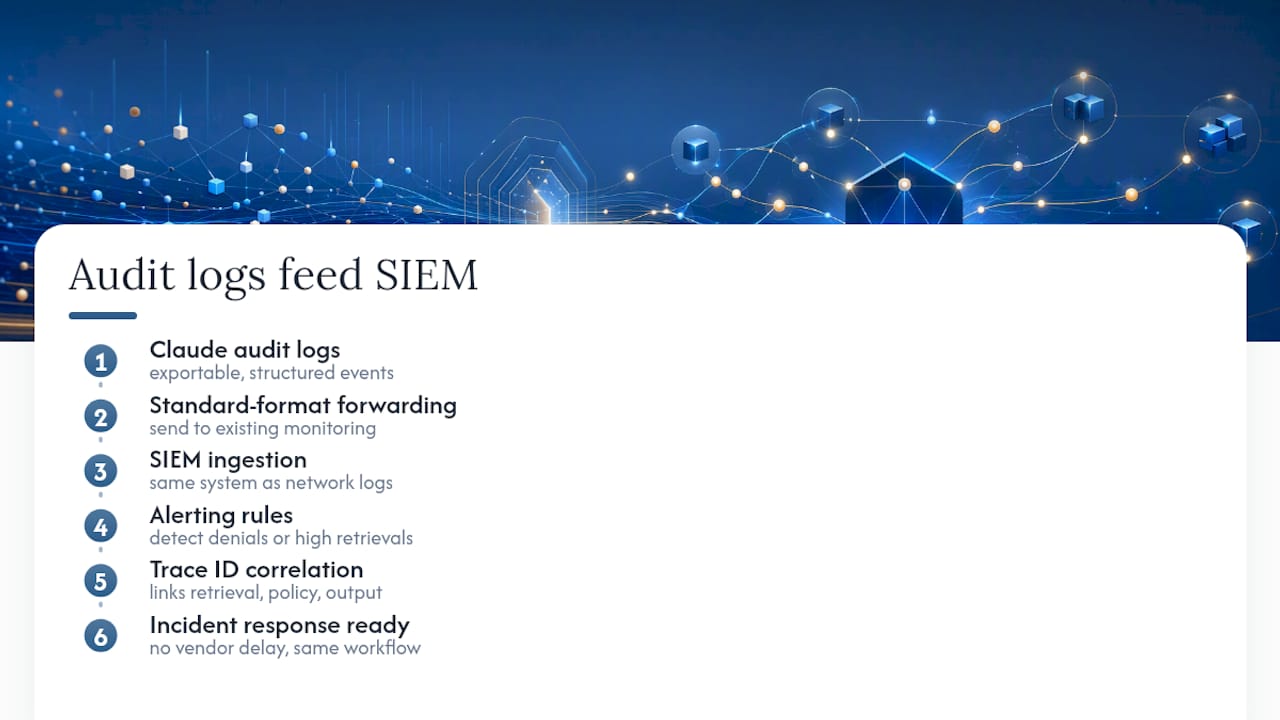
The practical requirement is an exportable, structured event stream, not a dashboard you can only view manually. Ask whether logs can be forwarded in a standard format your monitoring stack already ingests, and whether alerting rules can trigger on patterns like repeated access denials, unusual retrieval volume from one account, or access attempts against a document a user’s role no longer covers. A trace ID that ties retrieval, policy decisions, and output together makes this correlation possible; without it, your SIEM sees disconnected fragments instead of a coherent event.
This matters most during incident response. If your security team is investigating a broader breach and needs to know whether AI-generated briefings touched compromised accounts, the audit trail needs to answer that question inside the same investigation workflow, on the same timeline, using the same tools your team already knows. A system that requires a separate request to the AI vendor and a multi-day wait for exported logs adds friction exactly when speed matters most. Evaluate this before rollout, because retrofitting SIEM integration after your team has built workflows around a gap is far harder than requiring it up front.
How Do Multi-Tenant Systems Keep Logs Separate?
Shared infrastructure is standard in SaaS, and it raises a specific question for audit logs: can one organization’s log data ever mix with, or become visible to, another tenant’s? The answer needs to be an unambiguous no, verified structurally rather than promised verbally.

Multi-tenant audit systems should isolate log data by organization at the storage layer, not just filter it at the application layer for display. The distinction matters because an application-layer filter is a display convenience that a bug or misconfiguration can bypass, while storage-layer isolation makes cross-tenant visibility structurally impossible rather than merely unlikely.
Within a single organization, the same logic applies to teams and individuals. A leader’s audit log covering their own briefings should never expose another executive’s document access patterns unless that visibility is explicitly part of an admin or compliance role. Ask vendors how they handle this internally: does an admin see every user’s full audit trail by default, or is that visibility itself logged and restricted? A system with genuinely permission-aware retrieval extends the same discipline to who can view the audit records themselves, not just the underlying documents.
Shared environments also raise a practical question about instant offboarding. When someone leaves the company, their access needs to end immediately across every connected tool, and the audit trail should show that revocation event with a timestamp, closing the loop rather than leaving a permission in an ambiguous state.
What Legal Requirements Shape Audit Log Design?
Regulatory expectations for audit trails vary by industry and jurisdiction, but a few patterns show up consistently enough to plan around. Financial services firms typically face retention requirements tied to specific record types, and healthcare organizations operate under data handling rules that affect how long access records must be kept and who can view them. Neither of these is optional once your Claude briefings touch documents covered by those rules.
Beyond sector-specific rules, general information security frameworks increasingly expect documented audit trails as part of certification. Guidance tied to ISO 27001 compliance treats audit evidence, including who accessed what and when, as a core control auditors will ask to see directly, not describe secondhand.
Data residency rules add another layer. If your company operates across borders, the physical location of your audit log storage can itself become a compliance question, independent of the documents the logs reference. This is one more reason to know exactly where your vendor stores audit data and whether you can export it to keep records under your own organization’s control if a legal or regulatory need arises. None of this requires you to become a compliance expert. It does require asking your vendor for specifics rather than accepting a general assurance that “we’re compliant.”
What Should Leaders Prioritize First?
The audit trail work described here draws on how document AI systems get evaluated for compliance readiness across finance, legal, and governance functions. If you take one priority from all of this: demand source traceability before anything else. A confidence score or approval flag means little if you can’t independently check the underlying document yourself.
See the live demo, or talk to to us about a pilot, before you commit to a system you can’t verify.
— Paul
See What Source-Linked Briefings Look Like In Practice
Everything described above, the retrieval logging, the source grounding, the permission checks before output, is what ClaudeDrive builds into daily briefings by default, not as an add-on module you configure later. Connect your meeting notes, GitHub, and calendar, and each person on your team gets a private update inside Claude built only from what they’re individually authorized to see, with every line traceable back to its source document.

Offboarding works the same way in reverse: when someone leaves, their access ends immediately across every connected tool, and that revocation shows up in the record. There’s no new dashboard to learn and no wiki to maintain, because ClaudeDrive feeds Claude directly rather than asking your team to adopt another assistant. If you’re evaluating auditability as part of a broader AI governance decision, see the live demo at ClaudeDrive Console and walk through a real briefing’s decision chain yourself.
Sources
- Audit Trail for Document AI: What Compliance Teams Need to See - Korea Deep Learning
- Enterprise RAG with Citation Tracking and Audit Trails | Hélain Zimmermann
- Permission-Aware Retrieval for Enterprise AI: A Practical Guide | o11 Blog
- Building Audit Logs for Enterprise AI Agents