Private Company Context for Claude: A Leader's Guide
Discover how private company context for Claude transforms data access, boosting efficiency and reducing cycle times for high-growth teams.
ClaudeDrive
A Yungsten Tech product

Private Company Context for Claude: A Leader’s Guide

Private company context for Claude is a permissioned context layer that lets Claude access only the company data each person is approved to see, then return source-linked, auditable daily briefings inside the Claude account your team already uses. The recommended approach for most high-growth teams: deploy a turnkey, permission-aware layer on a commercial Claude plan rather than building from scratch.
Enterprise deployments using this approach have reported 40–60% compression in deal cycle times and 35–45% reductions in reporting cycle time. Those numbers come from financial-services deployments automating document synthesis and monthly management account processing. Your mileage will vary by workflow, but the direction is consistent.
Three things make this work:
- A commercial Claude plan (Team, Enterprise, or API) that excludes your inputs and outputs from model training
- Permission enforcement at retrieval, not just at the UI level, so nothing leaks across roles
- Source-linked output, where every line in a briefing traces back to a real document
Table of Contents
- What does “private company context for Claude” actually mean?
- Why this matters to leaders: outcomes and evidence
- What security and governance checks should you run first?
- Which implementation path fits your team?
- What does deployment actually cost and how long does it take?
- A short procurement checklist and 30-day pilot plan
- What your engineers will need to deliver
- What the market is telling you about this approach
- Why ClaudeDrive is the recommended option for most leaders
- Key Takeaways
- The governance gap most teams miss
- Talk to us about a pilot
- Useful sources
What does “private company context for Claude” actually mean?
The capability is straightforward: you connect approved data sources to Claude, tag who can see what, and each person gets a private view of company information when they ask Claude for an update. The sources typically include meeting notes, GitHub activity, calendar data, financial documents, and data-room files.
Claude is well-suited for this work. It reads whole documents, signals uncertainty rather than guessing, and handles long-form synthesis without losing the thread. Those traits matter when you are asking it to summarize a CIM, flag anomalies in a portfolio company’s monthly accounts, or draft an LP update.
Primary use cases for leaders:
- Daily briefings: each executive sees only what they are cleared for, pulled from live sources
- Deal and diligence acceleration: CIM analysis, first-draft IC memos, due diligence checklists
- Portfolio monitoring: automated anomaly detection across management accounts
- Executive summaries and LP reporting: consistent format, traceable assertions, no manual aggregation
Who benefits most: founders, COOs, deal teams, and CTOs in 15–80 person high-growth companies who need governed, accurate context without standing up a new tool.
Why this matters to leaders: outcomes and evidence
Faster decisions are the headline. When Claude has accurate, permissioned context, leaders stop waiting for someone to compile a brief and start asking direct questions. The output is consistent across the team because it draws from the same approved sources.

That framing holds up in practice. The 35–45% reporting cycle reductions, and 40–60% deal cycle time compression, cited in financial-services and private equity deployments came not from a smarter model but from automating the document-gathering and first-draft steps that previously consumed analyst hours. The model cleverness mattered less than the governance structure around it.
What security and governance checks should you run first?
Run this checklist before feeding any private context to Claude. These are the controls that matter at the procurement stage.
- Confirm your plan type. Commercial plans (Team, Enterprise, API) do not use your inputs or outputs for model training. Consumer plans may. This is the single highest-risk decision in the whole deployment.
- Verify permission enforcement at retrieval. UI-level labels are not enough. Confirm that the context layer enforces per-person, per-file access at the point of retrieval, not just at login.
- Require full source traceability. Every line in a briefing should cite the document it came from. Unattributed assertions are a governance failure, not a minor inconvenience.
- Audit trail and offboarding guarantees. Immutable logs, admin controls, and a tested process for immediate access revocation when someone leaves.
- Operational controls. SSO, role-based admin console, retention policy options, and SOC 2 or equivalent contractual assurances.
Pro Tip: Treat plan selection and data isolation as the primary security decision. A team that picks the right plan and enforces permissions at retrieval has solved 80% of the governance problem before writing a single line of configuration.
Which implementation path fits your team?
Two paths exist. Neither is universally better; the right one depends on your engineering capacity and how fast you need governed outcomes.
Path A: Native Claude agent templates and connectors. Anthropic provides reference architectures and plugin templates that connect Claude to enterprise data stacks. These are kits, not appliances. They assume you have engineering resources, existing subscriptions to data providers like FactSet, PitchBook, S&P Capital IQ, or Bloomberg, and the time to wire connectors and enforce permissions yourself.
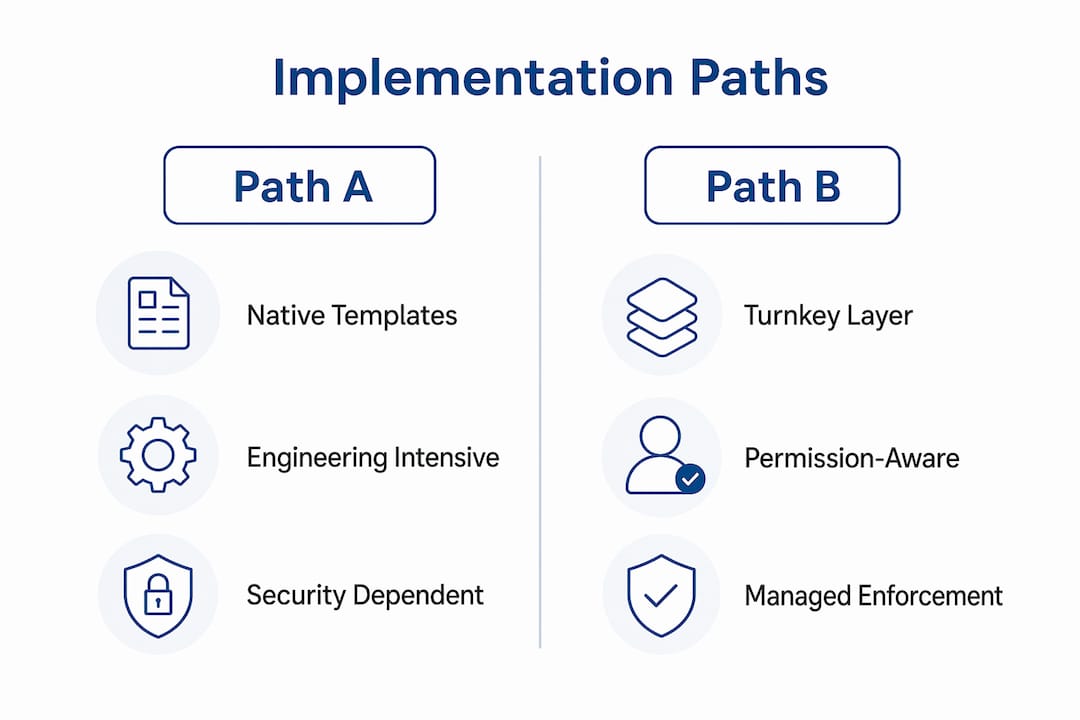
Path B: Turnkey, permission-aware context layers. These host the connectors, enforce permissions, manage citation discipline, and return source-cited briefings out of the box. No engineering lift to get started. ClaudeDrive is built for this path.
| Dimension | Native templates (Path A) | Turnkey layer (Path B) |
|---|---|---|
| Security guarantees | Depends on your engineering | Enforced by vendor |
| Source traceability | Manual discipline required | Built in per briefing line |
| Permission model | You configure and maintain | Per-person/per-file, managed |
| Integrations | Enterprise data stacks (FactSet, PitchBook, Bloomberg) | Meeting notes, GitHub, calendar, drives |
| Deployment speed | Weeks to months | Days |
| Offboarding/auditability | Custom build | Audit logs, immediate revocation |
| Pricing shape | Engineering + data subscriptions | Seat or org subscription |
Firms with dedicated engineering and existing enterprise data subscriptions often find Path A worth the investment. High-growth teams that need fast, governed outcomes without a six-week build typically do better on Path B.
What does deployment actually cost and how long does it take?
A realistic pilot runs in three phases:
- Pilot (Days 1–14): Pick one workflow (daily brief or CIM summary), connect two or three sources, define who sees what, and run it with a small group.
- Validate (Weeks 3–4): Measure time saved, check source accuracy, test offboarding, and confirm the permission model holds under real conditions.
- Scale (Month 2 onward): Add workflows, users, and connectors based on what the pilot proved.
Cost buckets to budget for: Claude Team or Enterprise plan licensing, a vendor subscription for a turnkey context layer, any connector or integration work for non-standard sources, and admin overhead for onboarding and governance setup. Enterprise connectors to data providers like Bloomberg or S&P Capital IQ add meaningful cost and complexity; factor those in before committing to Path A.
A short procurement checklist and 30-day pilot plan
Vendor evaluation questions to ask:
- Show me how data isolation works at retrieval, not just at login.
- Demonstrate an audit log and walk me through an offboarding test.
- What is your SLA on data deletion when a user is removed?
- Which integrations are live today versus on a roadmap?
- How is pricing structured when we add users or ventures?
30-day pilot plan:
- Choose one workflow: daily executive brief or deal summary.
- Connect two or three approved sources (meeting notes, a shared drive, calendar).
- Tag access by role; confirm no cross-role leakage before going live.
- Run for two weeks with three to five users.
- Measure: time saved per briefing cycle, accuracy of source citations, and any permission failures.
- At day 30, decide: expand, adjust, or stop. Document the criteria before you start.
Pro Tip: Standardize a single CLAUDE.md company context file to centralize constraints, stakeholders, and preferences. It avoids repeated setup across users and keeps briefings consistent.
What your engineers will need to deliver
Keep this short for the leader conversation. Your engineering team will need connectors to approved drives and data rooms, an enterprise webhook to keep context current as documents change, secure credential handling for each integration, and a tested offboarding flow that revokes access immediately.
The guarantees to confirm with your vendor: SSO support, immutable audit logs, and a zero-training retention option on the underlying Claude plan. Those three cover the questions your security team will ask.
- Connectors: drives, data rooms, GitHub, calendar
- Webhook: keeps context fresh without manual re-uploads
- Credential handling: secure, per-integration, auditable
- Offboarding test: run it before go-live, not after
What the market is telling you about this approach
Anthropic and Blackstone have bet publicly that the next major enterprise AI value will come from implementation and deployment services, not model improvements alone. That is not a minor signal. When the model maker and one of the largest private equity firms jointly back implementation as the growth vector, it tells you where the durable value sits.
The ecosystem reflects this. Anthropic’s enterprise push includes SSO, audit logging, and role controls as standard commercial-plan features. Turnkey tools and connector libraries are expanding. The infrastructure for governed, private company context is more mature than it was twelve months ago.
Key signals:
- Anthropic’s commercial plans now include enterprise controls as defaults, not add-ons
- Implementation-focused joint ventures signal sustained investment in deployment services
- Connector ecosystems for meeting notes, GitHub, calendars, and financial data are production-ready
Why ClaudeDrive is the recommended option for most leaders
ClaudeDrive maps directly to the recommended approach: permission enforcement at retrieval, source-linked briefings, no new assistant to adopt, and a pilot you can approve in a day.
| Feature | ClaudeDrive guarantee |
|---|---|
| Permission enforcement | Per-person, per-file, enforced at retrieval |
| Audit trails | Full logs, admin-controlled, immutable |
| Connectors | Meeting notes, GitHub, calendar, cloud drives |
| CLAUDE.md | Supported; standardizes context across users |
| Webhooks | Enterprise webhook keeps context current |
| Admin console | Role-based, SSO-ready, offboarding tested |
Leaders open Claude, ask for their daily update, and read a briefing built only from what they are cleared to see. No new dashboard. No wiki to maintain. The context layer for Claude handles the rest.
Key Takeaways
Governance and plan selection, not model choice, determine whether private company context for Claude is safe and trustworthy to deploy.
| Point | Details |
|---|---|
| Plan type is the primary decision | Commercial plans (Team, Enterprise, API) exclude your data from model training; consumer plans may not. |
| Permission enforcement must happen at retrieval | UI-level labels are insufficient; verify per-person, per-file enforcement before go-live. |
| Pilot one workflow in 30 days | Start with a daily brief or deal summary, measure time saved and citation accuracy, then decide to scale or stop. |
| Deal cycles compress with governed context | Enterprise deployments have reported 40–60% compression in deal cycle times and 35–45% reductions in reporting cycle time using automated document synthesis. |
| ClaudeDrive is the recommended turnkey option | It enforces permissions at retrieval, traces every briefing line to a source, and requires no new app adoption. |
The governance gap most teams miss
Most leaders evaluating AI tools focus on what the model can do. The harder question is what the system around the model guarantees. A model that reads a CIM brilliantly but pulls from data a junior analyst was never supposed to see is not a productivity tool. It is a liability.
The teams that get this right treat the permission model and the audit trail as the product, and the AI output as the benefit that follows from getting those right. That sequence matters. You do not earn the briefing until you have earned the trust infrastructure underneath it.
ClaudeDrive was built in that order. The sourcing discipline and permission enforcement came first. The daily briefing is what you get when those hold.
Talk to us about a pilot

ClaudeDrive gives your leadership team a daily update they can trust, built only from what each person is cleared to see, delivered inside the Claude account you already use. Every line traces to a real source. Permissions are enforced at retrieval. Offboarding is immediate and auditable. No new app, no dashboard, no wiki. Connect meeting notes, GitHub, and your calendar, and your team has a governed, private view of what happened. Talk to us about a pilot at the ClaudeDrive Console and see the live demo.
Useful sources
- WorkWise Solutions: Claude for Private Equity — A Buyer’s Guide — recommended for procurement and security teams validating plan-level governance claims
- Claude Implementation: Claude for Private Equity — source for deal-cycle and reporting-cycle reduction figures
- Devaland: Claude’s Private Equity Plugin vs a Turnkey Diligence Tool — useful for comparing native templates against turnkey options
- TechCrunch: Anthropic and Blackstone on implementation as the next enterprise AI vector — market signal on enterprise deployment investment
- Hannah Stulberg: CLAUDE.md and personal assistant context — practitioner guidance on standardizing company context files
- ClaudeDrive: Claude Daily Briefing from Company Context — trust signals and sourcing discipline for procurement packs