How to Glean Insights From Company Tools Inside Claude
Discover how to effectively glean insights from your company's tools with Claude. Get tailored briefings based on your access, effortlessly.
ClaudeDrive
A Yungsten Tech product

How to Glean Insights From Company Tools Inside Claude

Gleaning insights from your company’s internal documents and tools now means one thing: opening Claude and getting a private daily briefing built only from what you’re allowed to see. Every line traces back to a real source. Nothing is invented, and nothing crosses a permission line it shouldn’t.
That briefing pulls from meeting notes, GitHub activity, calendars, and shared documents, then compresses them into a short, sourced update scoped to your own access. No new dashboard, no separate login, no wiki to babysit. ClaudeDrive is built specifically to deliver this inside the Claude account leaders already use.
What that looks like in practice:
- A short daily summary of decisions, blockers, and cross-team updates
- Every claim linked back to the document, message, or ticket it came from
- Access limited to exactly what you’re personally permitted to view
- A full audit trail of what was asked and what was returned
Key Takeaways
A trustworthy daily Claude briefing depends on permission-aware retrieval enforced before content reaches the model, not a filter applied after the fact.
| Point | Details |
|---|---|
| Permissions come first | Enforce access checks at retrieval, before generation, so the model never sees unauthorized content. |
| Citations are non-negotiable | Every factual claim in the briefing should link back to its source document or message. |
| Revocation speed matters | Push for event-driven permission sync so access changes propagate fast, not overnight. |
| Pilot narrow, then expand | Start with one corpus, one owner, and read-only connector scopes before wider rollout. |
| ClaudeDrive fits this job directly | It delivers a permission-scoped, source-linked daily briefing inside Claude with no new dashboard to learn. |
Table of Contents
- Why Leaders Need to Extract Valuable Insights, Not Just Data
- How Does Permission-Aware Retrieval Work for Leaders?
- What Security Guarantees Should You Demand From Any Vendor?
- How Do You Run a Safe Pilot in Two Weeks?
- What Metrics and Vendor Questions Decide a Pilot’s Success?
- What Most Companies Get Wrong About Gleaning Insights
- See How ClaudeDrive Delivers a Daily Briefing Inside Claude
- Sources
Why Leaders Need to Extract Valuable Insights, Not Just Data
A CEO doesn’t need more dashboards. They need to know what changed since yesterday, who’s blocked, and whether a claim in a Slack thread is actually true. That’s the gap between raw data and a briefing built to extract valuable insights leaders can act on without digging.
Here’s what a daily Claude briefing actually replaces:
- The exec summary you used to build yourself. Instead of scanning five tools before a 9am standup, you ask Claude for the update and get decisions, blockers, and open questions from the last 24 hours, each tied to its source.
- The cross-team risk you’d otherwise miss. A GitHub merge that touches a customer-facing feature, a meeting note flagging a slipped date, a calendar shift signaling a canceled review. The briefing surfaces these together instead of leaving you to piece them together from four different apps.
- The hours spent chasing threads. Chiefs of staff routinely lose time reconstructing “what happened” for a leader who missed a meeting. A sourced briefing collapses that reconstruction into a two-minute read.
- The verification step, done up front. Because every line carries a citation back to the original document or message, you can check a claim in seconds instead of asking someone to “send me the thread.”
The value isn’t the summary. It’s a summary you can trust enough to act on without a second opinion.
How Does Permission-Aware Retrieval Work for Leaders?
You don’t need to understand retrieval architecture to trust this briefing. You need one guarantee: Claude only ever sees what you personally have permission to see, and it can’t accidentally show you something a colleague can access but you can’t.
That guarantee comes from how connectors handle identity. When you connect a tool like your meeting notes platform, GitHub, or a shared drive, the connection inherits your own permissions rather than using some shared, all-access service account. Anthropic’s documentation on MCP connectors confirms this directly: no service accounts with elevated access, and tokens are encrypted and scoped to the individual user asking the question.
The second guarantee matters just as much: permission checks happen at the moment of retrieval, before any content reaches the model, not afterward as a filter on what gets displayed. Industry guidance on enterprise AI search is blunt about why this order matters: systems that check permissions after retrieval, rather than before it, are the ones that leak.
What this means day to day:
- Two people asking the same question can get different answers, because their access differs.
- A document you were removed from stops showing up in your briefing, not just your file browser.
- There’s no separate portal to check. The briefing arrives inside the Claude interface you already use.
Pro Tip: If a vendor can’t clearly explain whether permission checks happen before or after content is retrieved, assume it’s the riskier “after.” Ask them directly and get it in writing.
What Security Guarantees Should You Demand From Any Vendor?
Trust in an automated briefing isn’t a feeling. It’s a checklist. Before you let any tool summarize internal documents for your leadership team, four controls should be non-negotiable.
- Per-call identity and auditable traces. Every request should log who asked, what source chunks were returned, and which model version answered. Without this, you can’t investigate a wrong answer or prove compliance during a review.
- Source-linked citations on every factual claim. If a briefing states a fact without a link back to its origin, you have no way to verify it fast, which defeats the entire point of trusting the summary over a person’s memory.
- Fast permission-change propagation. When someone loses access to a system, that revocation needs to reach the briefing quickly, not after an overnight batch job. Design guidance on this problem recommends event-driven permission synchronization that treats access changes as their own fast-moving stream, separate from content updates, precisely because nightly re-indexing leaves a dangerous gap.
- Redaction and injection defenses. Retrieved documents should be treated as untrusted text, not instructions. Guidance on secure ingestion design recommends neutralizing embedded instructions and masking sensitive fields before anything reaches a prompt or a log file, so a poisoned document can’t manipulate the assistant or leak PII.
AWS’s own security reference architecture for generative AI systems backs the same list: retrieval-side controls, metadata filtering, and audit-grade logging aren’t optional add-ons. They’re the baseline for anything touching sensitive company data.
Ask any vendor to walk through each of these four points specifically. A vague answer on any one of them is your answer.
How Do You Run a Safe Pilot in Two Weeks?
You don’t need a company-wide rollout to test whether this works. A narrow pilot, run correctly, tells you everything you need to know in days.
- Pick one narrow corpus and one owner. Product launch notes, recent meeting threads, or a single team’s GitHub repo work well. Assign one person accountable for the pilot’s scope and results.
- Enable connectors org-wide, but require individual authentication. Every user signs in with their own credentials so permissions inherit correctly from day one, rather than through a shared or admin account.
- Start with read-only scopes. Disable any connector’s write actions until the pilot proves out. You want the briefing tested before it can touch or change anything.
- Set a permission freshness target. Decide how fast a revoked user should lose access to the briefing, and confirm whether the vendor supports event-driven sync rather than a nightly batch.
- Define citation format and log retention up front. Decide what a citation looks like, how long audit logs are kept, and who on your team reviews them.
Our own guide to connecting company tools to Claude safely walks through connector scope decisions in more depth if you want a reference before you start.
What Metrics and Vendor Questions Decide a Pilot’s Success?
Four metrics tell you whether a pilot is actually working, and a short set of questions tells you whether a vendor is being straight with you.
Track these important aspects:
- Unauthorized retrieval: whether the system surfaces content a test user shouldn’t see.
- Authorized recall: whether it finds content the user is entitled to see.
- Groundedness: whether answers trace back to a real source.
- Permission-change propagation: how quickly a revoked user loses access.
Assign clear owners for ingestion, identity management, security review, and the final product decision. One person should own each.
Ask every vendor three questions: How exactly are per-call permissions enforced? How fast do revocations propagate? How are citations surfaced and can they be independently checked? Testing guidance for enterprise AI search recommends testing against revoked users and group changes specifically, not just normal queries, because that’s where most systems fail quietly.
Your pilot passes when sample queries validate correctly, audit traces match reality, and zero unauthorized retrieval shows up in testing.
What Most Companies Get Wrong About Gleaning Insights
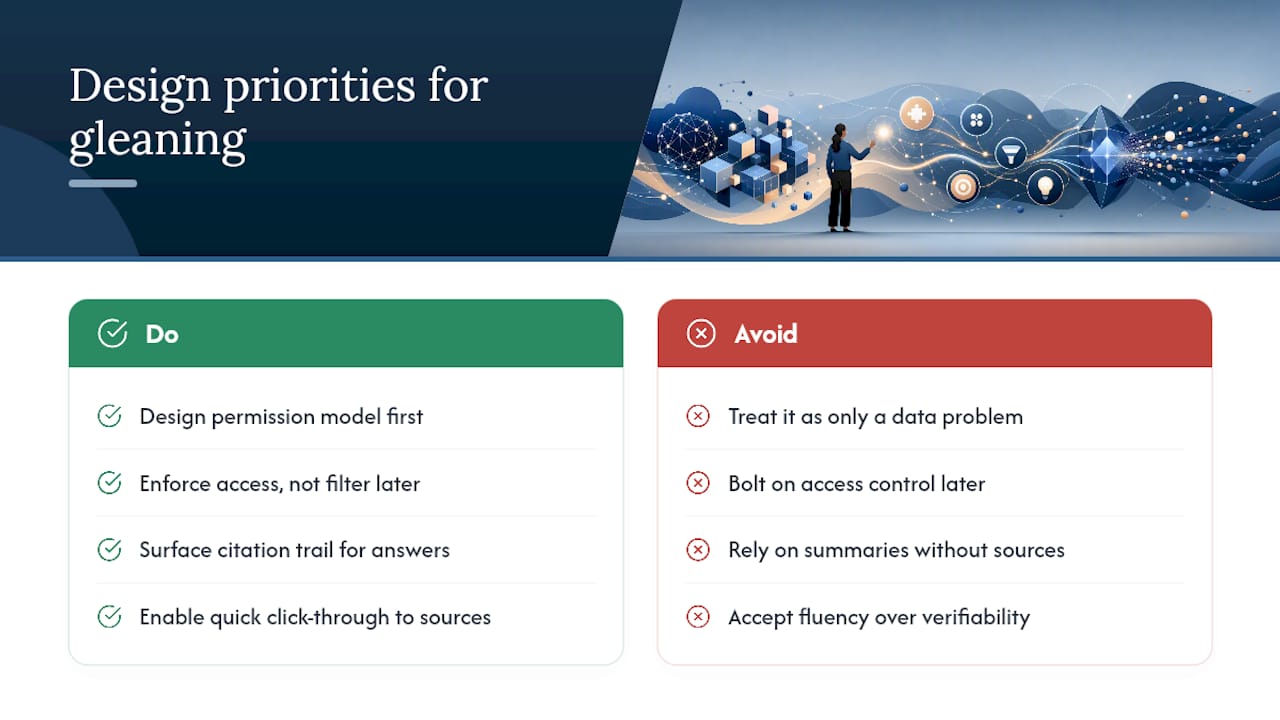
Most advice on this topic treats “insight extraction” as a data science problem: better embeddings, smarter reranking, cleverer prompts. That’s backward. The failure point in almost every real deployment isn’t retrieval quality. It’s permission modeling done as an afterthought.
Teams get excited about a system that finds the right document, then bolt on access control once someone in security asks about it. By then the architecture already assumes broad access and tries to filter it down after the fact, which is exactly the pattern that leaks. Permission enforcement has to be the first design decision, not the last patch.
The other overrated idea is that a good summary is enough. It isn’t, if you can’t check it. Leaders don’t need a confident paragraph. They need a paragraph they can interrogate in ten seconds by clicking through to the source. That’s the real differentiator, and it’s why citations matter more than fluency.
If you’re evaluating anything in this category, start with the permission model and the citation trail. Everything else is secondary.
See How ClaudeDrive Delivers a Daily Briefing Inside Claude
ClaudeDrive is built for exactly the job this article describes: a private, permission-aware daily briefing inside the Claude account your leadership team already has open. Connect your meeting notes, GitHub, calendar, and shared documents, and each person gets their own briefing scoped to what they’re already permitted to see.

Every guarantee covered above is built in from the start, not bolted on later: per-user permission enforcement so nobody sees beyond their own access, source-linked citations on every factual claim so you can verify anything in seconds, and full audit logs recording who asked and what was returned. There’s no new dashboard to roll out and no wiki to maintain. If your team is already on Claude and you’re tired of chasing updates across five tools, see the live demo or talk to us about a pilot.
Sources
- Why enterprise AI search fails — Atlassian community guidance
- AWS security reference architecture for generative AI — prescriptive guidance