How to Connect Claude to Internal Docs: 2026 Guide
Learn how to connect Claude to internal docs seamlessly. Utilize AI to access your company's knowledge sources and enhance team collaboration.
ClaudeDrive
A Yungsten Tech product

How to Connect Claude to Internal Docs: 2026 Guide

Connecting Claude to internal docs is defined as linking Claude’s AI capabilities directly to your company’s live knowledge sources so that anyone on your team can ask a question and get an answer drawn from real, permission-controlled files. The two primary methods are Claude’s built-in “Ask Your Org” connectors and the Model Context Protocol (MCP), an open standard for custom integrations. Both methods respect the access controls already set in your source systems, so a leader in finance sees finance files, and nothing crosses that line. Platforms supported out of the box include Google Workspace, Microsoft 365, and Slack, with MCP extending coverage to tools like Atlassian Confluence, Jira, and GitHub.
What do you need before you can connect Claude to internal docs?
The starting point is your Claude subscription. Ask Your Org is available only on Claude Team and Enterprise plans. A personal or free account cannot connect to organizational data sources. That single requirement filters out most ad hoc setups and puts the decision squarely with technical leadership.
Beyond the subscription, you need administrative access to the platforms you want to connect. For Google Workspace, that means a Google admin account with OAuth consent configured. For Microsoft 365, you need a tenant admin who can authorize SharePoint and Outlook connections. These are not developer tasks. They are IT governance decisions that require the right person in the right role.

The “Owner” role inside Claude’s admin panel is the only role that can add connectors to a Team or Enterprise plan. Only Owners can add connectors, and individual users must then enable those connectors themselves to grant Claude access under their own credentials. This two-step model keeps access explicit and auditable.
For teams connecting proprietary tools or legacy knowledge bases, MCP servers add another layer. You can deploy an MCP server remotely on a cloud host or locally behind your firewall. Remote deployment works well for cloud-hosted tools. Local deployment suits air-gapped environments or systems that cannot expose data externally. For teams looking to go deeper on MCP deployment options, the context layer guide for technical leaders covers the architecture in plain terms.
Optional but worth considering: a lightweight vector database paired with your MCP server. Semantic search over internal docs dramatically improves Claude’s citation quality compared to basic keyword indexes. It means Claude finds the right paragraph, not just the right file.
| Requirement | Details |
|---|---|
| Claude plan | Team or Enterprise |
| Platform admin access | Google Workspace admin or Microsoft 365 tenant admin |
| Claude Owner role | Required to add connectors in the admin panel |
| MCP server (optional) | Needed for Confluence, Jira, GitHub, or custom tools |
| Vector database (optional) | Improves semantic search quality over raw file access |
How do you set up Ask Your Org and built-in connectors?
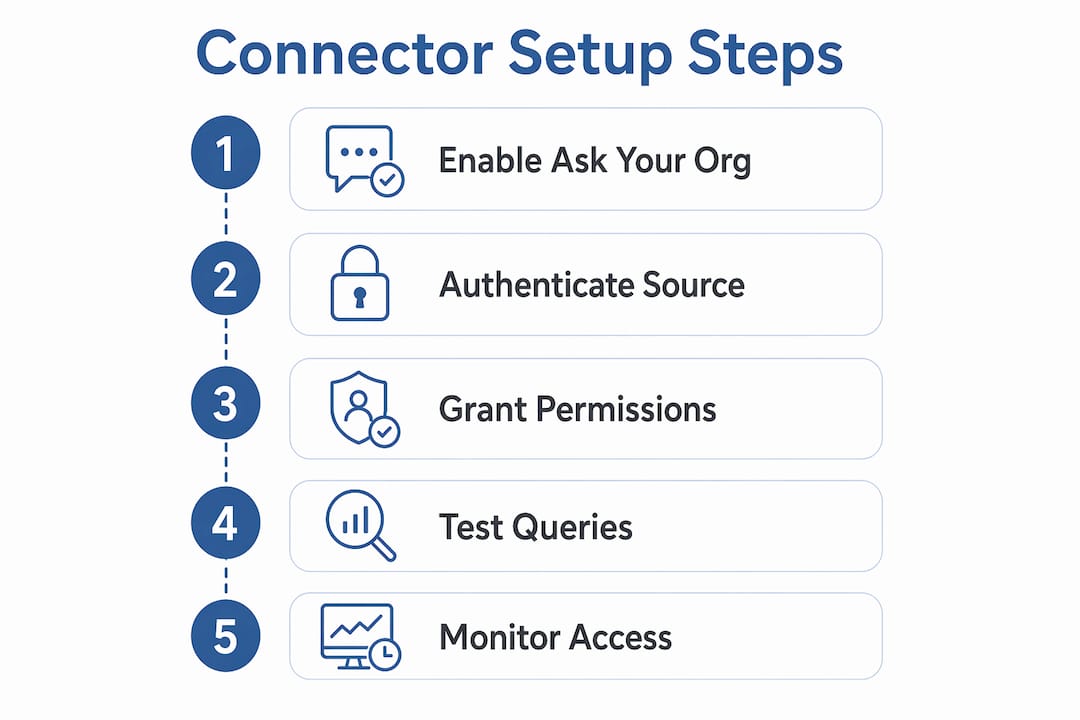
Ask Your Org typically takes about 15 minutes to configure. The process is straightforward, but the sequence matters. Follow these steps in order.
- Open Claude and navigate to the project sidebar.
- Select “Ask Your Org” from the connector options.
- Choose the data source you want to connect: Google Workspace, Microsoft 365, or Slack.
- Authenticate as an Owner using your admin credentials for that platform.
- Authorize the specific scopes Claude needs. For Google Workspace, this includes Drive and Gmail. For Microsoft 365, this includes SharePoint and Outlook.
- Save the connector configuration.
- Notify team members that the connector is live. Each user must individually enable it under their own account to activate access under their own permissions.
Once a connector is live, any enabled user can open a Claude project and ask questions in plain English. “What did the product team decide in last week’s meeting?” pulls from Slack. “What’s the current version of the onboarding policy?” pulls from SharePoint. Claude returns an answer with source citations so the reader knows exactly where the information came from.
Pro Tip: Review which OAuth scopes you authorize at setup. Granting read access to Drive is different from granting access to all Google services. Start with the narrowest scope that covers your use case, then expand only when a specific need arises.
| Setup step | Who does it |
|---|---|
| Enable Ask Your Org | Claude Owner (admin panel) |
| Authenticate data source | Owner using platform admin credentials |
| Authorize OAuth scopes | Owner, with IT review recommended |
| Enable connector per user | Each individual team member |
| Query internal docs | Any enabled user via Claude project |
How does MCP extend Claude’s reach to custom tools?
MCP, the Model Context Protocol, is an open standard that lets you connect Claude to any tool that does not have a built-in connector. Think Confluence wikis, Jira boards, GitHub repositories, or a proprietary internal knowledge base built five years ago. Confluence integration via MCP can be completed in about 30 minutes using pre-built MCP servers. That is a meaningful benchmark for planning your rollout.
MCP servers come in two deployment modes. Remote servers live on a cloud host and communicate with Claude over the internet. Local servers run behind your firewall and never expose data externally. Remote MCP servers offer better security for cloud-hosted tools because they sit between Claude and your data, enforcing permissions at every request. Local servers are the right choice for regulated environments where data cannot leave the building.
Permission enforcement works the same way in MCP as it does in built-in connectors. Claude respects source system access controls at the individual user level. If a user does not have access to a file in Confluence, the MCP server blocks Claude from retrieving it during that session. The AI does not override what the source system already decided.
Building a custom MCP connector requires a developer, but registering a pre-built one does not. Anthropic and the open-source community maintain MCP servers for Atlassian products, GitHub, and several other common platforms. For teams evaluating which approach fits their stack, the MCP alternatives overview covers the main options without vendor bias.
| Integration method | Best for | Setup time | Permission enforcement |
|---|---|---|---|
| Built-in connectors | Google Workspace, Microsoft 365, Slack | ~15 minutes | Source system OAuth |
| Pre-built MCP server | Confluence, Jira, GitHub | ~30 minutes | Source system credentials |
| Custom MCP server | Proprietary or legacy tools | Varies by complexity | Developer-defined rules |
What security controls govern Claude’s access to internal files?
Security in this context is not a feature you configure once. It is a set of ongoing decisions about who sees what and under what conditions. The foundation is permission inheritance: Claude never accesses files a user could not access directly in the source system. If a file is restricted in Google Drive, it stays restricted when Claude queries Drive. The AI does not gain elevated access by virtue of being an AI.
The least privilege principle applies directly to OAuth scope selection. Granting excessive OAuth scopes creates risk even when the connector itself is trustworthy. A connector that reads only the files it needs is safer than one with broad access granted for convenience. This is a governance decision, not a technical one, and it belongs in the Owner’s setup checklist.
Custom connectors from unverified sources carry additional risk. Before adding any third-party MCP server to a Team or Enterprise plan, verify the server’s source, review its permission model, and confirm it does not store or forward data outside your approved environment. The two-step model (Owner adds, user enables) provides a checkpoint, but it does not replace due diligence on the connector itself.
- Confirm the connector’s data handling policy before authorization.
- Restrict OAuth scopes to the minimum needed for the stated use case.
- Review active connectors quarterly and remove any that are no longer in use.
- Require users to re-authenticate after major permission changes in the source system.
- Log connector activity and review it as part of your standard IT audit cycle.
Pro Tip: Set a calendar reminder every 90 days to audit which connectors are active and which users have enabled them. Access patterns change as teams shift, and a connector enabled for a project that ended six months ago is an unnecessary exposure.
How do you troubleshoot and maintain reliable document access?
Authentication failures are the most common setup problem. They usually mean the OAuth token expired, the admin credentials changed, or the scope was revoked at the platform level. The fix is to re-authenticate the connector from the Owner account and confirm the platform admin has not changed the OAuth consent settings.
Connector timeouts often point to network configuration rather than Claude itself. Remote MCP servers need a stable outbound connection from Claude’s infrastructure to your server. Local MCP servers need firewall rules that permit the specific port and protocol the server uses. Check both before assuming the connector is broken.
Document indexing frequency matters for teams that update files often. Claude Cowork and Desktop clients can make real-time changes to local files, which requires safety guardrails rather than assuming a read-only model. For most knowledge base use cases, a daily or hourly sync is sufficient. Real-time sync adds complexity and should be reserved for workflows where stale data causes genuine problems.
- Check OAuth token validity first when a connector stops returning results.
- Verify firewall rules for local MCP servers after any network infrastructure change.
- Set document sync frequency based on how often the source content actually changes.
- Train end users to include specific project or folder names in their queries for more precise results.
- Consult Anthropic’s support documentation or your MCP server’s GitHub repository for connector-specific error codes.
Key Takeaways
Connecting Claude to internal documents works reliably when permission controls are set correctly from the start and maintained as an ongoing practice.
| Point | Details |
|---|---|
| Plan requirement | Claude Team or Enterprise is required; free plans cannot connect to organizational data. |
| Built-in connectors | Ask Your Org covers Google Workspace, Microsoft 365, and Slack in about 15 minutes. |
| MCP for custom tools | Pre-built MCP servers connect Confluence, Jira, and GitHub in roughly 30 minutes. |
| Permission inheritance | Claude never accesses files the authenticated user cannot access in the source system. |
| Ongoing security | Audit active connectors and OAuth scopes every 90 days to prevent unnecessary exposure. |
What I’ve learned from watching teams actually do this
Most technical leaders I’ve spoken with underestimate how much the organizational structure of their documents affects the quality of Claude’s answers. The integration itself is straightforward. The harder problem is that years of ad hoc file naming, nested folders with no clear logic, and duplicate documents across drives mean Claude retrieves technically correct files that are practically useless.
The teams that get the most value from linking Claude with internal documents start with a deliberate structure. A CLAUDE.md directory that defines company identity, communication norms, and key document locations gives Claude a map before it starts searching. This structured approach produces markedly better synthesized results than pointing Claude at a raw file dump and hoping for the best. It takes a few hours to set up and pays back immediately.
The second thing I’d push back on is the assumption that more data equals better answers. Exposing a targeted semantic search tool through MCP produces more trustworthy citations than connecting every folder in your Drive. Narrower scope means fewer irrelevant results and fewer hallucinated connections between unrelated documents.
Security is the area where I see the most complacency after initial setup. The two-step connector model (Owner adds, user enables) creates a false sense that access is controlled. It is controlled at the moment of setup. Six months later, people have changed roles, projects have ended, and connectors are still active. The 90-day audit cadence is not bureaucracy. It is the minimum viable governance for a system that touches your company’s most sensitive knowledge.
— Paul
ClaudeDrive brings traceable document access to your Claude account
Technical leaders who have completed the integration steps above often face a second challenge: making sure the answers Claude returns are auditable and trustworthy at the leadership level, not just technically functional.

ClaudeDrive is the private context layer that feeds Claude from your connected sources, with every line of a briefing traced back to a real document. Leaders open Claude, ask for their update, and read a clear summary built only from what they are permitted to see. No new app, no dashboard, no wiki to maintain. The ClaudeDrive Console gives Owners audit trails, permission controls, and a clean way to manage which sources feed which leaders. Talk to us about a pilot.
FAQ
What Claude plan is required to connect to internal docs?
Claude Team or Enterprise plans are required. Free and personal plans do not support organizational connectors or Ask Your Org.
How long does it take to set up Claude document integration?
Built-in connectors for Google Workspace, Microsoft 365, and Slack typically take about 15 minutes. MCP-based integrations for tools like Confluence take roughly 30 minutes with a pre-built server.
Does Claude access files the user is not permitted to see?
No. Claude inherits the source system’s access controls. If a user cannot access a file directly in Google Drive or SharePoint, Claude cannot retrieve it during that user’s session.
What is MCP and when do I need it?
MCP, the Model Context Protocol, is an open standard for connecting Claude to tools that lack built-in connectors. Use it for Confluence, Jira, GitHub, or any proprietary internal system not covered by Ask Your Org.
How do I keep Claude’s document access secure over time?
Audit active connectors and OAuth scopes every 90 days, remove connectors tied to completed projects, and require re-authentication after major permission changes in the source system.