How AI Personalizes Per User Inside Your Team's Claude
Discover how AI tailors experiences for each user, ensuring personalized, secure access to data and insights within your team's Claude system.
ClaudeDrive
A Yungsten Tech product

How AI Personalizes Per User Inside Your Team’s Claude

The direct answer: personalized AI for a company only works if it acts with the requesting person’s own identity, shows them only what they’re already cleared to see, and links every fact back to a real source. That’s the whole standard. Anything less is a leak waiting to happen.
Picture a CEO opening Claude on a Monday morning and asking for “today’s exec highlights” powered by decision intelligence. A system built this way returns a private brief pulling only from meetings, files, and tools that CEO is authorized to view, with each line pointing back to where it came from. The same question from a marketing coordinator returns a different, narrower brief, because that’s what they’re cleared to see. Tools like ClaudeDrive build this pattern directly into a team’s existing Claude account. Frameworks like ISO 27001 and Microsoft Purview already set the bar for this kind of access discipline in enterprise software.
Three things have to be true at once:
- The AI knows exactly who is asking, every time.
- It filters out anything that person isn’t cleared to see before it ever writes an answer.
- Every claim in the response traces back to a real, checkable document.
Key Takeaways
Permission-aware personalization works only when identity, retrieval filtering, and source attribution operate together on every single query.
| Point | Details |
|---|---|
| Identity travels with the request | Every retrieval and tool call must be attributable to the specific person asking, not a shared system account. |
| Filter before generating, not after | Checking permissions before pulling documents prevents leaks; scrubbing answers afterward is fragile. |
| Demand exportable audit logs | Require per-query logs showing user, query, and documents checked, aligned to standards like ISO 27001. |
| Budget six to twelve weeks for a pilot | Discovery, connector setup, guardrail testing, and validation each take one to four weeks. |
| ClaudeDrive runs this pattern in Claude | Connects meeting notes, GitHub, and calendar to deliver private, source-linked daily briefs with instant offboarding. |
Table of Contents
- How AI Personalizes Per User Without Crossing a Line
- What Should You Require Before Rollout?
- Which Deployment Model Fits Your Team?
- How Do You Verify Personalization Is Actually Safe?
- What Does a Pilot Actually Cost, and How Long Does It Take?
- What Should Vendors Prove Before You Sign?
- Get Private, Source-Linked Updates Running in Your Team’s Claude
- Where to Go for Deeper Technical and Procurement Review
- Frequently Asked Questions
- Sources
How AI Personalizes Per User Without Crossing a Line
Here’s the plain version of what happens behind the scenes, without the engineering detail.
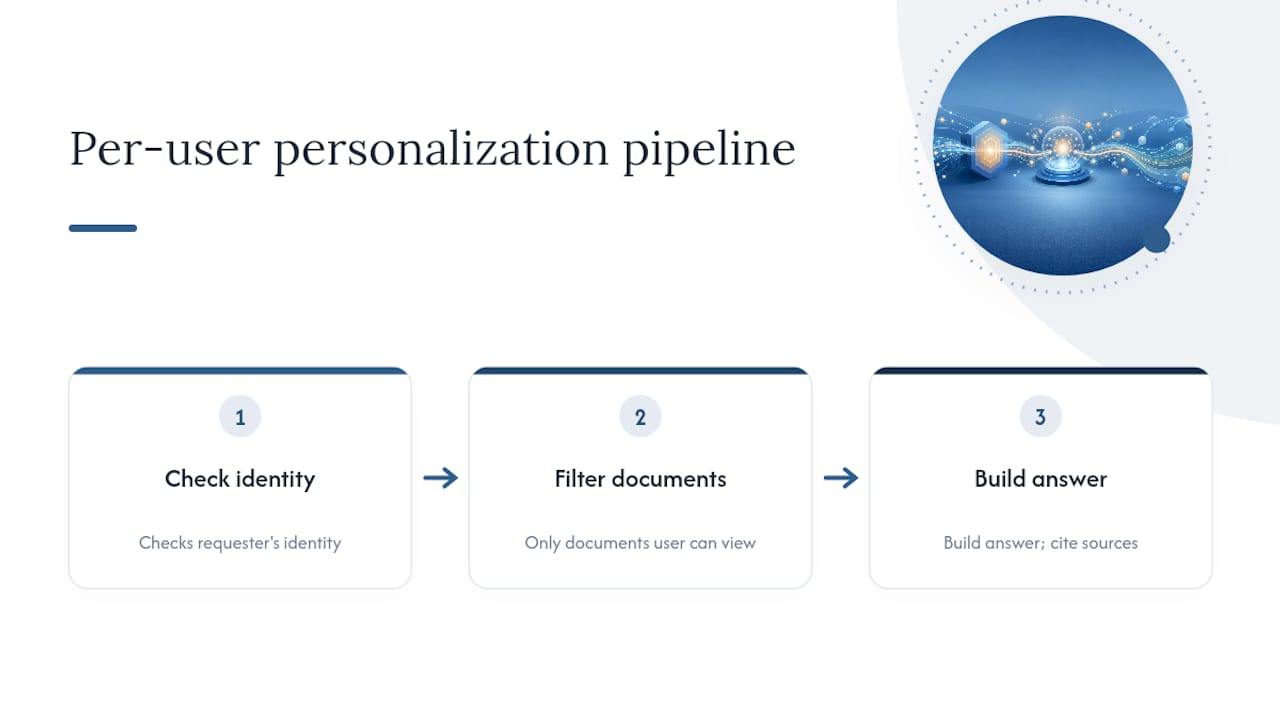
A person logs into Claude and asks a question. That identity travels with the request the entire way through the system, the same way a badge follows an employee through a building rather than getting checked once at the front door. Before any document gets pulled to answer the question, the system checks what that specific person is allowed to see, filters out everything else, and only then builds an answer from what remains.
This matters because a lot of AI tools do the opposite: they pull everything relevant first, generate an answer, and try to scrub out sensitive bits afterward. That’s backward. Permission-aware engineering practice treats post-generation filtering as fragile, because once sensitive content has been read into the model’s context, you’re relying on cleanup rather than prevention. The safer design checks permissions before retrieval, not after generation.
What this gives you as a leader:
- No cross-line leaks. A junior analyst can’t accidentally see board notes because the system never pulled them in the first place.
- Every answer comes with source links, so a claim in a brief can be checked against the original document in seconds.
- A record of who asked what, and which documents were actually checked and returned, tied to that person’s identity.
This is the architecture pattern ClaudeDrive runs inside a standard Claude account. No separate assistant, no new login. The permission logic sits quietly underneath the conversation the team is already having.
What Should You Require Before Rollout?
Before you sign anything, put these on the table with your vendor. This is the checklist that separates a system your security team will approve from one that gets flagged in the first review.
Identity comes first. Every retrieval and every tool call should be traceable to a specific person, not a shared system account. Red Hat’s security guidance treats a shared “agent credential” as one of the most common ways AI systems get compromised. Ask the vendor directly: does the AI ever act with more access than the person asking it a question?

Permissions sync immediately, not eventually. If someone loses access to a folder, that change needs to reach the AI in minutes, not the next overnight batch job. Ask for the sync latency in writing.
Sensitive fields get handled carefully. Ask whether the vendor supports classification labels and can mask specific fields, not just whole documents, when only part of a record is sensitive.
Every query leaves a paper trail. You want logs showing who asked, what was searched, which documents were checked, and which were actually returned. Ask whether those logs export to your existing security monitoring, and whether the vendor aligns with standards like ISO 27001 or SOC 2.
Offboarding is instant. When someone leaves the company, their access to indexed content should end the moment their account is deactivated, not on the next sync cycle.
Pro Tip: Ask the vendor for a dry-run mode that lets you preview exactly what a policy change will affect before you flip it on. If they can’t show you that, you’re finding out about mistakes after they happen, not before.
Score each vendor on a simple pass or fail against these six items. A vendor that hedges on more than one deserves a harder look.
Which Deployment Model Fits Your Team?
The right setup depends on how sensitive your data is and how fast you need results.
| Model | Best for | Main tradeoff |
|---|---|---|
| Hosted, managed connectors | Teams wanting speed with minimal setup | Requires trust in the vendor’s security perimeter; ask about private networking and data residency |
| Hybrid (vendor manages logic, data stays local) | Teams balancing speed and control | Slightly more setup than pure hosted, but sensitive data never leaves your network |
| Self-hosted indexing | Regulated industries with strict sovereignty needs | Highest control, but longest setup and ongoing maintenance |
Many teams moving fast land on hosted or hybrid, since the setup burden of full self-hosting rarely matches their risk profile. Regulated industries handling health or financial data often need the extra control self-hosting provides, even with the added overhead.
How Do You Verify Personalization Is Actually Safe?
Trusting a vendor’s claim isn’t enough. Verify it before rollout with these steps:
- Run test questions designed specifically to try to surface documents a test user shouldn’t see, and require the vendor to show you the pass and fail results.
- Review what the system actually checked during a real query: which documents were considered, which got filtered out, and why.
- Track ongoing metrics: how often queries return anything they shouldn’t, how fast permission changes take effect, and how often the filters get it wrong in either direction.
Beyond the pilot, push for recurring checks, not a one-time test:
- Independent audits or penetration tests on a set schedule, not just at launch.
- Log integration with your existing security monitoring so unusual access patterns get flagged automatically.
- A documented remediation process for any test that fails, with a clear owner and timeline.
Research on role-aware filtering pipelines, including the ARBITER framework, shows that layered checks at retrieval and output stages can enforce access rules reliably even as roles change over time. That layered approach is what you’re paying a vendor to have already built, so you don’t have to build it yourself.
What Does a Pilot Actually Cost, and How Long Does It Take?
A realistic pilot runs six to twelve weeks. Expect roughly one to two weeks for discovery and mapping who can see what, two to four weeks connecting tools and syncing permissions, two to four weeks running the pilot with guardrails on, and one to two weeks validating results before full rollout.
Cost mostly tracks two things: how many tools you’re connecting and how messy your existing permissions are. A team with clean, well-organized access controls moves faster and cheaper than one where nobody’s quite sure who can see the finance folder.
- Budget extra time for cleaning up permission mismatches discovered during discovery, since that’s the most common source of delay.
- Tie your go or no-go decision to two things: retrieval accuracy and audit completeness, not just whether people like the briefs.
What Should Vendors Prove Before You Sign?
Ask for these artifacts up front, not after the contract is signed.
Request a sample audit log showing a real query: who asked, what was searched, which permission groups got checked, and what came back. Ask for a plain diagram showing how a user’s identity flows through the system from login to answer. Confirm the vendor has documented content-filtering policies for anything the AI outputs, in line with practices Microsoft’s cloud security guidance recommends for enterprise AI workflows.
On contracts, insist on fail-closed defaults, meaning the system denies access when it’s unsure rather than guessing yes. Get clear language on incident response timelines, data retention, and exactly how fast offboarding revokes access. Ask about ISO 27001 or SOC 2 status and whether recent penetration test results are available for review.
The best practical check: ask the vendor to run a live demo using a sanitized copy of your own environment. Watching it work on your actual structure tells you more than any slide deck.
Why This Can’t Wait for the Next Budget Cycle
I’ve watched enough companies bolt AI onto their workflows without checking who sees what, and the exposure compounds fast, especially with investors and regulators now asking pointed questions about AI data handling. The good news: none of this requires slowing down. With a clear checklist and the right verification gates up front, a team can have trustworthy daily updates running in weeks without opening up new risk. ClaudeDrive was built around exactly this pattern, permission checks first, traceable sources always, inside the Claude account your team already has.
Get Private, Source-Linked Updates Running in Your Team’s Claude
ClaudeDrive is the fastest path to the checklist above, because it’s built to satisfy it by default rather than bolt it on after the fact. Every retrieval runs under the requesting person’s own access, so a briefing never contains a line that person wasn’t already cleared to see. Connect your meeting notes, GitHub, and calendar, and each person gets a private daily update inside Claude with every fact linked back to its source and a full audit trail behind it.

There’s no new app for your team to learn and no dashboard to maintain. Offboarding is instant: when someone leaves, their access to indexed content ends the moment their account is deactivated. If your team is already using Claude and you want to see how this looks with your own tools connected, see the live demo or talk to us about a pilot.
Where to Go for Deeper Technical and Procurement Review
Hand these to your security or procurement team for follow-up. For architecture review, start with AWS’s least-privilege guidance for AI workloads and the ARBITER research on role-aware filtering. For identity design, Red Hat’s AI security guidance is the clearest plain-language source. For procurement language, Microsoft’s Azure AI security recommendations cover the classification and DLP terms worth writing into a contract. For connector behavior specifics, review write-ups from OpenNash, Quellix Labs, and Katonic AI on permission-aware retrieval at scale.
Frequently Asked Questions
How does AI personalize content for each individual user inside a company? It checks the requesting person’s identity first, filters available documents down to only what that person can already see, then builds an answer from that narrowed set, with each fact linked to its source.
Can two employees ask the same question and get different answers? Yes, and they should. A CEO and a coordinator asking for “today’s highlights” will get briefs pulled from different sets of documents, based on what each is authorized to view.
Does this require replacing our existing tools? No. A system like ClaudeDrive connects to tools you already use, such as meeting notes, GitHub, and your calendar, and delivers updates inside the Claude account your team already has.
What happens when someone leaves the company? Their access to indexed content should be revoked the instant their account is deactivated. Ask any vendor to confirm this happens immediately, not on a delayed sync.
How long does a pilot typically take? Most pilots run six to twelve weeks, covering discovery, connector setup, permission syncing, guardrail testing, and validation before full rollout.
Sources
- AI security: Identity and access control
- AI security recommendations for Azure (cloud adoption framework)
- GENSEC01-BP03 Implement least privilege access permissions for foundation models accessing data stores
- Permission-Aware AI Agents: Controlling Who Sees What Data | OpenNash Blog
- ARBITER: Role-Aware Filtering for RAG systems (arXiv)