How AI Keeps Teams Informed: A Manager's Pilot Guide
Discover how AI keeps teams informed by streamlining communication, reducing status meetings, and enhancing decision-making with trusted insights.
ClaudeDrive
A Yungsten Tech product

How AI Keeps Teams Informed: A Manager’s Pilot Guide

AI keeps teams informed by automatically triaging, summarizing, and routing information from your existing tools, so every person sees only what they’re allowed to see, with every line tied to a real source. The result: fewer status meetings, faster decisions, and clearer ownership across functions.
Three things make this work in practice:
- Triage and summarization pull signal from meeting notes, calendars, and code repositories before anyone has to ask.
- Permissioned context means each person’s briefing reflects their actual access, not a one-size-fits-all digest.
- Source traceability lets leaders verify any claim in seconds, which is what separates trusted AI updates from noise.
Research backs the outcome. A Harvard Business School field experiment found AI users produced more integrated, cross-functional solutions than teams without AI. IBM’s human-AI collaboration guidance frames the same principle: let AI handle high-volume routine capture while humans keep judgment on high-stakes calls.
Key Takeaways
AI keeps teams reliably informed by triaging, summarizing, and routing information from permitted sources, so every person gets a source-linked briefing without a status meeting to produce it.
| Point | Details |
|---|---|
| Enable three capabilities first | Start with automated summaries, action-item extraction, and priority triage before adding routing or agenda suggestions. |
| Run a 6-week pilot | Connect calendar, meeting notes, and one engineering source; assign a chief of staff or ops lead as pilot owner. |
| Track two primary KPIs | Measure status meeting hours and action-item close rates weekly from day one of the pilot. |
| Manage risk with transparency | Show why messages are deprioritized and give team members a one-click override to prevent missed-message fear. |
| ClaudeDrive as the pilot option | ClaudeDrive feeds Claude from your permitted sources with source-linked briefings, no new app, and instant offboarding. |
Table of Contents
- How does AI actually keep people informed?
- What do managers actually gain?
- How should you redesign workflows for human-AI collaboration?
- What does a 6-step pilot plan look like?
- Which KPIs show AI is keeping your team better informed?
- What risks should leaders plan for?
- ClaudeDrive: a permission-aware way to run your pilot
- What a week looks like after a successful pilot
- Sources
How does AI actually keep people informed?
Seven capabilities do the real work. Each maps to something a leader notices on Monday morning.
- Action-item extraction. Rather than burying commitments inside a transcript, AI flags each one with an owner and a due date. Late joiners get the same list without watching the recording.
- Cross-source stitching. AI agents sit across Slack, docs, and meeting notes to surface decisions and action items in a single role-personalized digest, which can cut onboarding ramp time for new hires significantly.
- Multilingual transcripts. Teams spanning time zones get meeting summaries in their working language without a separate translation step.
- Agenda suggestions and scheduling assistance. AI reviews open action items and calendar gaps, then proposes agenda topics before the next sync, so meetings start with context already shared.
- Contextualized briefings. Each person’s morning update draws only from sources they’re permitted to read. No one sees a finance thread they shouldn’t; no one misses an engineering incident they should.
The architecture pattern that matters: AI reads allowed sources and delivers permissioned, source-linked summaries. It does not replace human judgment. It removes the retrieval work so judgment can happen faster.
Pro Tip: Start with read-only summaries for two weeks before enabling action-item routing. Teams trust the output more when they’ve seen it be accurate before it starts moving work.
What do managers actually gain?
The benefits land in five places leaders track.
- Fewer meeting hours. When summaries and action items arrive automatically, the weekly status meeting often becomes optional. Teams that adopt AI briefings over email updates report reclaiming several hours per person per week.
- Faster decision cycles. A cross-functional issue that previously required three email threads to surface now appears in a morning briefing with context attached. The Harvard Business School experiment found AI specifically helps bridge functional silos, producing more balanced solutions across disciplines.
- Fewer missed action items. Extracted commitments with named owners close at higher rates than verbal agreements buried in meeting recordings.
- Faster onboarding. Role-personalized digests give new hires a running picture of decisions made before they joined, compressing ramp time.
Pairing AI with deliberate human skill development amplifies these gains. ScienceDirect research on generative AI’s organizational impact found that firms combining AI with upskilling see stronger performance improvements across both automation and decision-support tasks.
How should you redesign workflows for human-AI collaboration?
The shift is straightforward: assign routine capture and triage to AI, keep high-stakes judgment with humans. IBM’s framework puts it plainly: AI handles high-volume data processing; humans handle decisions with real consequences.
Here’s a practical checklist to get there:
- Define your sources. List every tool that holds team context: calendar, meeting notes, issue tracker, primary chat. Anything not on the list won’t appear in briefings.
- Set permission rules. Map who can see what before connecting any source. Finance threads stay with finance; engineering incidents go to engineering leads and above.
- Pick a pilot team. Choose 10–20 people across two functions. Cross-functional pilots surface alignment gaps faster than single-team ones.
- Set expected behaviors. Ask team members to use thread titles that signal urgency, keep decisions in writing, and flag blockers explicitly. AI triage works better when the input is clean.
- Train reviewers. Assign one person per function to spot-check summaries for the first two weeks. They confirm accuracy and flag any misclassified items.
- Establish an escalation channel. Give everyone a direct path to flag a missed or misprioritized message. This is the trust safety valve.
Pro Tip: Increase AI agency in stages: read-only summaries first, then action-item routing, then agenda suggestions. Each stage gives the team time to calibrate trust before the next one adds more autonomy.
For cadence design and scheduling, the guide on automating company update cadence covers the operational details.
What does a 6-step pilot plan look like?
Run this over six to eight weeks with a named owner, ideally a chief of staff or operations lead.
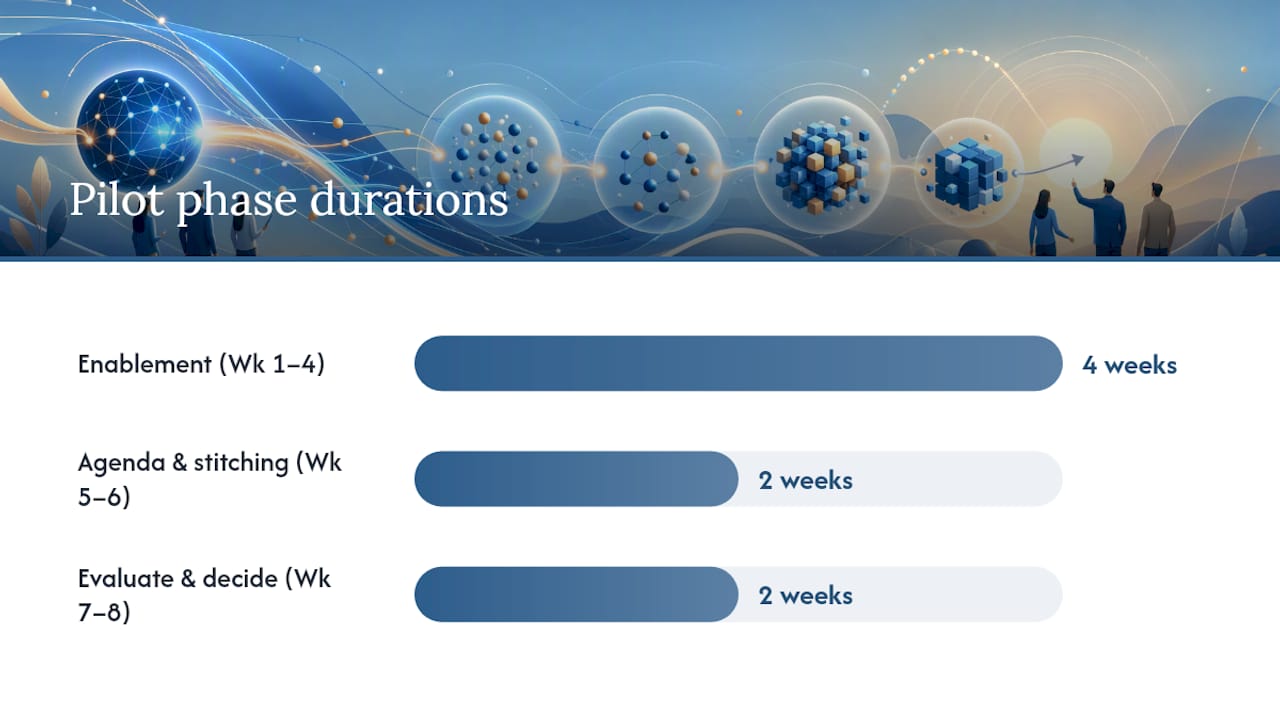
- Week 1: Source audit. Owner maps all active information sources and confirms permission boundaries with IT or the data owner.
- Week 2: Connect and configure. Connect calendar, meeting notes, and one engineering or project source. Set access rules. Verify no cross-boundary leakage.
- Week 3: Read-only summaries live. Pilot team receives daily briefings. No routing yet. Collect qualitative feedback on accuracy and relevance.
- Week 4: Action-item routing enabled. Extracted commitments route to named owners. Track close rates against baseline.
- Weeks 5–6: Agenda suggestions and cross-source stitching. Enable agenda proposals and multi-source digests. Measure meeting duration and decision speed.
- Week 7–8: Evaluate and decide. Review KPIs against targets. If two of three primary KPIs are met and trust indicators are positive, expand to the next team.
Minimum integrations to connect: calendar, meeting notes, one source code or issue tracker, and primary chat or email. Permission checks and a weekly reporting cadence to the pilot owner are non-negotiable from day one. For sample update formats, AI-powered status update templates give concrete examples to adapt.
Which KPIs show AI is keeping your team better informed?
| KPI | Measurement method | Pilot target |
|---|---|---|
| Status meeting hours per week | Calendar data, before vs. after | 20% reduction |
| Action items closed within SLA | Issue tracker or task tool | higher close rates |
| Meeting catch-up time for late joiners | Team survey, sampled weekly | Under 5 minutes per meeting |
| Time to decision on cross-functional issues | Ticket timestamps, sampled | faster than baseline |
| New-hire ramp time to first contribution | HR or project data | Measurable reduction vs. prior cohort |
Measure the first three weekly via tool hooks and a short Friday survey. Decision speed and ramp time need a four-week minimum to show signal. Report to the pilot owner weekly; report to leadership at the four-week and eight-week marks.
What risks should leaders plan for?
- Privacy and access leakage. Mitigation: enforce permission rules at the source connection level, not at the display layer. Audit access logs monthly and offboard contractors instantly when their engagement ends.
- Hallucination or misclassification. Mitigation: require source links on every summary line. A claim without a traceable source gets flagged, not acted on.
- Missed-message fear. This is the most common adoption blocker. Mitigation: show team members why a message was deprioritized and give a one-click override to escalate anything. Zylos Research confirms that transparency and easy override controls are what separate trusted triage from black-box filtering.
- Attention displacement. AI digests can create a false sense of coverage. Mitigation: keep a live escalation channel for urgent items that bypasses the digest entirely.
- Over-automation. Routing action items before the team trusts the summaries creates friction. Mitigation: follow the staged rollout in the workflow section above.
For a deeper look at building executive-grade trust in AI briefings, the guide on AI briefings executives can trust covers audit design and governance notes.
ClaudeDrive: a permission-aware way to run your pilot

ClaudeDrive is built for exactly the pilot described above. It feeds Claude directly from your permitted sources, so leaders open Claude, ask for their update, and read a briefing where every line links back to the document, meeting note, or commit that generated it. Nothing is made up. Nothing crosses a permission boundary.
Connect meeting notes, GitHub, and your calendar. Each person gets their own private view of what happened. No new app, no dashboard, no wiki to maintain. The ClaudeDrive console handles access controls at the source level, with full audit trails and instant offboarding for contractors.
A typical pilot runs with 10–20 people over six weeks. The admin responsibility is light: connect sources, set access rules, and review the weekly accuracy report. Talk to us about a pilot or see the live demo at claudedrive.ai.
What a week looks like after a successful pilot
Monday morning: open Claude, ask for the update, read a two-minute briefing that covers what shipped, what’s blocked, and what needs a decision today. No inbox archaeology. The status meeting that used to run 45 minutes now runs 15, because everyone already knows the context.
Two leadership behaviors sustain this. First, keep human oversight on any decision with real consequences: compensation, hiring, customer commitments. AI surfaces the context; a person makes the call. Second, be transparent with your team about what the AI reads and why. When people know the sources, they trust the output. The Harvard Business School research on AI and cross-functional alignment shows the gains are real, but they depend on teams actually using the briefings rather than working around them.
Sources
- Human-AI Collaboration: What is it and Why is it Important? | IBM
- The Cybernetic Teammate: A Field Experiment on Generative AI Reshaping Teamwork and Expertise - Article - Faculty & Research - Harvard Business School