Leaders' 90 Day Operational Guide to Stop Shadow AI Risk Using OAuth
Playbook for leaders to cut shadow AI risk in 90 days. Start with OAuth, browser-extension and DNS signals, then adopt permission aware delivery as a...
ClaudeDrive
A Yungsten Tech product

Leaders’ 90 Day Operational Guide to Stop Shadow AI Risk Using OAuth

Shadow AI is employee use of AI tools, models, or AI features inside other software that IT and security never approved or reviewed. The risk is not just unmanaged access. It is that sensitive prompts, files, and customer data get sent to third-party models that retain, train on, or expose that input in ways no one signed off on. The first move is not a policy memo. It is an audit: pull your OAuth grant list and your browser and endpoint logs, and see what is actually connecting to AI services right now.
TL;DR:
- Most shadow AI instances originate from simple, unsanctioned signups or browser extensions, making them difficult to detect and control.
- Companies face immediate risks of data leakage and unintentional training of third-party models when employees paste sensitive information into unreviewed AI tools.
- Regular audits of OAuth grants, DNS logs, and endpoint inventories can identify the majority of shadow AI activity within a few weeks.
- An effective governance program requires real ownership, clear AI tool status classifications, and policies that balance security with employee productivity needs.
- Building a rapid detection and response cycle with focused monitoring can significantly reduce shadow AI’s operational and security exposure.
Table of Contents
- What Shadow AI Risk Actually Means (And Why It’s Not Shadow IT)
- How Shadow AI Happens: The Five Common Entry Points
- The Real Damage: Data Leakage, Compliance Gaps, and Model Risk
- Where to Look First: Detection Signals That Actually Work
- Building a Governance Program That Employees Won’t Route Around
- A Five-Step, 90-Day Action Plan
- How to Know the Controls Are Working
- A Practical Example: Permission-Aware Delivery Instead of Open Access
- A Leader’s Bottom Line on Shadow AI
- See How Permission-Aware Delivery Works
- Sources
What Shadow AI Risk Actually Means (And Why It’s Not Shadow IT)
Shadow IT has a well-worn definition: employees using unsanctioned software, usually SaaS apps bought with a company card and no procurement review. Security teams have managed that problem for over a decade with CASB tools, single sign-on enforcement, and spend audits.
Shadow AI shares the “unauthorized” part but breaks the old playbook in one critical way. With shadow IT, the worst case is usually an unmanaged app holding a copy of your data. With shadow AI, an employee’s prompt itself is the leak. Someone pastes a customer contract into a free chatbot to summarize it, and that contract text may now sit inside a model provider’s logs, training pipeline, or a third-party integration nobody at your company ever vetted.
Consider the practical contrast:
- A shadow IT example: a marketing coordinator signs up for a project management app with a personal email to track a campaign.
- A shadow AI example: that same coordinator pastes unreleased product pricing into a public AI writing tool to draft a press release.
The first creates an orphaned account. The second creates a data disclosure that cannot be undone once it’s sent. You cannot revoke a prompt the way you can deactivate a login.
This is why security leaders increasingly treat shadow AI as its own risk category rather than a subset of shadow IT. The NIST AI Risk Management Framework gives the clearest structure available for this: it organizes AI governance around four functions, Govern, Map, Measure, and Manage, rather than the simple allow/block logic that worked for traditional software. The OWASP GenAI Security Project adds the technical layer NIST doesn’t cover in depth, ranking prompt injection as one of the top threats facing organizations that deploy or interact with large language models. Together, they’re the two reference points worth anchoring any internal shadow AI policy to, because both are maintained by organizations with no product to sell you.
How Shadow AI Happens: The Five Common Entry Points
Shadow AI rarely arrives through a dramatic breach. It arrives through convenience, one browser tab or one signup form at a time. Here’s where to look first.
- Personal AI accounts. An employee signs up for a consumer AI chatbot with a personal email and starts pasting work content into it during the workday. This is the single most common vector because it requires no approval, no IT ticket, and no technical skill.
- Browser extensions. AI writing assistants, meeting summarizers, and “AI email helpers” install as browser extensions that can read page content, including internal dashboards and webmail, and route it to an external server.
- SaaS-embedded AI features. Tools your company already pays for, like CRM platforms or documentation software, quietly ship a new AI summarization or “ask AI” feature that’s turned on by default and sends field data to a third-party model behind the scenes.
- OAuth-connected apps. An employee grants a new AI tool access to their Google Workspace or Microsoft 365 account to “save time,” and that grant persists long after anyone remembers it exists.
- Public model pulls. Engineering teams download open-weight models or pre-trained checkpoints from public repositories and fine-tune them on internal data, without anyone reviewing where that model file originated or what it does.
Each of these bypasses the controls built for traditional software procurement, because none of them go through a purchase order. Developer adoption of AI makes this worse at scale: the Stack Overflow Developer Survey found roughly 84% of developers are using or planning to use AI tools in their work, and most of that adoption happens tool by tool, not through a centralized rollout.
Pro Tip: Run a 30-minute OAuth grant review this week. Pull the third-party app list from your Google Workspace or Microsoft 365 admin console and sort by “last used.” Anything AI-related that an employee approved without a ticket is your starting inventory.
The Real Damage: Data Leakage, Compliance Gaps, and Model Risk
The stakes here are concrete, not hypothetical. Shadow AI was a factor in 43% of security incidents last year, and Forbes reporting on IBM’s breach data found that 68% of the firms that experienced a breach involving AI had no AI governance policy in place at all. That’s not a rounding error. It’s a signal that most organizations are exposed before they’ve written a single rule.
The numbers that matter: Shadow AI contributed to 43% of security incidents in the past year, and companies with AI-related breaches took measurably longer to detect them, according to IBM’s reporting on AI adoption and shadow risk.
The data most at risk falls into a few predictable buckets: customer PII, unreleased financial or product information, source code, and legal or HR records. What makes this exposure different from a typical breach is irreversibility. A stolen laptop can be wiped remotely. A prompt sent to an external model cannot be recalled once it’s processed, and you often have no contractual visibility into whether that provider retained or trained on it.
Beyond input leakage, there’s a second category of risk that gets less attention: the models and tools themselves.
- Prompt injection, ranked as a top threat by the OWASP GenAI Security Project, lets attackers embed hidden instructions in content an AI tool processes, manipulating its output without the user ever knowing.
- Unreviewed model files pulled from public repositories can carry malicious code, the same way a compromised software package can, according to security trade press analysis of AI supply-chain risk.
- Decision integrity risk shows up when unvetted AI output feeds into a business decision, a hiring screen, a credit determination, a pricing model, with no audit trail showing how that output was generated.
These aren’t edge cases reserved for AI-native companies. Any team that lets an unreviewed model or extension touch its data inherits this exposure by default.
Where to Look First: Detection Signals That Actually Work
You don’t need a new platform to start finding shadow AI. You need to know which existing logs to pull and in what order. Some signals are near-instant to check; others take a week of monitoring to produce a useful pattern.
Start with what’s cheapest to check and expand from there:
- OAuth and SSO grant audits surface every third-party app an employee has connected to their work account, including AI tools nobody in IT approved.
- DNS and proxy logs reveal traffic to known AI provider domains, even when the tool itself never touched a company device directly.
- Browser extension inventories, pulled through your endpoint management tool, show which AI assistants and summarizers employees have installed.
- CASB or SaaS discovery tools, if you already have one, often flag AI apps automatically since many vendors maintain updated app risk databases.
- Expense report review catches AI subscriptions employees paid for personally and later expensed, one of the more reliable paper trails for shadow spend.
Here’s how those signals map to a practical monitoring cadence:
| Telemetry source | What it reveals | Recommended cadence |
|---|---|---|
| OAuth/SSO grant logs | Third-party AI apps connected to work accounts | Weekly review |
| DNS/proxy logs | Traffic to AI provider domains, including blocked or unsanctioned ones | Continuous, alert-based |
| Browser extension inventory | Installed AI assistants and summarizers on managed devices | Monthly |
| CASB/SaaS discovery | Unsanctioned SaaS apps with embedded AI features | Monthly |
| Expense reports | Personally purchased AI subscriptions later expensed | Quarterly |
Most organizations that run this audit for the first time find more tools than they expected, often across departments that never once mentioned AI in a planning meeting. That’s not a failure of your existing controls. It’s simply what happens when adoption outpaces policy, which industry guidance from the Cloud Security Alliance treats as the default state for most companies right now, not the exception.
Building a Governance Program That Employees Won’t Route Around
Detection tells you what’s happening. Governance decides what happens next, and it has to do that without making employees feel like their fastest tool just got taken away, because that’s exactly when they’ll go find a slower path around you.
The NIST AI RMF gives a clean structure for this. Govern means someone owns AI risk decisions with real authority, not a committee that meets quarterly. Map means you maintain a living inventory of every AI tool in use, sanctioned or not. Measure means you track exposure with real metrics, not gut feel. Manage means you have documented response steps when a new tool shows up unreviewed.
On top of that structure, most mature programs settle into a four-tier status model for every AI tool they discover:
- Approved: reviewed, contracted, and available to employees with no restriction beyond normal data handling rules.
- Monitored: in use, not yet fully vetted, but tracked closely while a formal review is underway.
- Restricted: allowed only for specific roles or data types, usually with additional logging requirements.
- Blocked: disallowed outright, typically because the vendor has no data processing agreement or the tool has a known security issue.
That status model only works if it’s backed by real levers, not just a spreadsheet. That means OAuth policies that require admin approval for new third-party app connections, a sanctioned-tool catalog that’s actually easy to find on your intranet, DLP rules tuned to catch sensitive data patterns headed to AI domains, and procurement language that requires a data processing agreement before any AI vendor gets signed.
Pro Tip: Publish your sanctioned-tool catalog somewhere employees already look, like your onboarding wiki or Slack pinned messages, not buried in a policy PDF. A catalog nobody can find gets ignored the same way an unwritten one does.
One insight worth sitting with: employees who reach for top AI productivity apps are usually not trying to break policy. They’re trying to finish work faster than your sanctioned tools let them. A governance program built purely around blocking will always lose that race unless it also offers something that matches the speed employees were chasing in the first place.
A Five-Step, 90-Day Action Plan
You don’t need a year-long transformation project. You need five moves, in order, with clear owners.
- Run the discovery audit (weeks 1 to 2). IT operations pulls OAuth grants, DNS logs, and browser extension inventories. Outcome: a first-pass inventory of every AI tool actually in use.
- Classify what you find (weeks 2 to 4). The CISO or security lead sorts discovered tools into approved, monitored, restricted, or blocked based on data sensitivity and vendor risk. Outcome: a working status list, not a perfect one.
- Draft and publish the policy (weeks 4 to 6). Legal and compliance write acceptable-use language covering what data can and can’t be shared with AI tools. Outcome: a short, readable policy, not a 40-page document nobody reads.
- Roll out sanctioned alternatives and communicate (weeks 6 to 10). HR and internal communications explain the “why” alongside the “what,” and IT provisions approved tools for the workflows employees were routing around. Outcome: fewer reasons for anyone to reach for an unapproved tool.
- Monitor and adjust (weeks 10 to 13 and ongoing). Security repeats the discovery audit and compares findings against week one. Outcome: a measurable drop in unsanctioned AI traffic, and a repeatable quarterly cycle going forward.
Constrained teams should compress steps one and two into a single week if needed. Visibility beats a perfect classification scheme every time you’re starting from zero.
How to Know the Controls Are Working
Residual risk is what’s left after your controls are in place, and you need a way to measure it that isn’t just “we haven’t heard of an incident lately.” Track the count of unsanctioned AI tools discovered per audit cycle, the percentage of employees on sanctioned tools for their core workflows, and the average time between a new tool appearing and it getting classified. A shrinking discovery count over successive quarters is the clearest sign your policy is landing, not just existing.
Firms without a documented AI policy made up 68% of those hit by AI-related breaches, according to Forbes’ summary of IBM breach data. That gap is exactly what insurers and auditors are starting to price into their questions.
Insurers underwriting cyber policies increasingly ask for evidence of an AI usage policy, a tool inventory, and incident response steps specific to AI, not just general data breach coverage. Auditors reviewing SOC 2 or similar attestations are starting to ask the same questions. If your company handles health data, HIPAA’s privacy rules apply in full force to any AI tool touching protected health information, and HHS guidance on HIPAA regulations makes clear that a covered entity remains liable even when the exposure happened through an employee’s well-intentioned shortcut. Sector-specific rules, and emerging frameworks like the EU AI Act for companies with European operations, are worth a direct legal consult rather than a generic policy template, since the evidence requirements vary by category and get expensive to reconstruct after the fact.
A Practical Example: Permission-Aware Delivery Instead of Open Access
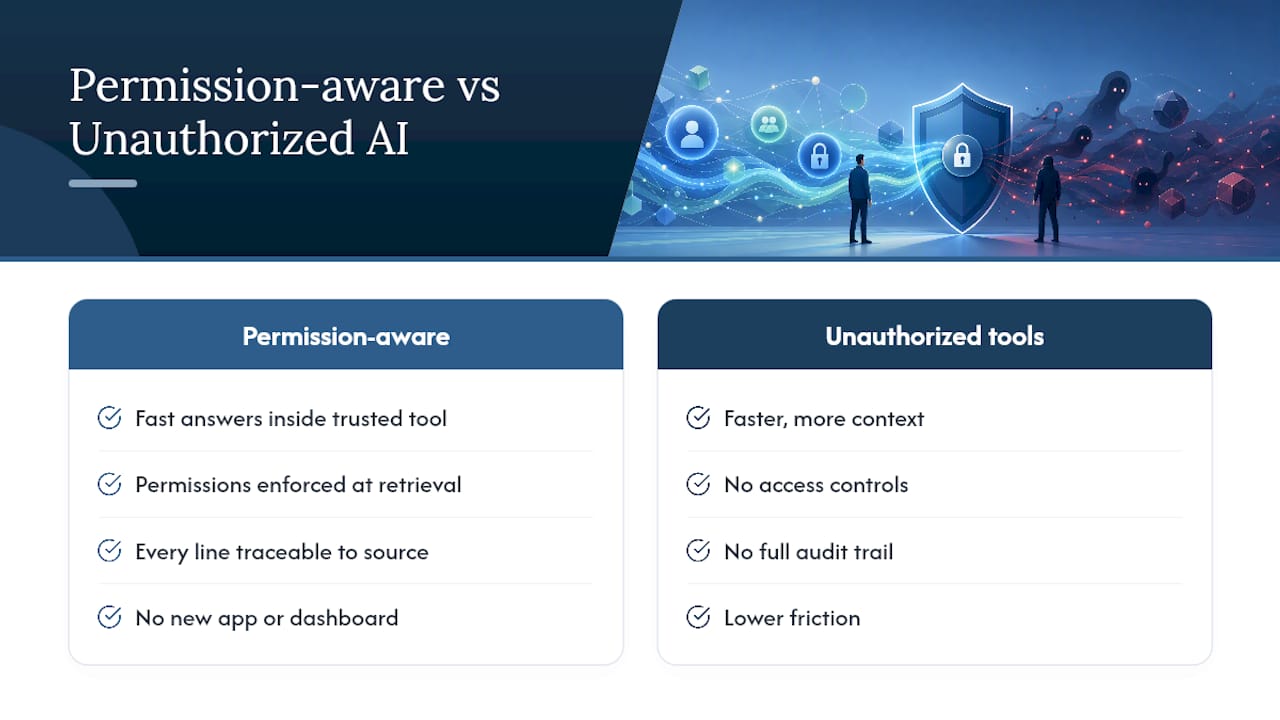
One reason employees turn to unauthorized AI tools is that sanctioned options feel slower or answer with less context than what they need. Permission-aware delivery closes that gap without opening a new exposure. ClaudeDrive works inside the Claude account your team already uses: someone asks for their update, and they get a briefing built only from what they’re allowed to see, with every line traceable to a real source and nothing invented.
Connect a few tools, meeting notes, GitHub, the calendar, and each person gets their own private view of what happened, with access controls enforced at the moment information is retrieved, not after the fact. There’s no new app to roll out and no dashboard to learn, which matters because friction is exactly what pushes employees toward unsanctioned tools in the first place. Every update carries a full audit trail, and offboarding is instant when someone leaves.
That combination, a fast answer inside a tool employees already trust, with permissions enforced automatically, removes the incentive to paste sensitive data into something unreviewed. See the live demo to see how it works for your team.
A Leader’s Bottom Line on Shadow AI
The uncomfortable truth is that blocking tools without offering something faster just teaches employees to hide better. Fix visibility first, then governance, then give people a sanctioned option worth choosing over the shortcut.
— Paul
See How Permission-Aware Delivery Works
ClaudeDrive is the alternative to open-access AI tools for leaders who need answers fast without opening a new data exposure. Instead of employees pasting sensitive files into a public chatbot to get a quick summary, they open Claude, ask for their update, and get one built only from sources they’re already permitted to see.

The demo shows exactly what a daily update looks like once meeting notes, GitHub, and your calendar are connected, including how access controls apply automatically so nothing crosses a line it shouldn’t. If your team is trying to close the gap between what employees need and what they’re allowed to use, talk to us about a pilot or see the live demo at ClaudeDrive.