AI-Powered Status Updates: A 2026 Guide for Leaders
Discover what is AI-powered status update and how it streamlines reporting, saving time and ensuring accuracy for leaders in 2026.
ClaudeDrive
A Yungsten Tech product

AI-Powered Status Updates: A 2026 Guide for Leaders

An AI-powered status update is a machine-generated briefing that pulls live data from your project tools, synthesizes it into a concise summary, and delivers it to the right people without anyone writing it by hand. Tools like Jira, Linear, and GitHub feed these systems directly, so the output reflects what is actually happening right now, not what someone remembered to type last Tuesday. The efficiency gains are real: reporting time drops from 90 minutes to 15 minutes per cycle, an 83% reduction. That time savings compounds across every team, every week. The catch is that human review is not optional. AI drafts require a person to verify the numbers, add judgment, and sign off before anything reaches an executive.
What is an ai-powered status update, really?
The industry term for this category is automated status reporting, and the phrase “AI-powered status update” describes the same concept with more specificity about the technology driving it. At its core, the system does three things: it retrieves live data, it synthesizes that data into a structured summary, and it flags anything that needs attention.
The retrieval step is where most of the value lives. A well-built system connects to task trackers, calendars, meeting notes, and code repositories. It reads what changed since the last update and builds a picture of current project health. The synthesis step turns that raw data into plain English that a CEO or COO can read in two minutes. The flagging step surfaces risks, blockers, and delays before they become surprises.

What separates a good AI status update from a bad one is the quality of the data connection. A system pulling from stale exports is no better than a spreadsheet. A system with live integrations gives you a briefing you can actually trust. That distinction matters more than any feature on a vendor’s marketing page.
How does AI update work with live data?
The mechanism behind real-time accuracy is a retrieval approach that pulls current records directly from your connected tools rather than relying on a model’s training data. RAG-based systems access live project facts, which is why they outperform static, training-based models for status reporting. The difference is the same as reading today’s newspaper versus a book published last year.
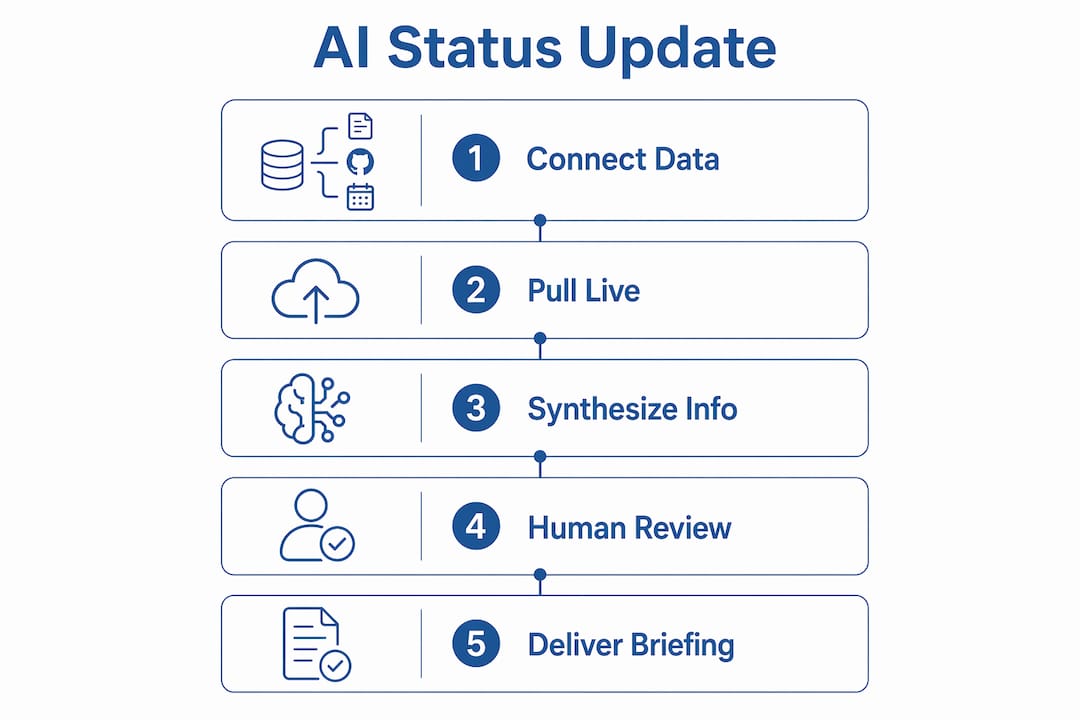
Here is how a typical AI status update cycle works:
- Data pull. The system queries connected platforms (Jira, Linear, GitHub, Asana) and retrieves task completions, milestone changes, and resource flags since the last report.
- Health calculation. The system applies pre-set logic to assign a color indicator: green means on track, yellow means at risk, red means blocked. Standardized color logic lets executives skim a portfolio of projects in seconds.
- Draft generation. The AI writes a structured summary in plain English, highlighting wins, risks, and items that need a decision.
- Freshness check. A built-in freshness router verifies that retrieved data is current. If any source exceeds a 24–48 hour threshold, the system triggers a live pull or flags the gap for human review.
- Human edit and sign-off. The draft is fully editable. A team lead or project manager reviews the numbers, adds the judgment call, writes the ask, and approves before distribution.
Pro Tip: Never skip step five. The freshness check catches stale data, but only a human catches a number that is technically current and still wrong in context.
What are the benefits of AI status updates?
The most direct benefit is time. Cutting weekly reporting from 90 to 15 minutes frees up roughly an hour per project manager per week. Across a 20-person leadership layer, that is a meaningful return with no new headcount.
Beyond time, the benefits compound in ways that are harder to quantify but easier to feel:
- Executive visibility. Standardized summaries with color-coded health indicators give leaders a consistent view across every team. No more decoding five different reporting formats from five different project leads.
- Faster issue detection. AI systems can flag shipping delays over 24 hours and route alerts for manual review before the customer notices. That kind of exception alerting is nearly impossible to do manually at scale.
- Stakeholder responsiveness. When your update is ready in 15 minutes instead of 90, you can send it more often. More frequent updates mean fewer “what’s the status?” messages from stakeholders.
- Proactive customer communication. In e-commerce and operations environments, AI-driven status reporting supports outbound alerts before customers ask. That shift from reactive to proactive changes the customer relationship.
- Reduced reporting fatigue. Project managers who spend less time writing status updates spend more time solving the problems those updates describe.
The compounding effect is real. Teams that adopt AI-driven status reporting consistently report that their weekly standups get shorter because everyone already knows the status before the meeting starts.
How do you keep AI status reports accurate and trustworthy?
The single biggest risk in automated status reporting is over-trusting the output. AI-generated reports are first drafts, not final documents. Numerical data is especially vulnerable to misstatement. A system that hallucinates a completion percentage or invents a milestone date can send an executive team in the wrong direction for days.
The governance model that works is a clear division of labor. AI handles 80% of data aggregation and summary drafting. Humans write the judgment calls, the asks, and the context that no data source captures. That split is not a workaround. It is the correct architecture for any reporting system that needs to be trusted.
Practical steps to maintain accuracy:
- Require human sign-off on every report before it reaches an executive. No exceptions, even for routine updates.
- Standardize your taxonomy before you automate. Green, yellow, and red must mean the same thing across every team. Ambiguous definitions produce inconsistent reports that undermine trust.
- Build feedback loops. When a reviewer corrects an AI draft, that correction should feed back into the system’s configuration. Living data infrastructure improves accuracy over time rather than degrading it.
- Audit regularly. Review a sample of AI drafts against source data monthly to catch drift before it becomes a pattern. The practical audit guide from ClaudeDrive covers this process in detail.
Pro Tip: The most common failure mode is a report with no human-written “ask.” If the AI draft does not end with a clear decision request, a reviewer added nothing. That is a governance gap, not a technology problem.
Which AI status update tools should leaders consider?
AI status update tools vary significantly in automation depth, integration breadth, and how much control they give humans over the final output. The table below compares the leading options across the dimensions that matter most to business leaders.
| Tool | Live Data Integration | Editable Drafts | Health Indicators | Best For |
|---|---|---|---|---|
| ServiceNow | Jira, GitHub, internal ITSM | Yes | Configurable | Enterprise IT and project portfolios |
| SlideGMM | Jira, Linear, Asana | Yes | Green/amber/red | Program and project managers |
| Korl | Jira, GitHub, Slack | Yes | Customizable | Product and engineering teams |
| ClaudeDrive | GitHub, calendar, meeting notes | Yes | Configurable | Executive briefings inside Claude |
ServiceNow targets large enterprises with complex IT portfolios. Its configurable RAG logic and editable summaries are powerful, but the setup cost is high. SlideGMM focuses on program-level reporting with strong visual output. Korl is built for product teams that live in Jira and GitHub. ClaudeDrive takes a different approach entirely: it delivers the briefing inside Claude itself, so leaders get their update in the tool they already use without adopting a new dashboard or learning a new interface.
The right choice depends on where your leaders spend their time and how much configuration your team can support. A tool that requires a dedicated admin to maintain will not get used. A tool that fits into an existing workflow will.
How do you implement AI status updates in a high-growth company?
Adoption fails most often when teams skip the design phase and go straight to automation. The steps below reflect what actually works in high-growth environments where reporting needs change fast.
- Audit your current workflow. Map every status report your team produces in a week. Note the source data, the recipient, and the time cost. This baseline tells you where automation delivers the most value.
- Define your taxonomy first. Agree on what green, yellow, and red mean before you connect a single tool. Write it down. Share it with every team lead. Automation without shared definitions produces noise.
- Pilot on steady-state projects. Start with projects that are running normally, not ones in crisis. Crisis projects have too many edge cases for a new system to handle cleanly. Build confidence on routine work first.
- Train on human accountability. Every person who reviews an AI draft needs to understand that their name on the report means they verified it. The AI daily update formats from ClaudeDrive show what a well-structured, human-reviewed briefing looks like in practice.
- Connect your tools incrementally. Start with one or two data sources. Add more as the team builds confidence in the output. Connecting everything at once creates a verification burden that overwhelms reviewers.
- Monitor and adapt. Track how often reviewers change AI drafts. High edit rates signal a configuration problem. Low edit rates with no corrections signal that reviewers are rubber-stamping, which is a governance problem. Both need attention.
Key takeaways
AI-powered status updates deliver their full value only when live data, standardized health indicators, and mandatory human review work together as a system.
| Point | Details |
|---|---|
| Definition is clear | An AI-powered status update aggregates live project data and generates a concise, editable briefing automatically. |
| Time savings are measurable | Reporting time drops from 90 to 15 minutes per cycle, an 83% reduction across the team. |
| Human review is non-negotiable | AI drafts require human sign-off to catch numerical errors, missing context, and hallucinated progress. |
| Taxonomy precedes automation | Standardizing green, yellow, and red before connecting tools is the step most teams skip and later regret. |
| Tool fit drives adoption | The best AI status update tool is the one that fits where your leaders already work, not the one with the most features. |
Why leadership vigilance makes or breaks this technology
I have watched teams adopt AI status reporting with genuine enthusiasm and then quietly abandon it six months later. The pattern is almost always the same. The tool works well in the pilot. Reporting gets faster. Executives get cleaner summaries. Then someone stops reviewing the drafts carefully because the output looks good. A bad number slips through. A stakeholder makes a decision based on it. Trust collapses.
The technology is not the problem. The governance is. AI status updates are not a replacement for judgment. They are a way to free up the time your team needs to apply better judgment. That distinction sounds obvious, but it disappears under deadline pressure.
The leaders who get the most out of these systems treat the AI draft the way a good editor treats a reporter’s first submission: read it carefully, fix what is wrong, and put your name on it only when you believe it. That standard does not slow you down. It is what makes the system worth trusting in the first place.
The other thing I have learned is that the feedback loop matters more than the initial configuration. A system that gets corrected and improves is worth far more than a perfectly configured system that never adapts. Build the feedback channel before you need it, not after something goes wrong. The risk of measuring the wrong metrics in AI projects is real, and status reporting is no exception.
— Paul
See how ClaudeDrive delivers this for your team
ClaudeDrive gives your leaders a daily briefing they can trust, right inside the Claude account they already use. Connect meeting notes, GitHub, and your calendar, and each person gets a private view of what happened, built only from sources they are authorized to see.
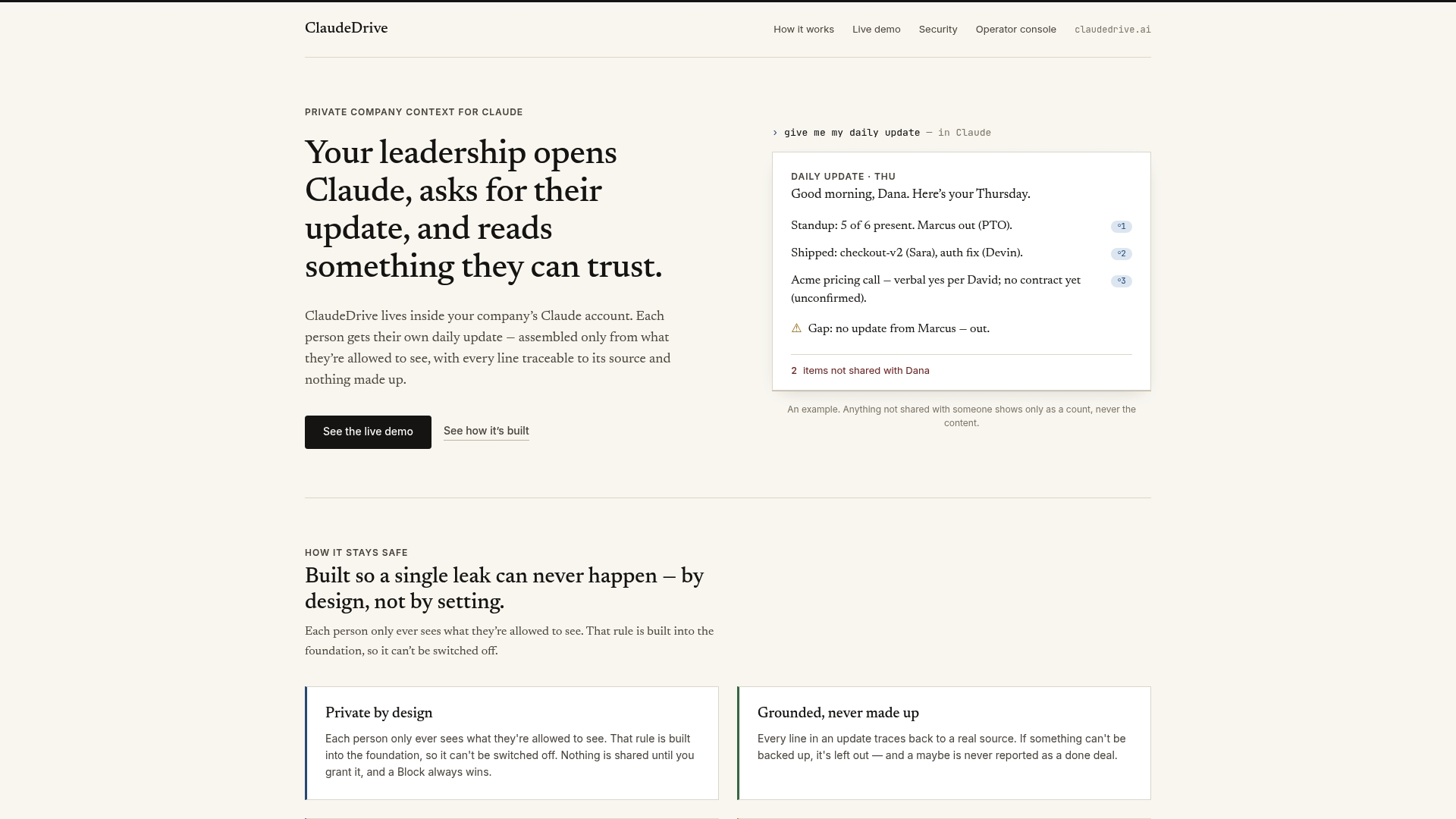
Every line in a ClaudeDrive briefing traces back to a real source. Nothing is invented. Nothing crosses a permission line it should not. There is no new app to roll out, no dashboard to learn, and no wiki to maintain. ClaudeDrive is the context layer for Claude that turns your existing tools into a trusted daily update. Talk to us about a pilot, or see the live demo to watch it work with your own data.
FAQ
What is an ai-powered status update?
An AI-powered status update is an automatically generated briefing that pulls live data from project tools and synthesizes it into a concise, editable summary for leaders. It replaces manual report writing while preserving human review before distribution.
How does an AI status update differ from a manual report?
A manual report depends on someone remembering to write it accurately. An AI status update pulls current data directly from connected tools, calculates health indicators, and produces a structured draft in minutes without human input at the drafting stage.
Do AI status updates require human review?
Yes. AI-generated reports are first drafts and carry real risks of numerical errors and false progress claims. Human sign-off before distribution is the governance step that makes the output trustworthy.
Which tools integrate with AI status update systems?
Most AI status update tools connect to Jira, Linear, GitHub, and Asana. ClaudeDrive also integrates with meeting notes and calendars to give leaders a broader view of what happened across the organization.
How long does it take to implement ai-driven status reporting?
A focused pilot on one or two projects can be running in days. Full rollout across a team typically takes two to four weeks when taxonomy is defined upfront and training on human accountability is included from the start.