A Claude Integrations Guide for Leaders Running a Rollout
Discover how to effectively use Claude integrations for streamlined workflows and real-time data insights in your organization.
ClaudeDrive
A Yungsten Tech product

A Claude Integrations Guide for Leaders Running a Rollout

Claude integrations let your team pull live company data, meeting notes, code, and calendars into Claude, so every person gets a briefing built only from what they’re already allowed to see. That’s the entire value case: permissioned, source-traceable context, not a new tool to learn. Any team that already runs meeting notes, a project tracker, and a shared calendar is ready to pilot.
The first move isn’t a company-wide rollout. It’s a narrow test with a clear finish line.
- Pick two connectors tied to one real workflow (for example, a project tracker and a calendar).
- Run the pilot for one week with a small group.
- Set a measurable goal upfront: time saved per person, or percentage of status questions Claude can answer without a follow-up email.
TL;DR:
- Starting with a two-connector pilot tied to one workflow allows measuring time savings and accuracy without overextending the initial test.
- Connectors inherit user permissions, so Claude only accesses data users can open directly in source applications, ensuring security compliance.
- Enterprise-managed auth simplifies onboarding for larger teams by eliminating individual consent, but should only be implemented after validating the pilot.
- Custom MCP connectors are necessary for internal or proprietary tools and require firewall allowlisting to ensure accessibility from Anthropic’s cloud.
- Using ClaudeDrive Console provides traceable, permission-aware summaries that link back to original sources, improving trust and security in operational reports.
Table of Contents
- What Is a Claude Integrations Guide Supposed to Cover?
- What Can a Connector Actually See?
- How Do You Find and Connect a Connector?
- How Does Enterprise-Managed Auth Change Admin Rollout?
- When Should You Build a Custom MCP Connector?
- Which Workflows Should You Pilot First?
- What Goes Wrong During Setup, and How Do You Fix It?
- How Do You Govern a Rollout Once the Pilot Works?
- What Security Guarantees Should Leaders Actually Rely On?
- What I’d Tell Any Leader Before Their First Connector Pilot
- How ClaudeDrive Console Fits Into Your Rollout
- Key Takeaways
- Sources
What Is a Claude Integrations Guide Supposed to Cover?
A useful guide has to separate two things people often conflate: pre-built connectors and custom Model Context Protocol (MCP) servers. Connectors are the ready-made links, Google Drive, Slack, GitHub, and similar apps, that Anthropic or a partner has already built and listed for you to turn on. MCP is the open protocol underneath them, and you can use it to build a connector to a tool that isn’t listed at all.
Choose a directory connector when the tool you need is already supported. It’s faster to set up and someone else maintains the connection. Choose a custom MCP server when you’re linking an internal system, a proprietary database, or a niche tool with no listed connector, and you have engineering time to build and host it.
Connectors show up across Claude’s surfaces in slightly different ways:
- Claude chat and Projects use web connectors and desktop extensions for day-to-day questions and document work.
- Claude Desktop supports local desktop extensions for file-system and app-level access.
- Claude Code and enterprise deployments rely more heavily on remote MCP servers for internal tooling.
What Can a Connector Actually See?
The single most important guarantee in this entire guide: a connector inherits the permissions of the person using it. Claude cannot open a file, channel, or repository that the person logging in couldn’t open themselves in the source app, according to Anthropic’s own connector documentation. That single rule is what makes a pilot safe to run before you’ve built any governance around it.
Two other distinctions matter for risk assessment:
- Read vs. write actions. Most connectors default to read access. Some, particularly project management and docs tools, support write actions like creating a task or updating a doc, and those need explicit scope review.
- Admin-level controls vs. individual consent. An admin can add a connector to the org catalog, but that’s a separate action from a person authenticating their own account.
- Audit visibility. Enterprise plans can forward this activity to existing security tooling through the Claude Compliance API, so nothing about connector use has to stay invisible to your security team.
Before any pilot, require this checklist from whoever owns the rollout: confirm the connector scope (read only, or read and write), confirm which user roles can enable it, and confirm audit logging is on.
How Do You Find and Connect a Connector?
Every connector lives in one place: the Connectors Directory, reachable from Claude’s settings menu. From there, the flow splits into an admin path and a user path, and mixing them up is the single most common setup mistake.
- Admin enables the connector org-wide. This adds it to the catalog for your workspace, nothing more.
- Each user visits the same directory and clicks “Connect.” This triggers an individual OAuth consent screen unless Enterprise-managed auth is configured.
- Grant the requested scopes. Read the permission screen. It tells you exactly what Claude will be able to see.
- Run one sample query against real data, a calendar lookup or a repo search, and check the response against the source system directly.
- Confirm citations. A working connector response should point back to the specific document or record it pulled from.
Pro Tip: Run your first test with an account that has average, not admin-level, access to the source tool. If the connector works fine for an admin but breaks for a regular employee, you’ve found a permissions gap before your whole team does.
How Does Enterprise-Managed Auth Change Admin Rollout?
Enterprise-managed auth, or EMA, removes the individual OAuth consent screen entirely. Instead of every employee clicking through a separate authorization flow, the admin configures a trust relationship with the identity provider, and access flows silently through that existing login, according to Anthropic’s guidance on organization-wide connector authorization. For a 60-person team, that’s the difference between one afternoon of setup and 60 separate help desk tickets.
Okta is the identity provider Anthropic names specifically in its EMA participation documentation, and EMA itself is still in beta, meaning support for other identity providers and authorization servers varies and is worth confirming before you commit a rollout date to it.
| EMA setup step | What it involves |
|---|---|
| Configure IdP trust | Establish the connection between your identity provider and Claude’s admin console. |
| Map roles | Decide which employee groups get which connectors by default. |
| Test provisioning | Log in as a test user and confirm access flows without a manual consent screen. |
| Expand in stages | Add departments gradually rather than switching on access for everyone at once. |
Treat EMA as the mechanism that scales a pilot, not the thing you configure before you’ve proven the pilot’s value.
When Should You Build a Custom MCP Connector?
Directory connectors cover the popular tools. Anything internal, a proprietary database, a homegrown ticketing system, an internal wiki, needs a custom remote MCP server, which your engineering team builds and hosts.
Adding one to Claude takes three inputs: the server’s URL, and optionally an OAuth client ID and secret if the server requires authenticated access. Two paths cover authentication:
- OAuth is the standard choice for anything touching individual user permissions, since it ties access back to the person logging in.
- Request-header authentication is supported in beta for cases where a shared service credential makes more sense than per-user OAuth, though the Authorization header syntax has to be entered exactly, including the word “Bearer” where required.
Network reachability is the detail engineering teams miss most often. A custom MCP server has to be reachable from Anthropic’s cloud, so anything sitting behind a private network needs firewall allowlisting for Anthropic’s IP ranges before it will work at all.
Pro Tip: If you’re building more than one internal MCP server, standardize a single configuration file and store it centrally. Anthropic’s own enterprise deployment documentation recommends this specifically to stop dev and production environments from drifting apart. Teams weighing broader automation investments alongside MCP work might also find this guide to workflow automation vendors useful for sequencing which systems to connect first.
Which Workflows Should You Pilot First?
Anthropic’s own guidance is blunt about scope: start with a small number of high-impact connectors tied to one real workflow, rather than connecting every available app at once. Four combinations consistently deliver value fast.
- Meeting notes into action items. Connect a notes tool, calendar, and task tracker, and Claude can turn a call transcript into assigned tasks with due dates pulled from the actual meeting, not a guess.
- Release notes from an issue tracker. Point Claude at GitHub or a similar tracker and a docs tool, and it can draft release notes from closed tickets, citing the specific issues it pulled from.
- A weekly executive briefing. Combine a calendar, a handful of high-priority docs, and project status data, and a leader gets a single summary instead of five separate check-ins.
- Content and marketing drafts. Connect a docs tool and a design asset library so a writer can pull brand guidelines and prior campaign notes into a new draft without hunting for them.
A starter pilot recipe connecting meeting notes, GitHub, and calendar covers the first workflow end to end and is a reasonable template for the other three. Each of these works because it’s narrow: one team, one outcome, source data Claude can point back to.
What Goes Wrong During Setup, and How Do You Fix It?
Most setup failures fall into four predictable buckets, and none of them require a support ticket to resolve.
- A GitHub connector returns empty results for private repos. This is almost always an SSO issue: the user hasn’t authorized the organization’s SAML login inside GitHub itself, even though an admin already enabled the app. Have the affected person check their GitHub SSO status directly.
- A custom MCP server times out. Confirm the server is publicly reachable, and if it sits behind a firewall, allowlist Anthropic’s IP ranges rather than opening the server to the entire internet.
- A connector shows in the catalog but a user can’t authenticate. Admin enablement adds a connector to the org list; it doesn’t automatically log anyone in unless EMA is configured. Check whether the affected user ever completed their own consent screen.
- A connector seems to work for one person and not another. Check browser cookies, confirm they’re logged into the correct account, and confirm their organization’s tenant has actually granted consent, not just the admin’s test account.
How Do You Govern a Rollout Once the Pilot Works?
A pilot that works deserves a governance plan before it becomes company-wide, not after.
- Set pilot goals and a timeline. One to three weeks, a defined group, and one measurable KPI, such as the percentage of pilot users authenticated within the first seven days.
- Assign an owner. One person approves new connectors, reviews scope requests, and handles offboarding when someone leaves the team.
- Build a revoke process. Offboarding should disable connector access the same day a person leaves, not at the next quarterly review.
- Monitor with existing tools. Enterprise plans can route Claude activity into current security dashboards through the Compliance API, so security teams don’t need a separate monitoring system.
Pro Tip: Track one adoption number specifically: the share of pilot users who complete their own authentication within a week of being invited. A noticeable gap between “enabled” and “authenticated” is a clear early warning that EMA, not more emails, is what you actually need.
What Security Guarantees Should Leaders Actually Rely On?
Two guarantees do the real work here, and they’re both structural rather than promises. Access follows the person, not the connector: Claude cannot see what the logged-in user can’t see in the source system. And once Enterprise-managed auth is configured, that access flows through your existing identity provider rather than a patchwork of individual consent screens.
The gap that sinks most rollouts isn’t a security hole. It’s a leader trusting a summary they can’t trace back to a real document, a real meeting, or a real commit.
Enterprise plans add a third layer: activity can flow into your existing security dashboards through the Compliance API, so nothing about connector use happens outside the tools your security team already trusts. This is exactly the gap ClaudeDrive was built to close: a permission-aware daily update, built only from sources a person is actually allowed to see, with every line traceable back to where it came from.
What I’d Tell Any Leader Before Their First Connector Pilot
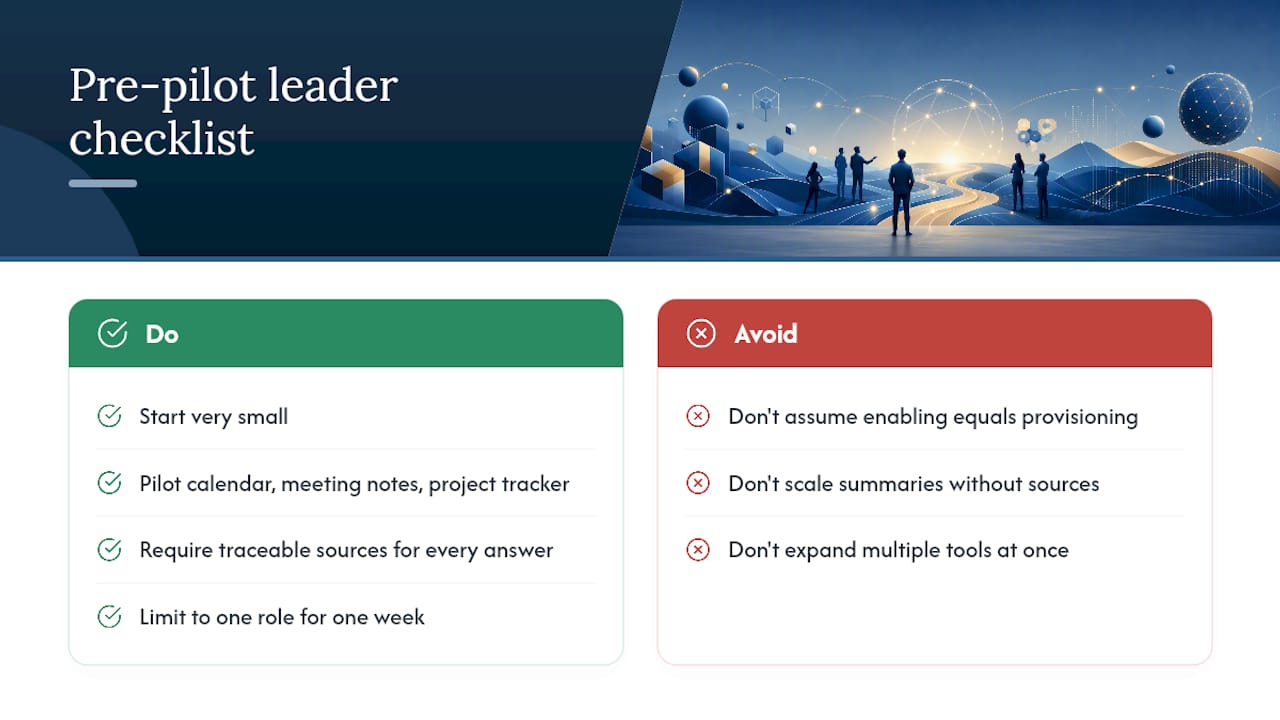
The rollouts that stall aren’t the ones with a security problem. They’re the ones where someone assumed enabling a connector was the same as provisioning it for their team, then wondered three weeks later why adoption stalled at 20%.
Start smaller than feels necessary. One project tracker, one calendar, one notes tool, one role, one week. Require that anything Claude tells your team can be traced to a real source before you expand further. If a summary can’t point back to where it came from, don’t scale it, fix it. A calendar, meeting notes, and a single project tracker is the right first pilot for almost every team we’ve seen try this.
— Paul
How ClaudeDrive Console Fits Into Your Rollout
Everything in this guide, connectors, permissions, EMA, governance, solves the access problem. It doesn’t solve the summary problem: once ten tools are connected, who actually reads through all of it, and can you trust what they wrote back?

That’s what ClaudeDrive Console does. Connect meeting notes, GitHub, and your calendar, and each person on your team opens Claude and gets their own daily briefing, built only from what they’re allowed to see, with every line traceable back to a real source. Nothing made up, nothing that crosses a permission line, no new dashboard to roll out or wiki to maintain. It’s the same connector foundation this guide walks through, applied to the one question every leader actually asks Claude: “what happened, and can I trust it?” If you’re already piloting connectors, this is the natural next step to test alongside them. See the live demo or talk to us about a pilot.
Key Takeaways
A safe Claude rollout depends on inherited permissions, a narrow pilot with a measurable KPI, and traceable sources in every automated summary.
| Point | Details |
|---|---|
| Pilot narrow, not wide | Start with two connectors tied to one workflow and a one to three week timeline. |
| Permissions are inherited | Claude can only see what the logged-in user can already see in the source app. |
| Admin enablement isn’t authentication | Users still need individual consent unless Enterprise-managed auth is configured. |
| Monitor through existing tools | Enterprise plans can route Claude activity into current dashboards via the Compliance API. |
| ClaudeDrive adds traceability | ClaudeDrive delivers permission-aware daily updates inside Claude with sources linked back to origin. |
Sources
- Use connectors to extend Claude’s capabilities | Anthropic Help Center
- Third party connectors with remote MCP