CTOs: Stop Asking for Status — Build the Team That Does It
Discover how when a CTO buys a leadership team, it stops asking for status. Empower your leaders with effective team strategies and templates.
ClaudeDrive
A Yungsten Tech product

CTOs: Stop Asking for Status — Build the Team That Does It

Stop being the status gatekeeper. The fix is three moves: assign Directly Responsible Individuals (DRIs) who own outcomes, install clear decision rights so approvals don’t route through you, and connect a trusted update source that gives each leader a permissioned daily briefing. When a CTO buys a leadership team or builds one deliberately, the status questions stop because the system answers them first.
This week’s checklist:
- Assign a DRI to every active initiative (not a team, a person)
- Define three outcome metrics per function and make them visible to the owner
- Connect one trusted update source so leaders read what happened, not ask you
The rest of this playbook shows you exactly how to do each of those, in order, with scripts, templates, and a 30–90 day plan you can run this quarter.
Table of Contents
- Why do CTOs keep asking for status?
- What failure modes create status friction, and what do you say instead?
- Buy vs. build: when should you hire, bring in interim help, or develop existing managers?
- How do you design decision rights so you stop being the checkpoint?
- What meeting rules actually stop status-checking?
- Which metrics replace status and actually build trust?
- What tools make status redundant at scale?
- What does a 30–90 day rollout look like?
- Key Takeaways
- What I would actually do first as a CTO
- ClaudeDrive gives CTOs a daily update they can actually trust
- Authoritative sources and further reading
Why do CTOs keep asking for status?
The honest answer: because the system makes it rational. Only a minority of executive teams are genuinely high-performing, and that gap shows up most visibly in how information flows. When updates are inconsistent, untraced, or filtered through too many hands, a CTO’s instinct to ask directly is not a character flaw. It’s a rational response to an unreliable system.
Four root causes dominate:
- Trust gap. Updates arrive from different people in different formats with no traceable source. The CTO can’t tell if the number is real or optimistic, so they ask again.
- Role ambiguity. No one is clearly accountable for a decision or an outcome. When ownership is fuzzy, status questions fill the vacuum.
- Process friction. Meetings are designed for reporting, not deciding. Escalation rules don’t exist, so everything escalates to the CTO by default.
- Structural habits. The CTO is still the best engineer in the room, still in every architecture review, still the de facto approver on releases. The CTO role has shifted from final checkpoint to orchestrator, but the org chart hasn’t caught up.
Run this 10-minute diagnostic. For each statement, mark yes or no:
- Every active initiative has one named person accountable for its outcome (not a team).
- Each of your direct reports can make at least three significant decisions without your sign-off.
- You receive updates in a consistent format with a traceable source, not a verbal summary.
- Your weekly calendar has fewer than two meetings whose primary purpose is status reporting.
- You have a written escalation threshold: the specific conditions under which something must reach you.
If you answered no to three or more, the problem is structural, not personal. HBS research confirms that most leadership-team failures trace back to insufficient investment in team design and role clarity, not to individual competence. The fix is a system, not a conversation.
What failure modes create status friction, and what do you say instead?
Most CTOs fall into one of four behavioral traps. Each one generates status requests as a symptom.
1. The gatekeeper. Every decision, even small ones, routes through the CTO for approval. Leaders stop deciding and start waiting.
What to say instead: “I don’t need to approve this. You own the outcome. Tell me your decision and your reasoning in the async update by Friday.”
Expected response: initial hesitation, then relief. Follow up once with “What would make you confident enough to decide without me?” and you’ll learn exactly where the trust gap lives.
2. The best-engineer trap. The CTO is still the most technically capable person in the room, so they naturally pull toward technical decisions. Practitioners are direct about this: a CTO shouldn’t be the best engineer on the team. When they are, the team defers rather than decides.
What to say instead: “Walk me through your recommendation. I want to understand your reasoning, not override it.” Then stay quiet. The goal is to build the leader’s judgment, not demonstrate yours.
3. Micromanaging by calendar. The CTO’s calendar is full of check-ins, standups, and syncs that exist to keep the CTO informed rather than to move work forward. Every meeting is a status request in disguise.
What to say instead: Cancel the recurring check-in. Replace it with: “Send me a three-line async update every Monday: what shipped, what’s blocked, what you need from me. I’ll respond by Tuesday noon.”
4. Misaligned spans of control. A manager with twelve direct reports cannot give each person real attention. A CTO with eight direct reports who each have ten reports is running a telephone game, not a leadership team. Practical CTO playbooks recommend a sustainable range of direct reports for hands-on managers, with tighter spans for senior leaders doing complex work.
What to say instead: “I want to redesign your team structure so you can actually lead rather than coordinate. Let’s map who owns what and where the bottlenecks are.”
Pro Tip: When shifting accountability in a conversation, always end with a question, not a directive. “What do you need to own this?” lands differently than “You own this now.” The first builds agency; the second just moves anxiety.
Buy vs. build: when should you hire, bring in interim help, or develop existing managers?
The decision comes down to five variables: time-to-impact, cost, domain knowledge required, cultural fit risk, and your tolerance for a learning curve. There is no universally right answer, but there is usually a clearly right answer for your situation right now.
| Dimension | Buy (external hire) | Build (develop internal) | Interim / fractional |
|---|---|---|---|
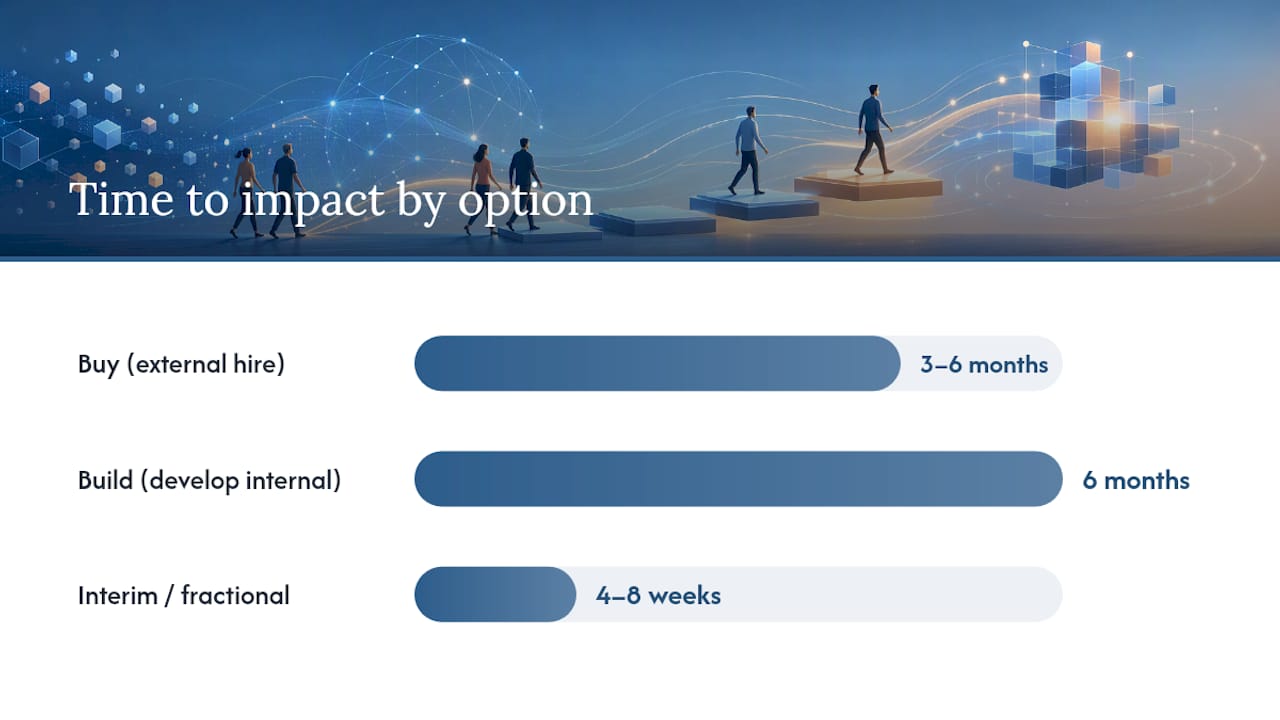
| Time to impact | 3–6 months | 6 months | 4–8 weeks |
| Cost profile | High (salary, equity, recruiting) | Low to medium (coaching, time) | Medium (day rate, no equity) |
| Domain knowledge | High, if hired well | Variable, grows over time | High, if matched well |
| Cultural fit risk | Moderate to high | Low | Low to moderate |
| Learning curve | Moderate (new context) | Low (knows the org) | Low (experienced operator) |
| Best when | You need a capability you don’t have and can’t wait | You have raw talent and 12+ months | You need to stabilize while you search or decide |
Checklist for vetting an external leader or interim operator:
- Can they describe a time they owned an outcome end-to-end, not just managed a team?
- Can they give you three decisions they made without their manager’s input in the last six months?
- Do they ask about your escalation thresholds, or do they assume everything goes through you?
- Can they name the metrics they’d track in the first 90 days without prompting?
- Do they have a view on what good looks like for this role, or are they waiting for you to define it?
Hire people who are better than you in the domains they’ll own. That’s not a platitude. It’s the only hiring criterion that actually removes you from the loop. A leader who is merely competent will still need you to fill the gaps.
Realistic timeline callout: External hires rarely produce independent output before month three. If you need status questions to stop in 30 days, an interim operator or a coaching sprint with an existing manager is faster. Use the buy decision for the six-month horizon, not the six-week one.
How do you design decision rights so you stop being the checkpoint?
The simplest version of a decision-rights framework assigns one of four roles to each decision type: Decider (owns the call), Recommender (provides input), Consulted (must be asked), and Informed (notified after). This is a DRI/RACI hybrid that most technology teams can adopt in a single working session.
McKinsey’s governance research is clear: leadership teams that spend time only on work that only they can do, and delegate the rest to named owners, reduce escalations and reclaim executive attention for strategy. The table below is a starting template.
| Decision type | Decider | Recommender | Consulted | Informed |
|---|---|---|---|---|
| Technology strategy (annual) | CTO | VP Engineering, CTO | CEO, Board | All leaders |
| Architecture choices | VP Engineering | Tech leads | CTO | Product, Security |
| Hiring (IC to senior) | Hiring manager | Recruiter | VP Engineering | CTO |
| Hiring (staff+ / director) | VP Engineering | Hiring manager | CTO | CEO |
| Release approval | Engineering lead | QA lead | Product | CTO |
| Incident response (P1) | On-call lead | SRE | VP Engineering | CTO |
| Budget reallocation (<$25,000) | VP Engineering | Finance | CTO | CFO |
Escalation threshold: the CTO gets pulled in when (a) a decision crosses a budget threshold you set in advance, (b) a decision affects a commitment made to the board or a customer, or © the Decider explicitly requests it. Everything else stays in the table.
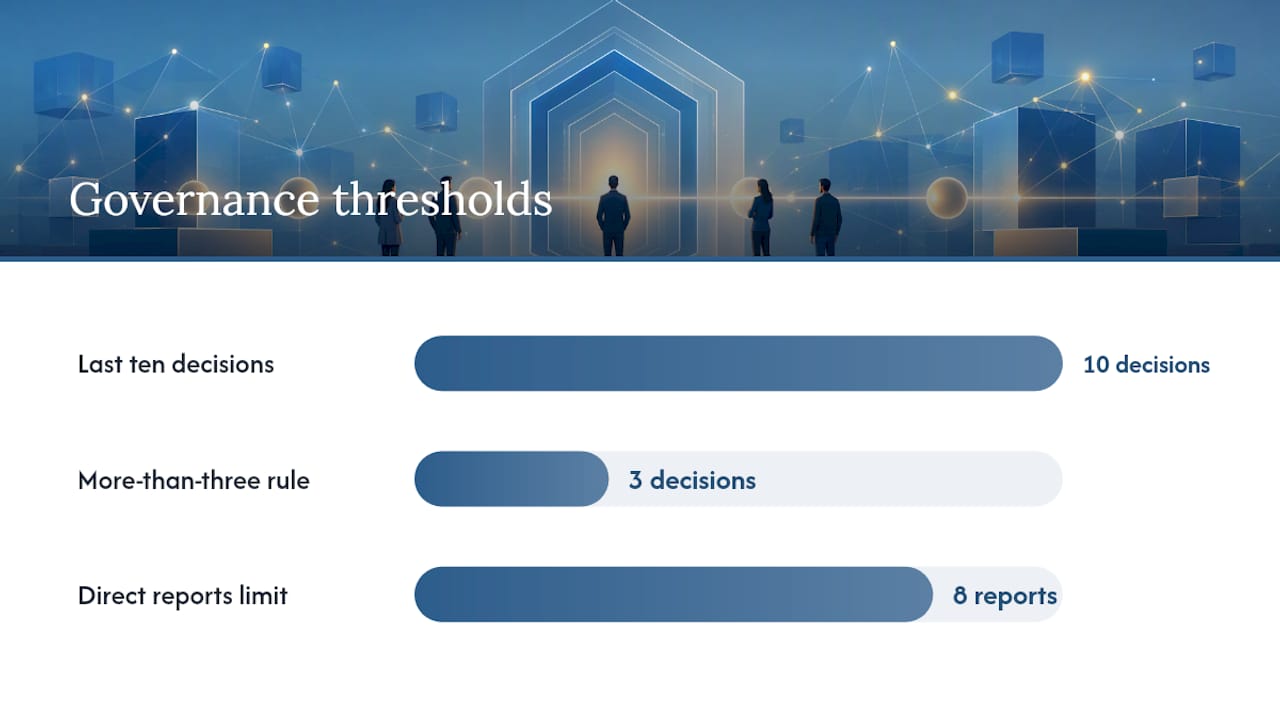
Pro Tip: Run a “decision audit” in your next leadership team meeting. List the last ten decisions that came to you. For each one, ask: should this have reached me? If more than three should not have, the table above needs to be shared and signed off by the team, not just written.
Span of control matters here too. CTO playbooks recommend a sustainable range of direct reports for hands-on managers. Above eight, managers coordinate rather than lead, and status requests multiply because no one has enough context to decide independently.
What meeting rules actually stop status-checking?
The rule that changes everything: sync time is for decisions, not updates. If a meeting’s primary output is information transfer, it belongs in an async format.
Meeting design rules:
- Every meeting has a written agenda with a decision or action as the expected output, shared 24 hours in advance.
- Status updates are banned from sync meetings. They go in a written async format before the meeting.
- Attendance is limited to people who have a role in the decision. Observers are not attendees.
- Meetings end with a written decision record: what was decided, who owns it, and by when.
Async update template (weekly, per leader):
Week of [date] Shipped: [one to three lines on what moved forward] Blocked: [one line on what needs a decision or resource] Needs from CTO: [specific ask, or “nothing this week”] Key metric this week: [one number, with context]
This template takes five minutes to write and gives the CTO everything they need without a meeting.
Escalation thresholds (examples):
- A P1 incident that affects more than 5% of users or a named enterprise customer
- A budget decision above the pre-agreed threshold
- A hiring decision at director level or above
- A commitment to a customer or board that may not be met
Below those thresholds, the leader decides and informs. Above them, the leader recommends and the CTO decides. Write these down. Unwritten thresholds default to “everything,” which is how the CTO becomes the bottleneck again.
Which metrics replace status and actually build trust?
Status questions are a symptom of metric poverty. When leaders have no shared, trusted number to point to, they fill the gap with narrative. The CTO fills the gap with questions.
Rules for metric selection:
- Every metric links to an outcome, not an activity. “Deploys per week” is an activity. “Mean time to restore” is an outcome signal.
- Every metric has one named owner who is accountable for the trend, not just the number.
- The signal-to-noise ratio matters. A metric that moves every day for reasons outside the team’s control is noise, not signal.
Sample KPI table:
| Area | Metric | Owner | Cadence |
|---|---|---|---|
| Product delivery | Cycle time (commit to production) | VP Engineering | Weekly |
| Reliability | Mean time to restore (MTTR) | SRE lead | Weekly |
| Cost | Cloud spend vs. budget | Platform lead | Monthly |
| Team health | Voluntary attrition (rolling 90 days) | VP Engineering | Monthly |
| Customer impact | Error rate on critical paths | Engineering lead | Daily |
Research on high-performing leadership teams consistently shows that teams with shared, visible metrics make faster decisions and escalate less. The metric table above is not a dashboard project. It’s a conversation: agree on the five numbers, name the owners, and set the cadence. The CTO reads the numbers; the leaders own them.
Dashboard guidance: the goal is a single trusted briefing, not a wall of charts. Each leader should be able to answer “how are we doing?” from one screen without stitching together four tools. A daily update that leaders can trust answers the CTO’s questions before they’re asked.
What tools make status redundant at scale?
The right tool for trusted updates has five properties. Evaluate any system against this checklist:
- Permission-aware sourcing. Each person sees only what they’re authorized to see. No manual filtering, no “just don’t share this with X.”
- Source traceability. Every line in the briefing links to the document, meeting note, or commit that produced it. Nothing is made up.
- Private briefings. Each leader gets their own view, not a shared dashboard where sensitive information bleeds across roles.
- Minimal new UX. If leaders need to learn a new tool to get their update, most won’t. The update should live where they already work.
- Audit trail. You can see who accessed what and when. This matters for compliance and for trust.
Implementation quick wins (in order):
- Connect meeting notes to the update system. This alone captures most of what the CTO currently asks about in check-ins.
- Connect the engineering repo (GitHub or equivalent) so commit activity and PR status are visible without a standup.
- Connect the calendar so context about upcoming decisions or deadlines is part of the briefing.
- Tag access by role. The VP of Engineering sees engineering metrics; the CFO sees cost data. Neither sees the other’s view.
Automating visibility through a single trusted briefing reclaims meaningful leadership time and cuts the interruptions that fragment deep work. The alternative, a DIY dashboard, requires ongoing maintenance, a dedicated owner, and usually produces a tool that’s accurate on day one and stale by week three.
Pro Tip: The biggest risk in any update automation rollout is not technical. It’s that leaders don’t trust the output. Build trust by starting with one source (meeting notes), showing the CTO the briefing before it goes live, and letting them verify two or three claims against the source. Once they’ve done that twice, they stop asking.
AI-powered update flows that pull from connected tools and enforce access controls at the retrieval layer are now the practical standard for teams that have outgrown manual stitching.
What does a 30–90 day rollout look like?
Days 1–30: Diagnose and design
- Run the 10-minute diagnostic from Section 2. Identify the dominant root cause.
- Hold a two-hour leadership team session to map decision rights using the table in Section 5. Get written sign-off.
- Cancel at least two recurring status meetings. Replace them with the async update template from Section 6.
- Name a DRI for every active initiative. Write it down and share it with the team.
- Connect one update source (meeting notes) to a trusted briefing tool. Run it for two weeks before adding more sources.
Days 31–60: Install the rhythm
- Introduce the KPI table from Section 7. Assign owners and set cadences. Review in the first leadership team meeting of month two.
- Run a “decision audit” (see Section 5 Pro Tip). Identify which decisions still route to the CTO that shouldn’t.
- Add the engineering repo and calendar to the update source. Verify traceability with two leaders before rolling out broadly.
- Send a short communication to the leadership team: what’s changing, why, and what you expect from them. Keep it to one page.
Days 61–90: Measure and adjust
- Count the number of status questions the CTO asked in week 12 versus week 1. If it hasn’t dropped, identify the specific source of the gap.
- Review voluntary attrition and team health metrics. Leadership changes create uncertainty; address it directly.
- Run a 30-minute retrospective with the leadership team: what’s working, what’s still routing to the CTO, and what one thing would make the system more trustworthy.
Success criteria: by day 90, the CTO should be asking fewer than three status questions per week, each leader should be able to describe their top outcome metric without prompting, and the async update template should be running without reminders.
Bain’s research on top-team effectiveness identifies direction, discipline, collaboration, dynamism, and drive as the five behaviors that distinguish high-performing leadership teams. The rollout above is designed to install the first two, direction and discipline, in the first 30 days, then build the rest over the quarter.
Key Takeaways
A CTO stops asking for status by installing three things in sequence: named outcome owners, written decision rights, and a trusted update source that answers questions before they’re asked.
| Point | Details |
|---|---|
| Assign DRIs first | Name one person accountable for each initiative’s outcome; teams without a named owner default to the CTO. |
| Write decision rights down | A shared DRI/RACI table cuts escalations faster than any cultural initiative or coaching program. |
| Replace meetings with async templates | A three-line weekly update per leader gives the CTO what they need without a single check-in meeting. |
| Metrics replace narrative | Five outcome metrics with named owners eliminate the need for status questions in leadership reviews. |
| ClaudeDrive automates the trusted briefing | Connect meeting notes, GitHub, and the calendar; each leader reads a permissioned, source-linked daily update inside Claude, with nothing made up and nothing leaking across roles. |
What I would actually do first as a CTO
The conventional advice is to start with culture: build trust, have the hard conversations, invest in your leaders. That’s right, but it’s also slow. Culture follows structure. If you change the structure first, the culture adjusts.
So here’s what I’d do in week one: cancel two meetings and write the decision-rights table. Not because those are the most important things, but because they produce visible evidence that something has changed. Leaders who see the CTO cancel a status meeting and hand them a decision-rights table understand, without a speech, that the rules have shifted.
On coaching versus hiring: most CTOs reach for an external hire too quickly. Before you post the job description, spend four weeks giving your existing managers real decisions to own. Not delegated tasks. Decisions with consequences. You’ll learn fast whether the gap is capability or confidence. Confidence responds to coaching in weeks. Capability gaps take months to hire around.
The “best engineer” trap is the hardest one to escape, because it’s tied to identity. Being the person with the answers feels like leadership. It isn’t. The moment you stop being the smartest person in the technical conversation, your team starts building judgment of their own. That’s the trade. It’s uncomfortable for about 60 days, and then it’s the best decision you made.
One more thing: don’t wait for perfect metrics before you trust the briefing. A traceable update that’s 80% complete is more useful than a manual status call that’s 100% filtered through someone’s optimism. Start with what you can connect, verify two claims against the source, and build from there.
ClaudeDrive gives CTOs a daily update they can actually trust
The hardest part of stopping status questions isn’t the org design or the meeting rules. It’s having something to trust instead. Without a reliable, permissioned briefing, the CTO’s instinct to ask is rational.

ClaudeDrive is that briefing. Connect meeting notes, GitHub, and the calendar, and each leader opens Claude and reads one clear update built only from what they’re authorized to see. Every line traces back to a real source. Nothing is made up. Nothing leaks across roles. No new dashboard to learn, no wiki to maintain, no app to roll out.
The CTO or chief of staff sponsors the pilot. It takes one afternoon to connect the first source and verify the output. Most teams run a two-week pilot before deciding whether to expand. See the live demo or talk to us about a pilot at claudedrive.ai.
Authoritative sources and further reading
A short reading list for CTOs who want the evidence behind the playbook:
- What the best leadership teams do right — Harvard Business Review
- At the top, it’s all about teamwork — Bain & Company
- What makes leadership teams effective? Start with these eight steps — HBS Working Knowledge
- Leading organizations: ten timeless truths — McKinsey & Company
- The CTO is dead. Long live the CTO — CIO
- Why a CTO shouldn’t be the best engineer — Spencer Norman (Substack)
- khasky/cto-playbook — GitHub