How to Automate Company Update Cadence with AI
Learn how to use AI to automate your company update cadence. Keep your leaders informed and drive action with effective communication.
ClaudeDrive
A Yungsten Tech product

How to Automate Company Update Cadence with AI

A company update cadence is the scheduled rhythm at which leaders send, receive, and act on internal communications across daily, weekly, monthly, and quarterly cycles. When you use AI to automate that cadence, you replace manual drafting and ad hoc timing with a consistent, structured flow that keeps every leader reading the right information at the right moment. The result is faster decisions, fewer missed updates, and communication that actually drives action. This guide covers how to design that cadence, which AI capabilities support it, and how to measure whether it is working.
What is an effective company update cadence and why does it matter?
A company update cadence is not just a publishing schedule. It is a decision architecture. Each layer of the cadence, daily standups, weekly CEO notes, monthly leadership updates, and quarterly town halls, serves a different decision class and a different audience.
Research shows that 56% of employees sometimes miss key updates, and 30% report missing them often. The cause is almost always inconsistent timing, not content quality. When updates arrive unpredictably, readers stop trusting them and stop opening them.

The fix is named ownership and a predictable schedule. Each update layer needs one person accountable for sending it, a fixed day and time, and a defined scope. A weekly CEO note covers company direction. A monthly leadership update covers cross-functional progress and blockers. A quarterly town hall covers strategy and culture. Each layer feeds the next.
Pro Tip: Assign a single owner to each cadence layer before you automate anything. Automation amplifies whatever ownership structure you already have. If ownership is unclear, automated updates will be ignored just as fast as manual ones.
Frequency matters as much as consistency. Internal communication benchmarks show that 4–6 sends per week produce the highest open rates at 66% and click-through rates at 12%. Sending more than 10 per week drops click-through to 7%. That data tells you the ceiling: more is not better. Build your cadence to stay inside the effective range.
- Daily: Team standups, blockers, and progress signals
- Weekly: CEO or department head notes with decisions and priorities
- Monthly: Cross-functional leadership updates with sentiment and OKR status
- Quarterly: Town halls with strategy, results, and forward planning
What AI tools and features enable automated update cadences?
AI-driven company communication works through a specific set of capabilities, not a single platform. The most widely adopted AI features in internal communications are subject line generation, content drafting, audience segmentation, and performance tracking.
75% of Workshop customers used AI features in 2025, and the platform translated 16,000 emails via AI that year. That adoption rate reflects how quickly AI has moved from experiment to standard practice in internal communications.
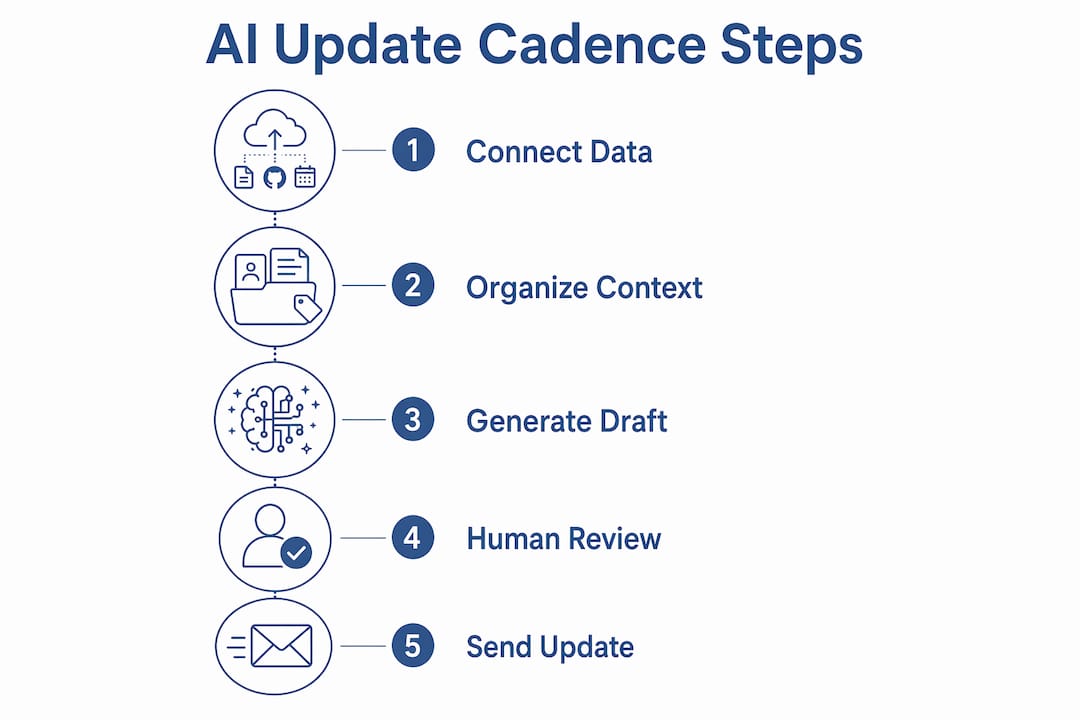
The table below maps the core AI functions to their role in a cadence for automated reporting.
| AI function | Role in update cadence |
|---|---|
| Subject line generation | Increases open rates by testing language variants automatically |
| Content drafting | Reduces time to produce structured weekly and monthly updates |
| Audience segmentation | Routes the right update to the right leadership tier |
| A/B testing | Identifies which update formats drive higher engagement |
| Performance tracking | Surfaces open rates, click-through, and read time per send |
| Escalation routing | Flags blocked items and routes them to the next cadence layer |
Pro Tip: Do not use AI to generate the entire update without a human review step. AI drafts the structure and fills in data. A leader or chief of staff reads it before it sends. That one review step is what separates trusted communication from noise.
Automated drip sequences, sometimes called journeys in platforms like Workshop, reach an 83% open rate and 96% completion rate. Those numbers apply to onboarding sequences and milestone reminders, but the same branching logic works for recurring leadership updates. You set the trigger, define the audience, and the system handles delivery.
The key AI capabilities to prioritize when you automate company updates are:
- Scheduling and triggering: Send updates based on calendar events, OKR cycles, or project milestones
- Data integration: Pull from GitHub, meeting notes, and project tools to populate update content automatically
- Personalization: Deliver different views of the same update based on role and access level
- Audit trails: Log every generated line back to a source so leaders can verify claims
How to implement AI-driven company updates for leadership communication
Implementing a cadence for automated reporting requires four decisions before you touch any tool: what gets automated, who sees what, what triggers each update, and what happens when something is blocked.
-
Map your existing cadence. List every recurring update your team currently sends or receives. Note the owner, frequency, audience, and average read time. This baseline tells you which layers are already working and which are inconsistent.
-
Define decision classes per layer. Each cadence layer should resolve a specific class of decision. Daily updates resolve blockers. Weekly updates resolve priorities. Monthly updates resolve resource allocation. Quarterly updates resolve strategy. Encoding these decision classes into your automation rules prevents updates from becoming reporting theater.
-
Build the update structure. The most effective format for AI-generated updates follows a consistent template: progress, confidence level, blockers, and next steps. Weekly OKR updates using this structure show a 65% success rate versus 35% for teams without a consistent format. That gap is large enough to treat the template as non-negotiable.
-
Set escalation rules. Every automated update needs a rule for what happens when a blocker is not resolved within one cycle. The item escalates to the next cadence layer with a flag and a named owner. Without this rule, blocked items disappear into the update stream and never get resolved.
-
Connect your data sources. AI-driven updates are only as good as the data they pull from. Connect meeting notes, project management tools, calendars, and code repositories. Each connection adds a traceable source line to the generated update.
“Updates that succeed are scannable and drive action by including blockers explicitly, separating facts from interpretation, and using a consistent progress, confidence, and next step template.” — OKR update research
The most common failure mode in AI-assisted update automation is skipping the escalation encoding step. When the system has no rule for blocked items, it generates updates that look complete but contain no decisions. Leaders read them, feel informed, and take no action. That is the definition of wasted communication. ClaudeDrive addresses this by building traceable source lines into every briefing, so leaders can see exactly where a claim came from and whether it needs a response.
For leaders who want to see what AI-structured daily updates look like in practice, daily update format examples show how the progress, blocker, and next step structure translates into a readable briefing.
How to measure success and troubleshoot AI-automated update cadences
The three metrics that tell you whether your automated cadence is working are open rate, click-through rate, and action rate. Open rate tells you whether the subject line and timing are right. Click-through tells you whether the content is relevant. Action rate, meaning decisions made or blockers resolved per update cycle, tells you whether the cadence is doing its actual job.
Pulse surveys embedded in updates capture employee sentiment in real time and increase update relevance over time. A monthly leadership update paired with a three-question sentiment survey gives you a feedback loop that no open rate metric can replicate. You learn not just whether people read the update, but whether they trusted it.
Common problems and their fixes:
- Low open rates: Check send time, subject line length, and frequency. If you are above 6 sends per week, cut back.
- High open rate, low action rate: The update is readable but not decision-focused. Add explicit blocker fields and next step assignments.
- Inconsistent content quality: The AI draft is pulling from stale or incomplete data sources. Audit your integrations monthly.
- Update fatigue: Leaders stop reading because every update feels the same. Rotate the lead item and vary the format quarterly.
Teams that audit AI-generated content on a regular schedule catch quality drift before it erodes trust. Set a monthly review where one person reads three consecutive updates and checks whether each line is traceable to a real source. If a line cannot be sourced, it gets removed from the template.
Pro Tip: Track action rate separately from open rate. A 70% open rate with a 5% action rate means your cadence is entertainment, not communication. The goal is decisions per cycle, not reads per send.
What I have learned running AI-automated cadences at high-growth companies
The biggest mistake I see leaders make is treating automation as a content problem. They focus on making the AI write better updates. The real problem is almost always structural: no escalation rules, no named owners, and no decision class defined for each cadence layer.
When you fix the structure first, the AI output improves automatically. The system has clear inputs, clear outputs, and a clear path for anything that does not resolve. That is when automation starts saving real time, not just drafting time, but the hours leaders spend chasing down blockers that should have surfaced three days earlier.
The second thing I have learned is that AI-driven updates need a human review step, but that step should be fast. A chief of staff or operations lead should be able to review an AI-generated briefing in under five minutes. If the review takes longer, the template is too complex or the data sources are too noisy. Simplify before you automate more.
The third observation is about trust. Leaders adopt AI-generated updates when every line traces back to a real source. The moment a briefing contains a claim that cannot be verified, trust collapses and the whole cadence gets abandoned. Source traceability is not a nice feature. It is the foundation.
— Paul
How ClaudeDrive fits into your automated update cadence
ClaudeDrive delivers a daily briefing directly inside the Claude account your leadership team already uses. Connect meeting notes, GitHub, and your calendar, and each leader gets a private view of what happened, built only from sources they are authorized to see.
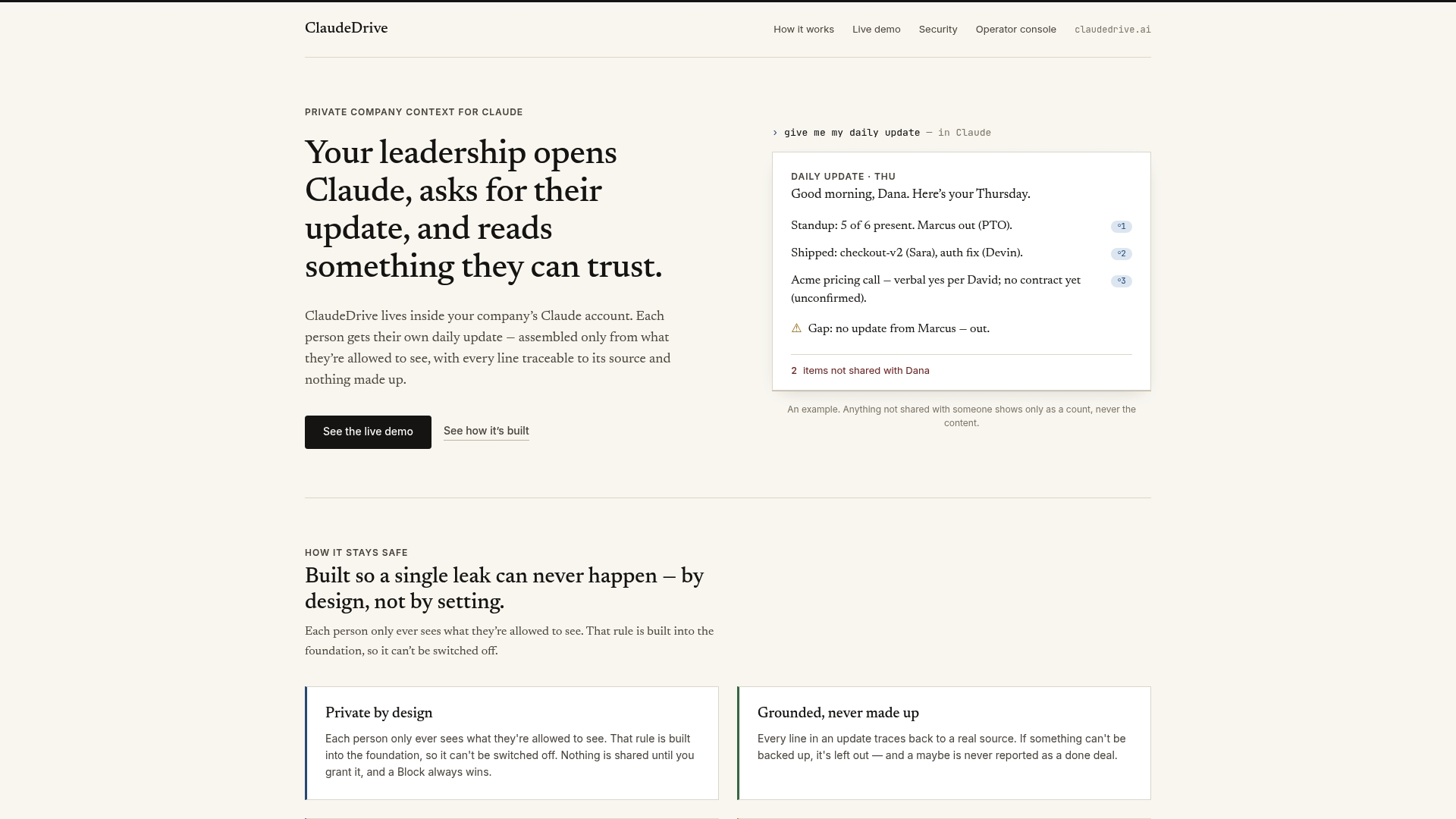
Every line in a ClaudeDrive briefing traces back to a real source. Nothing is invented. Nothing crosses an access boundary. There is no new app to roll out and no dashboard to learn. ClaudeDrive acts as the private company-context layer that feeds Claude, so your leaders ask for their update and read something they can trust. If you want to see how it works with your existing tools, see the live demo or talk to us about a pilot.
FAQ
What is a company update cadence?
A company update cadence is the scheduled rhythm of internal communications across daily, weekly, monthly, and quarterly cycles. Each layer serves a different decision class and a different audience.
How often should leaders send automated company updates?
4–6 sends per week produces the highest open rates at 66% and click-through rates at 12%. Sending more than 10 per week drops effectiveness significantly.
What AI features matter most for automating update cadences?
Subject line generation, content drafting, audience segmentation, and escalation routing are the highest-impact AI features for internal update automation. Performance tracking closes the loop by surfacing which updates drive action.
How do I prevent AI-generated updates from becoming noise?
Encode decision classes and escalation rules into your automation before you generate any content. Updates without escalation paths become reporting theater. Every update should resolve a specific class of decision or flag a blocker for the next cadence layer.
How do I measure whether my automated cadence is working?
Track open rate, click-through rate, and action rate per cycle. Embed pulse surveys in monthly updates to capture sentiment. If action rate is low despite high open rates, the update structure needs more explicit blocker fields and next step assignments.
Key takeaways
Automating your company update cadence requires a defined decision structure, named ownership at each layer, and AI tools that trace every claim back to a real source.
| Point | Details |
|---|---|
| Cadence is a decision architecture | Each layer (daily, weekly, monthly, quarterly) must resolve a specific class of decision, not just report status. |
| Frequency has a ceiling | 4–6 sends per week maximizes open and click-through rates; going above 10 sends cuts effectiveness sharply. |
| Escalation rules are non-negotiable | Without encoded escalation paths, blocked items disappear and updates become reporting theater. |
| Source traceability builds trust | Leaders adopt AI-generated briefings only when every line traces back to a verifiable source. |
| Action rate beats open rate | The real measure of cadence success is decisions made per cycle, not how many people opened the email. |