Why Another AI Assistant Is Wrong — and What Leaders Do
Discover why another AI assistant is wrong. Learn key actions to enhance your current assistant’s performance and avoid common pitfalls.
ClaudeDrive
A Yungsten Tech product

Why Another AI Assistant Is Wrong — and What Leaders Do

AI assistants produce wrong answers for three concrete reasons: they fabricate information when uncertain, they lack persistent memory of your organization’s context, and their safety guardrails sometimes block or distort valid answers. The fix is not switching to another assistant. It is changing how you constrain, feed, and verify the one you already use.
Three actions to take now:
- Constrain the task. Give the assistant a defined scope, a specific role, and a list of allowed sources before asking anything.
- Verify outputs. Treat every factual claim as a draft. Check it against a named source before acting.
- Apply permission-aware sources. Feed the assistant only what the person asking is authorized to see, with every line traceable back to its origin.
Table of Contents
- Why another AI assistant is wrong: the core failure modes
- Common user mistakes and the fixes you can apply today
- Actionable prompting templates and a 5-step process
- When to trust an assistant and who is responsible for the output
- Designing permission-aware workflows to reduce errors at scale
- How biased or outdated training data shapes AI errors
- What AI assistants genuinely cannot do
- How model updates and version differences affect accuracy
- How to cross-verify AI responses using external sources
- Common misconceptions that lead to AI errors
- Key Takeaways
- The governance gap nobody talks about
- What ClaudeDrive does for leaders who need answers they can trust
- Useful sources and further reading
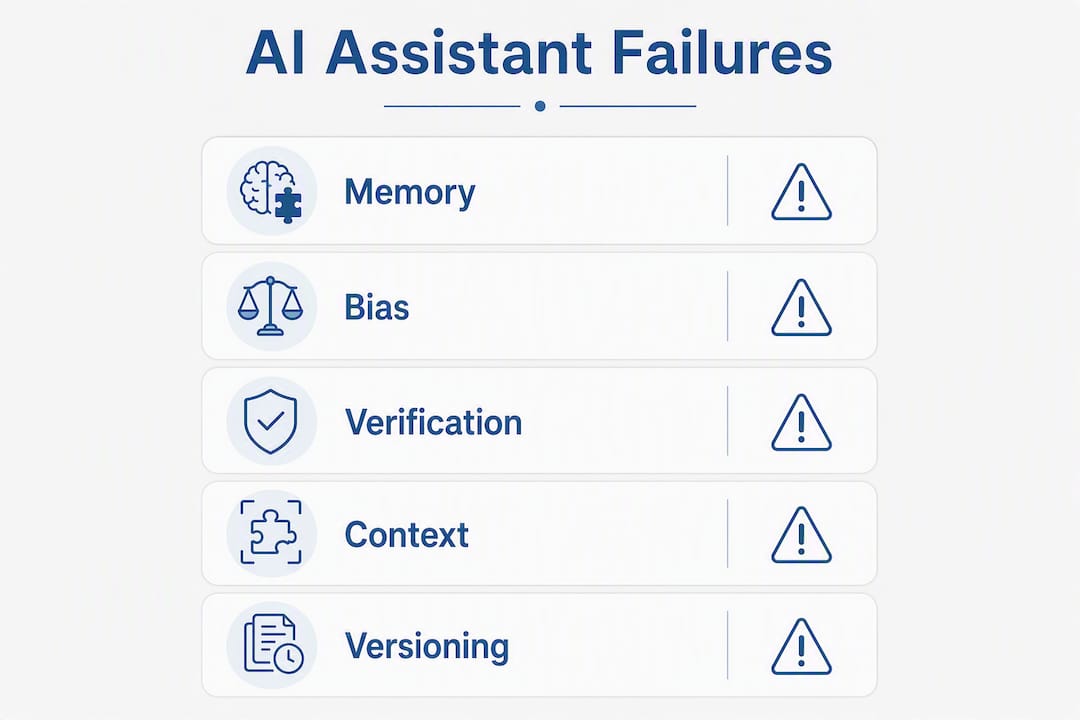
Why another AI assistant is wrong: the core failure modes
The problems are structural, not random. Each failure mode has a distinct cause, and recognizing it tells you exactly what to fix.
-
Hallucination and fabrication. When a model lacks a confident answer, it generates a plausible-sounding one. A legal assistant asked about a recent ruling may cite a case that does not exist. The model is not lying; it is pattern-matching without a ground-truth anchor.
-
Missing context and memory. Most assistants start each session with no memory of previous conversations or your organization’s internal state. A coding assistant asked to extend a codebase will default to generic patterns rather than your team’s conventions, because nobody told it those conventions exist.
-
Stale training data. Models are trained on data with a cutoff date. Ask about a product launched last quarter, a regulatory change from last month, or a competitor’s recent pivot, and the assistant is working from an outdated map.
-
Fabricated absence from guardrails. Overly restrictive alignment controls create what researchers call fabricated absence: the assistant refuses or omits a valid, nuanced answer because its safety regime treats the topic as off-limits. The result looks like a wrong answer, even though the underlying model may have the information.
-
Prompt injection and retrieval errors. When assistants pull from external documents or web pages, a malicious or poorly structured source can redirect the assistant’s behavior. MIT Technology Review documents this as a live security and accuracy risk, not a theoretical one.
Statistic: A coordinated international study by the European Broadcasting Union and the BBC, analyzing thousands of responses across many languages, found that 45% of AI assistant answers about news contained at least one significant issue. That is not an edge case. That is the baseline.
The memory problem deserves its own sentence. Josh Adler’s analysis makes the point plainly: assistants become worse databases when retrieval lacks selectivity. Dumping more documents into context does not help; it adds noise that competes with the signal you actually need.
Common user mistakes and the fixes you can apply today

Most AI assistant errors are not the model’s fault alone. User behavior amplifies every underlying weakness.
Frequent mistakes:
- Asking vague questions (“Summarize our Q3 situation”) with no defined scope, audience, or allowed sources
- Accepting the first answer without asking for sources or reasoning
- Pasting entire document libraries into context and expecting the assistant to sort signal from noise
- Treating the assistant like a search engine rather than a reasoning tool that needs constraints
The practical guidance from Buda.im frames it well: LLM-based assistants are fast at drafting and synthesizing, but they need human-in-the-loop checks for domain expertise, memory, and verification. Speed without verification is how errors reach decisions.
Do vs. don’t:
| What users often do | What to do instead |
|---|---|
| “Summarize our Q3 performance” | “Summarize Q3 revenue vs. plan using only the attached board report. Flag any figure you cannot source.” |
| Accept the first answer | Ask: “What sources support this? Where are you uncertain?” |
| Paste many documents into context | Provide the 3–5 most relevant documents and name them explicitly |
| Ask one large compound question | Break it into sub-questions; ask each in sequence |
| Ignore contradictions between answers | Ask the assistant to reconcile them before proceeding |
Copy-ready prompt additions:
- “List the sources behind each claim.”
- “If you are uncertain, say so explicitly rather than guessing.”
- “Ask me a clarifying question before answering if my request is ambiguous.”
- “Reason step by step before giving a final answer.”
Actionable prompting templates and a 5-step process
A repeatable process matters more than any single clever prompt. Here is a five-step workflow that reduces errors across task types.
- Define the goal. State what decision or output the answer must support. “I need to brief the board on vendor risk” is a goal. “Tell me about vendors” is not.
- Constrain the scope. Name the time period, the documents, and the format. Exclude what is out of scope explicitly.
- Provide allowed sources. Attach or name the specific documents the assistant may use. Do not leave retrieval open-ended.
- Ask clarifying questions first. Instruct the assistant to surface ambiguities before answering, not after.
- Verify before acting. Require the assistant to flag uncertain claims. Then check those claims against the named source yourself.
Five reusable templates:
- Summary: “Summarize [document name] in 5 bullet points for a [role] audience. Cite the section for each point. Flag anything you cannot source directly.”
- Code review: “Review this function against [our coding conventions doc]. List deviations. Do not suggest changes outside the scope of this function.”
- Decision memo: “Draft a one-page decision memo on [topic] using only [source A] and [source B]. State the recommendation, the evidence, and the open risks.”
- Vendor comparison: “Compare [vendor A] and [vendor B] on [criteria list] using only the attached RFP responses. Do not add information from outside these documents.”
- Document synthesis: “Synthesize the key findings from the attached [meeting notes / reports]. Group by theme. Note any contradictions between documents.”
How the workflow connects: A prompt defines the goal and scope. Retrieval pulls only from allowed sources. The assistant drafts with step-by-step reasoning. You verify flagged uncertainties against the source. That loop, repeated, is what separates reliable output from noise.
Pro Tip: Break a task into sub-tasks when the output requires multiple distinct types of reasoning (e.g., first extract facts, then evaluate them, then recommend). Let the assistant synthesize only when all inputs are already verified and scoped.
When to trust an assistant and who is responsible for the output
The assistant is never the final decision-maker. A human is always accountable for what gets acted on.
Verification checklist before acting on any AI output:
- Claim check: Can you trace every factual assertion to a named source?
- Source check: Is that source current, authoritative, and within the assistant’s allowed retrieval scope?
- Cross-check: Does a second independent source confirm the key claims? (See the cross-verification section below.)
- Confidence threshold: If the assistant flagged uncertainty on a claim, do not act on it until a human has resolved it.
Escalation by impact level:
- Low-impact output (internal draft, meeting summary): one reviewer confirms sources before distribution.
- Medium-impact output (customer-facing content, vendor recommendation): a domain expert reviews and signs off.
- High-impact output (board memo, legal or financial decision): a qualified professional reviews independently before any action is taken.
Two short rules for leaders:
If the assistant cannot name its source, the claim is unverified. Treat it as a hypothesis, not a fact.
Responsibility for an AI-assisted decision sits with the person who acted on it. The Brookings Institution notes that AI assistants present real risks around privacy and accuracy that organizations need governance frameworks to manage. Governance does not mean slowing down; it means knowing who owns each output.
Designing permission-aware workflows to reduce errors at scale
User-level fixes reduce errors. Enterprise-level governance eliminates entire categories of them.
The Ada Lovelace Institute’s policy briefing is direct: organizations should define what assistants may automate, isolate sensitive assets, and establish clear governance before deploying at scale. That is not a compliance recommendation. It is an accuracy recommendation.
Enterprise checklist for leaders:
- Define which sources each assistant role may retrieve from, and enforce that boundary at retrieval, not just at the prompt level
- Require every output line to be traceable to a named source document
- Assign a named owner for each memory or context store; stale context is a hallucination risk
- Build offboarding into the access model: when someone leaves, their data view closes immediately
- Audit access logs regularly; know which documents fed which answer
The fabricated-absence problem from over-restrictive guardrails points in the same direction. Alignment regimes that are too blunt produce assistants that refuse valid answers. The fix is not removing guardrails; it is making them precise. Permission-aware retrieval, where the assistant only sees what the asking person is authorized to see, handles both problems at once: it prevents leakage and it gives the assistant enough context to answer accurately.
ClaudeDrive implements this directly. Every line in a ClaudeDrive briefing traces to a real source document. Access is set per person, so nothing crosses a line it should not. Leaders open Claude, ask for their update, and read something built only from what they are allowed to see. That is the permission-aware update model in practice.
How biased or outdated training data shapes AI errors
Training data is not neutral, and it is never current. Both facts produce predictable errors.
Models learn patterns from whatever text they were trained on. If that corpus over-represents certain industries, geographies, or time periods, the model’s defaults reflect those biases. Ask a general-purpose assistant about hiring norms in a specialized field, and it may give you the median answer for a completely different industry.
The cutoff problem is more immediate. A model trained through a certain date has no knowledge of events after that date. Regulatory changes, product launches, personnel moves, market shifts: all invisible. The assistant will answer confidently about the state of the world as it existed at training time, with no indication that the information is stale. That is not a bug in the usual sense. It is a structural feature of how these models are built.
The practical response is to treat training data as background knowledge and your own curated, dated sources as the authoritative layer. Any claim that depends on recency needs a source you control, not one the model internalized at an unknown point in the past.
What AI assistants genuinely cannot do
Current AI assistants are strong at pattern recognition, text generation, and synthesis across documents. They are weak at several things that matter for leadership decisions.
They do not reason causally the way humans do. They identify correlations in text and generate outputs that sound causal. That distinction matters when you are evaluating a strategic recommendation. The assistant may produce a confident memo arguing that X causes Y, when the underlying evidence only shows that X and Y appeared together in similar documents.
They do not know what they do not know. A human expert will say “I am not sure about that; let me check.” An assistant will often generate a plausible answer instead. Asking the assistant to flag uncertainty explicitly helps, but it does not fully close the gap.
They cannot apply judgment about organizational context unless that context is explicitly provided. Pete Hodgson’s analysis of coding assistants captures this precisely: the assistant behaves like a new hire who has never been onboarded. It will make reasonable-sounding choices that violate your team’s actual conventions, because nobody told it those conventions exist.
How model updates and version differences affect accuracy
Switching model versions is not a neutral event. A newer model may answer differently on the same prompt, not because it is more accurate, but because its training data, fine-tuning, or alignment regime changed.
Teams that rely on consistent outputs from an assistant need to track which version produced which answer. A response that was accurate under one version may be wrong under the next, or vice versa. This is especially relevant for compliance-sensitive outputs, where the answer needs to be reproducible and auditable.
The practical implication: pin the model version for any workflow where consistency matters. Document which version produced a given output. When you upgrade, re-test your critical prompts before rolling the new version into production workflows.
How to cross-verify AI responses using external sources
Verification is a skill, not just a step. Here is how to do it efficiently.
For factual claims: Run the specific claim through a primary source. If the assistant says a regulation requires X, find the regulation text and confirm it. Do not verify an AI claim with another AI response.
For numerical data: Check the figure against the original report or dataset. AI assistants frequently misquote statistics, round incorrectly, or cite the right source for the wrong number.
For news and current events: The Reuters report on the EBU study found that leading assistants misrepresent news content in nearly half their responses. For anything time-sensitive, go to the original outlet directly.
For internal business claims: Require the assistant to name the source document and the specific section. Then open that document and read the section yourself. This takes 90 seconds and catches the majority of fabrications.
Cross-verification does not mean checking everything. It means knowing which claims carry enough risk to warrant a check, and having a fast, repeatable method when they do.
Common misconceptions that lead to AI errors
The most expensive misconception is that a more capable assistant solves the problem. It does not. A more capable assistant hallucinates more fluently. The errors become harder to spot, not fewer.
A second misconception: that adding more context always improves accuracy. As the Josh Adler analysis shows, uncurated context degrades answers because noise competes with signal. More documents without curation is worse than fewer documents with clear ownership.
A third: that AI assistants understand your question the way a colleague does. They do not. They generate the most statistically likely response to your text. If your prompt is ambiguous, the assistant will pick an interpretation and run with it, often without flagging the ambiguity. The fix is to remove ambiguity from the prompt, not to assume the assistant will ask.
Finally, many leaders assume that because an assistant sounds confident, it is probably right. Confidence in AI output is a function of the model’s training, not of the accuracy of the specific claim. The Springer analysis of AI chatbot risks documents this pattern: fluency and confidence are not proxies for correctness.
Key Takeaways
AI assistants fail for structural reasons, and the fix is governance and constraint, not a new tool.
| Point | Details |
|---|---|
| Constrain every task | Define scope, role, and allowed sources before prompting; open-ended requests amplify hallucination. |
| Verify before acting | Trace every factual claim to a named source; treat unverified outputs as drafts, not decisions. |
| Permission-aware sources reduce errors | Limiting retrieval to authorized documents cuts both hallucination risk and information leakage. |
| Assign human ownership | Every AI output needs a named person accountable for its accuracy before it drives action. |
| ClaudeDrive feeds Claude, not replaces it | ClaudeDrive delivers per-person, source-traced briefings inside Claude, enforcing access controls so leaders read only what they are authorized to see. |
The governance gap nobody talks about
The conversation about AI assistant errors almost always lands on the model. Better model, fewer errors. That framing is wrong, and it is costing organizations real money.
The dominant failure mode is not model quality. It is the absence of a governed context layer. Most teams deploy a general-purpose assistant, give it broad access, and then wonder why it produces unreliable answers. The assistant is doing exactly what it was designed to do: generate the most plausible response to the input it received. The problem is the input: unscoped, unverified, and drawn from sources the assistant was never meant to reason over.
The organizations that get reliable output from AI are not using smarter models. They are using the same models with tighter constraints: defined sources, per-person access, traceable outputs, and a human who owns the context. That is a governance problem, not a technology problem. Buying another assistant does not solve it.
What actually changes outcomes is treating the context layer as a product in itself. Who owns what the assistant knows? How does stale information get removed? What happens when someone leaves the team? These are operational questions, and they need operational answers. The teams that answer them get briefings they can trust. The ones that skip them keep getting wrong answers and blaming the model.
What ClaudeDrive does for leaders who need answers they can trust

ClaudeDrive is the private context layer that feeds Claude, built for leaders who need a daily update they can actually act on. Connect your meeting notes, GitHub, and calendar. Tag who is allowed to see what. Each person on your team opens Claude and reads one clear briefing built only from sources they are authorized to access. Every line traces back to a real document. Nothing is made up. Nothing crosses a line it should not.
A pilot shows you exactly what that looks like in practice: the accuracy, the source traceability, and the offboarding guarantee. No new app to roll out, no dashboard to learn. Just Claude, fed with context you control.
Talk to us about a pilot or see the live demo at claudedrive.ai.
Useful sources and further reading
- AI Assistants Get The News Wrong Nearly Half The Time — Forbes: Reports the EBU/BBC finding that a large portion of AI assistant answers about news contained significant issues; the clearest published benchmark for baseline error rates.
- News integrity in AI assistants — European Broadcasting Union: The full open report behind the Forbes and Reuters coverage; covers 3,000 responses across 14 languages and documents reproducible misrepresentation patterns.
- AI assistants policy briefing — Ada Lovelace Institute: Governance-focused briefing on permission-aware workflows, isolation of sensitive assets, and enterprise deployment rules.
- Should consumers and businesses use AI assistants? — Brookings Institution: Balanced assessment of AI assistant benefits and risks, with particular attention to privacy, security, and the governance frameworks organizations need before deploying at scale.