8 Step Zero Trust for AI Assistants: Leaders' 30 to 90 Day Plan
A prioritized 8 step checklist leaders can use to secure AI assistants in 30 to 90 days. Covers agent identities, JIT access, DLP, observability, rollout,...
ClaudeDrive
A Yungsten Tech product

8 Step Zero Trust for AI Assistants: Leaders’ 30 to 90 Day Plan

Every AI assistant and autonomous agent in your company needs a governed non-human identity, not a shared API key buried in a script. The first move is discovery: find every agent running today, then strip standing access and replace it with just-in-time grants tied to a specific task. Do that and you cut the blast radius of a compromised agent to a single action, with an audit trail that shows exactly what it touched.
TL;DR:
- Implement agent-specific identities with clear attributes and assign owners to create accurate inventories of all AI agents accessing production data.
- Transition from standing access to just-in-time grants for privileged actions, automating revocation to limit exposure if an agent is compromised.
- Enforce data sensitivity labels and deterministic policy checks outside language models to prevent sensitive data leaks and prompt manipulation.
- Feed all agent activity into existing SIEM and anomaly detection systems, establishing behavioral baselines and automated incident response capabilities.
- Extend existing zero trust controls, including identity, access, and data classification policies, to AI agents, avoiding the creation of parallel security programs.
Table of Contents
- What zero trust AI assistants actually require
- Prioritized zero trust checklist for AI assistants
- Finding every agent: inventory and identity assignment
- Removing standing privileges: least privilege and JIT authorization
- Stopping sensitive data from leaking through AI retrievals
- Catching agent misbehavior before it becomes an incident
- Enforcing policy outside the language model itself
- When you need hardware-backed isolation, not just software policy
- Sequencing the rollout without stalling the project
- Authenticating people and agents that work together
- Reducing the risk of AI assistants used as insider threats
- Adjusting policy continuously as agent risk changes
- Meeting compliance requirements for AI assistants under zero trust
- Fitting AI assistant controls into your existing zero trust architecture
- The threats unique to autonomous AI agents
- Why permission-aware AI updates change the security calculation
- How ClaudeDrive operationalizes this checklist without new dashboards
- Sources
What zero trust AI assistants actually require
Zero trust for AI assistants means the same rule that applies to a human employee applies to a piece of software making decisions on your behalf: never trust, always verify, and grant only what’s needed for the task in front of it. Most companies got Zero Trust architecture right for people years ago. Multi-factor authentication, Conditional Access, least-privilege roles. Then AI agents showed up connecting to your calendar, your codebase, and your customer database, often with a single service account that never expires and never gets reviewed.
That gap is the real risk. An AI assistant that can read your CRM, summarize a contract, and file a ticket is functionally a new employee, except it can act thousands of times a minute and nobody’s watching it in a hallway. Microsoft’s Zero Trust for AI guidance makes this explicit: agent-specific identities, Conditional Access policies, runtime logging, and data governance have to work together, not as four separate projects.
The standard industry term here is Agentic Zero Trust: extending the identity, data, endpoint, and observability pillars of traditional Zero Trust architecture to cover autonomous software agents. AI assistant security and trustless AI technology are the phrases you’ll see in vendor marketing, but Agentic Zero Trust is the term security teams should use in policy documents and vendor conversations, because it maps directly to NIST’s AI risk management guidance and to how your existing identity provider already thinks about non-human accounts.
Prioritized zero trust checklist for AI assistants
You don’t need a two-year transformation program to get meaningfully safer. You need eight moves, done roughly in this order, each with a start step you can assign this week.
- Inventory every agent and assign a sponsor. Pull a list of every automation, bot, and AI connector touching production data, and name a human owner for each one.
- Create per-agent identities with attributes. Stop sharing one service account across five automations; give each agent its own identity and metadata describing what it’s for.
- Replace standing access with just-in-time grants. Move from “always has access” to “requests access for this specific task, gets it, loses it.”
- Apply data sensitivity labels before retrieval. Tag sensitive content so an agent physically cannot pull it without the label check passing.
- Enforce policy outside the model. Put a deterministic gate in front of every tool call. Never let the LLM itself decide what it’s allowed to do.
- Log every tool call and feed it to SIEM. If an agent’s actions aren’t in your security monitoring, you’re flying blind on the fastest-moving identity in your environment.
- Use hardware-backed isolation for crown-jewel workloads. Reserve confidential computing for the model weights and data that would hurt most if exposed.
- Set governance checkpoints and a written incident playbook. Decide now who gets paged when an agent starts behaving strangely, not during the incident.
Pro Tip: Start with step 3, not step 1. Removing standing privileges from your riskiest agent this week buys you more protection than a perfect inventory that takes three months to build.
The SANS security checklist for AI agents frames this as a tiered approach for a reason. Trying to do all eight at once stalls projects. Sequencing them gets you real risk reduction in weeks.
Finding every agent: inventory and identity assignment
You cannot secure what you don’t know exists, and most enterprises have more AI agents running than their security team can name. Shadow automation built by a marketing analyst with an API key and a weekend is now common, and it usually has broader access than anyone intended.
Look for these signals to build an honest inventory:
- Orchestration manifests and workflow definitions in your CI/CD and automation platforms
- API keys and service principal credentials issued in the last 18 months that nobody can attribute to a specific project
- Container images and deployment configs referencing model endpoints or agent frameworks
- Unusual automation activity in access logs, particularly repeated, rapid-fire calls that don’t match human behavior patterns
Once you find them, build an agent registry: a record of who owns each agent, what persona or job it was built to perform, what capabilities it’s allowed to invoke, and what lifecycle state it’s in (development, production, retired). This isn’t paperwork for its own sake. A declared capability manifest is what makes it possible to say, deterministically, “this agent is allowed to read tickets but not close them,” which is the foundation everything else in this checklist depends on.
Custom security attributes, tagged to each agent identity, are what let this scale. Without them, your Conditional Access policies either apply to every agent uniformly or get managed one object at a time, and neither survives contact with a fleet of fifty agents. Attributes like approval status or data sensitivity tier let one policy correctly treat a finance-reporting agent differently than a customer-support bot, without anyone hand-editing rules every time a new agent ships.
Removing standing privileges: least privilege and JIT authorization
Standing access is the single biggest AI-specific risk most companies are carrying right now, and it’s also the easiest one to fix once you decide to. An agent that always has read access to your entire document store, because provisioning it that way was faster, is a liability sitting quietly until the day it’s compromised or simply misconfigured.
The fix is just-in-time authorization: an agent requests the specific permission it needs for the task at hand, gets a short-lived grant, and loses it automatically when the task ends or the clock runs out. Zscaler’s guidance on least-privilege access for AI agents is direct about this: inline, just-in-time enforcement at the moment of the request reduces the blast radius of a compromised agent to whatever it was doing in that one window, not everything it’s ever been able to touch.
Practical steps that get you there:
- Design policies that require a JIT grant for every privileged action, rather than issuing one broad token that covers a category of resources.
- Adopt token exchange and short-lived credentials instead of long-lived API keys; scope OAuth flows to the narrowest permission set the task requires.
- Automate the approval step itself. If a human has to click “approve” for every agent request, JIT becomes a bottleneck nobody follows.
- Build revocation into the design, not as an afterthought. Access should expire on its own; don’t rely on someone remembering to pull it.
Pro Tip: Track your revocation success rate as a real metric, not a nice-to-have. If grants aren’t reliably expiring on schedule, you have standing access with extra paperwork, not JIT authorization.
Stopping sensitive data from leaking through AI retrievals
Data governance and DLP for AI-driven retrievals
An AI assistant that can search your company’s files is only as safe as the labels on those files. If your sensitivity classification is inconsistent, or worse, nonexistent, the agent will happily surface a salary spreadsheet in an answer to someone who should never see it, because nothing told it not to.
The fix starts before retrieval, not after. Apply sensitivity labels to source content and enforce a label check at the moment an agent tries to pull it, so restricted material simply never enters the response in the first place. Cequence’s research on Agentic Zero Trust makes a point worth sitting with: agents operate at machine speed, so checks that rely on a human reviewing output after the fact will always be too slow. The enforcement has to live at the retrieval layer itself.
Three controls do most of the work:
- Sensitivity labels on every document and data source, checked before any agent retrieval is allowed to proceed.
- Inline content classification and DLP scanning at the retrieval gateway, sanitizing or flatly refusing requests that would surface restricted content.
- Output inheritance: whatever an agent generates from a labeled source carries that same label forward, so a summary of confidential material is treated as confidential too.
That last point trips up more companies than any other. Teams get the input side right, then forget the AI-generated summary or briefing needs the same retention and sharing rules as the document it came from. Building document-level permissions into AI search from the start avoids that gap entirely, because the enforcement travels with the content instead of stopping at the door.
Catching agent misbehavior before it becomes an incident
An AI agent that goes wrong doesn’t send a suspicious email at 2 a.m. that a human might notice. It makes ten thousand API calls in ten minutes, and by the time anyone’s looking, the damage is done. Runtime observability is what closes that gap, and it only works if you built it before you needed it.
Log every tool call, every API access, every prompt input and output, and pipe it into the same SIEM and UEBA tooling you already use for human identity threats. Microsoft Mechanics’ guidance on Zero Trust for AI agents specifically calls out feeding tool calls and data lookups into Sentinel for anomaly detection, because generic infrastructure logging misses agent-specific patterns entirely.
Three things need to be in place before an incident, not during one:
- A behavioral baseline for what “normal” looks like for each agent, so a sign-in spike or an unfamiliar resource access actually trips an alert instead of blending into noise.
- Correlation rules tuned to agent behavior specifically, since a login pattern that’s fine for a human on a laptop can be a compromise signal for a bot that’s supposed to run on a fixed schedule.
- Automated containment: the ability to block token issuance, freeze an agent’s identity, or revoke an access package the moment a high-fidelity alert fires, without waiting for a human to be paged first.
Companies that skip the automation step usually discover it the hard way. A manual response process that takes twenty minutes to freeze a compromised agent’s identity has already let that agent make thousands of calls by the time anyone acts.
Enforcing policy outside the language model itself
The single most common design mistake in AI assistant security is letting the model decide, in the moment, whether an action is allowed. Language models are persuadable. A cleverly worded prompt can talk a model into believing an action is fine when your policy says otherwise, which is exactly why authorization can’t live inside the model’s own reasoning.
Joint guidance from BSI and ANSSI on Zero Trust design for LLM-based systems is blunt about this: policy enforcement has to be deterministic and sit outside the model, evaluating every tool call and connector invocation against explicit rules before it’s allowed to execute.
The pattern that works:
- A Policy Enforcement Point in front of every tool call and connector, checking the request against policy before anything happens, not asking the model to self-report whether it’s allowed.
- Policy-as-code frameworks like OPA or Cedar, so rules are testable, versioned, and auditable rather than buried in prompt instructions that drift over time.
- Input validation and output sanitization at the gateway, rejecting requests that carry hallmarks of prompt injection before they ever reach a tool.
- Logged denials, not silent failures. Every blocked action should leave a record someone can review later.
This is also your primary defense against indirect prompt injection, where the malicious instruction hides inside a document the agent retrieves rather than the user’s own prompt.
When you need hardware-backed isolation, not just software policy
Most AI assistant deployments don’t need confidential computing. But if you’re protecting proprietary model weights or inference data sensitive enough that even your own infrastructure team shouldn’t be able to see it in plaintext, software-level policy alone won’t cut it.
Trusted Execution Environments, TEEs, give you a hardware root of trust: the model runs inside an enclave that even someone with root access to the host can’t inspect. NVIDIA’s architecture for confidential AI factories describes this using attestation and a key broker service, so decryption keys only get released to an enclave that can cryptographically prove it’s running the exact code you expect. Confidential Containers extend this pattern into cloud-native environments, wrapping a workload in a hardware-backed VM without requiring you to rewrite the application.
Two things to keep in view before you invest here:
- TEEs protect the confidentiality of what’s running inside them. They don’t fix a vulnerability in the application logic itself, and they don’t guarantee availability.
- The cost and complexity are real. Reserve confidential computing for the workloads where exposure would genuinely hurt: proprietary model weights, regulated data, anything a competitor or attacker would pay to see. Everything else gets covered adequately by the layered controls earlier in this checklist.
Sequencing the rollout without stalling the project
Trying to implement every control simultaneously is how these programs die. The practical path moves through five stages: discover what agents exist, assign them identities, replace standing access with JIT, wire up observability, then harden the highest-risk workloads with confidential computing.
- Days 1 to 30: discovery and sponsorship. Build the agent inventory, assign a human owner to every agent found, and flag anything with unrestricted standing access for immediate review.
- Days 30 to 60: identity and JIT. Issue per-agent identities with attributes, and convert your highest-risk agents from standing access to just-in-time grants first.
- Days 60 to 90: observability online. Get tool-call logging feeding your SIEM, establish behavioral baselines, and write the first version of your incident playbook.
- Months 3 to 12: hardening and governance. Extend JIT and DLP enforcement to the full agent fleet, evaluate confidential computing for crown-jewel workloads, and set quarterly governance checkpoints with measurable KPIs like revocation success rate and mean time to contain an agent incident.
Assign explicit owners at each stage and require sponsor approval before any new agent goes into production. A written playbook that says who gets paged, and what “freeze this agent” actually triggers technically, is worth more than a policy document nobody’s read.
Authenticating people and agents that work together
Most agent workflows aren’t fully autonomous. A human approves a step, reviews an output, or hands off a task partway through, and that handoff point is where authentication gets sloppy if you’re not deliberate about it.
The cleanest pattern treats human-agent interaction as its own authentication boundary, not an extension of either party’s existing session. When an agent needs a human to approve a privileged action, that approval should require its own verification step, ideally multi-factor, tied to the specific action being approved rather than a general “yes, proceed” that could apply to anything. Otherwise you’ve built a rubber stamp that an attacker only needs to trigger once.
On the flip side, when a human is directing an agent to act on their behalf, that agent’s actions should be traceable back to the specific person who initiated them, not just the service account running the automation. This is what makes your audit trail actually useful during an investigation. Without it, “the agent did it” is the end of the trail, and you can’t tell whether that was expected behavior or someone routing a malicious instruction through a bot to obscure who really asked for it.
Conditional Access policies that already govern human sign-ins should extend to these handoff points: device compliance, location, and risk signals ought to factor into whether an agent’s request for human approval gets treated as low risk or flagged for additional scrutiny.
Reducing the risk of AI assistants used as insider threats
An AI assistant with broad access is a more dangerous insider threat vector than most humans, because it doesn’t get tired, doesn’t hesitate, and can be redirected by anyone who gains control of its prompts or credentials. The mitigation isn’t fundamentally different from human insider threat programs. It’s the same principles applied faster.
Segregation of duties matters as much for agents as for people. An agent that can both approve and execute a financial transaction is a single point of failure that a compromised credential turns into fraud with no second check. Split those capabilities across separate agents or require human approval at the boundary between them.
Behavioral monitoring catches what static permissions miss. An agent suddenly accessing resources outside its normal pattern, even resources it’s technically permitted to touch, is worth flagging the same way an unusual login from a human employee would be. This is where the runtime observability built earlier in this checklist pays off directly: baseline behavior makes deviation visible.
Finally, treat every agent credential as something that can be misused by whoever controls the agent’s inputs, not just whoever controls its outputs. A prompt injection that convinces an agent to exfiltrate data through a legitimate-looking channel is functionally an insider threat, even though no human employee did anything wrong. Your containment plan for a compromised agent identity should look a lot like your plan for a compromised employee account: freeze it, review its recent actions, and only restore access once you understand what happened.
Adjusting policy continuously as agent risk changes
A policy written for an agent’s capabilities on day one is often wrong by day ninety, because agents get new tool integrations, new data access, and new tasks assigned to them faster than most security review cycles can keep pace with. Static, annually reviewed access policies are the wrong model for something that changes this often.
The alternative is continuous risk assessment tied to the same telemetry you’re already collecting for runtime observability. If an agent’s behavior pattern shifts, its risk score should shift with it, and its access should adjust automatically rather than waiting for a quarterly review. An agent that starts making calls to a new API it’s never used, or querying a data source outside its declared persona, should trigger a re-evaluation of its permissions, not just an alert that sits in a queue.
This is where the agent registry and capability manifests described earlier stop being paperwork and start being operationally useful. When an agent’s actual behavior diverges from its declared capabilities, that gap is itself a risk signal worth acting on, whether the cause is a misconfiguration, a new integration nobody logged, or an actual compromise.
Practically, this means building risk scoring into your identity governance rather than treating it as a separate security project. Feed anomaly signals from your SIEM back into the access decision engine so that a spike in unusual activity can automatically tighten an agent’s permissions, pending human review, instead of waiting for the next scheduled audit.
Meeting compliance requirements for AI assistants under zero trust
Regulators haven’t finished writing AI-specific rules, but the compliance obligations that already exist for data handling, access control, and audit trails apply fully to AI assistants right now, and most compliance teams haven’t caught up to that fact yet.
If your company handles regulated data, whatever framework governs that data (financial reporting controls, healthcare privacy rules, data protection regulations) applies the moment an AI assistant touches it, regardless of whether the assistant is a purchased product or something your engineering team built internally. An agent that summarizes patient records or pulls customer financial data needs the same access logging and retention controls a human employee handling that data would need, and in most jurisdictions, the same breach notification obligations if something goes wrong.
The practical compliance gap most companies have is audit evidence. When a regulator or auditor asks “who accessed this record and why,” an answer of “an AI agent did, we’re not entirely sure which one or why” is not a defensible position. The identity, logging, and DLP controls covered throughout this checklist aren’t just security hygiene. They’re what generates the audit trail a compliance team needs to answer that question with a specific agent, a specific timestamp, and a specific data source cited.
NIST’s AI risk management framework is a reasonable starting point for mapping these obligations to your existing control framework, since it’s built to align with risk profiles your compliance team likely already uses for other systems.
Fitting AI assistant controls into your existing zero trust architecture
The mistake to avoid is treating AI assistant security as a parallel program running next to your existing Zero Trust architecture instead of an extension of it. If you’ve already built identity governance, Conditional Access, and data classification for human users, most of that infrastructure should extend to agents rather than being duplicated.
Your identity provider almost certainly already supports non-human identities and custom attributes. Use that same system for agent identities rather than standing up a separate registry that your security operations team then has to monitor in a second place. Your Conditional Access policies should be extended with agent-specific conditions (device compliance for the host running the agent, risk signals from its behavior pattern) rather than replaced with an entirely new policy engine.
The same logic applies to your SIEM and data classification systems. An agent’s tool calls should flow into the same detection pipeline as human sign-in events, not a separate agent-monitoring dashboard nobody on the security operations team checks daily. And the sensitivity labels you’ve already applied to documents for human access control should be the exact same labels an agent’s retrieval requests get checked against, so you’re not maintaining two classification schemes that can drift out of sync with each other.
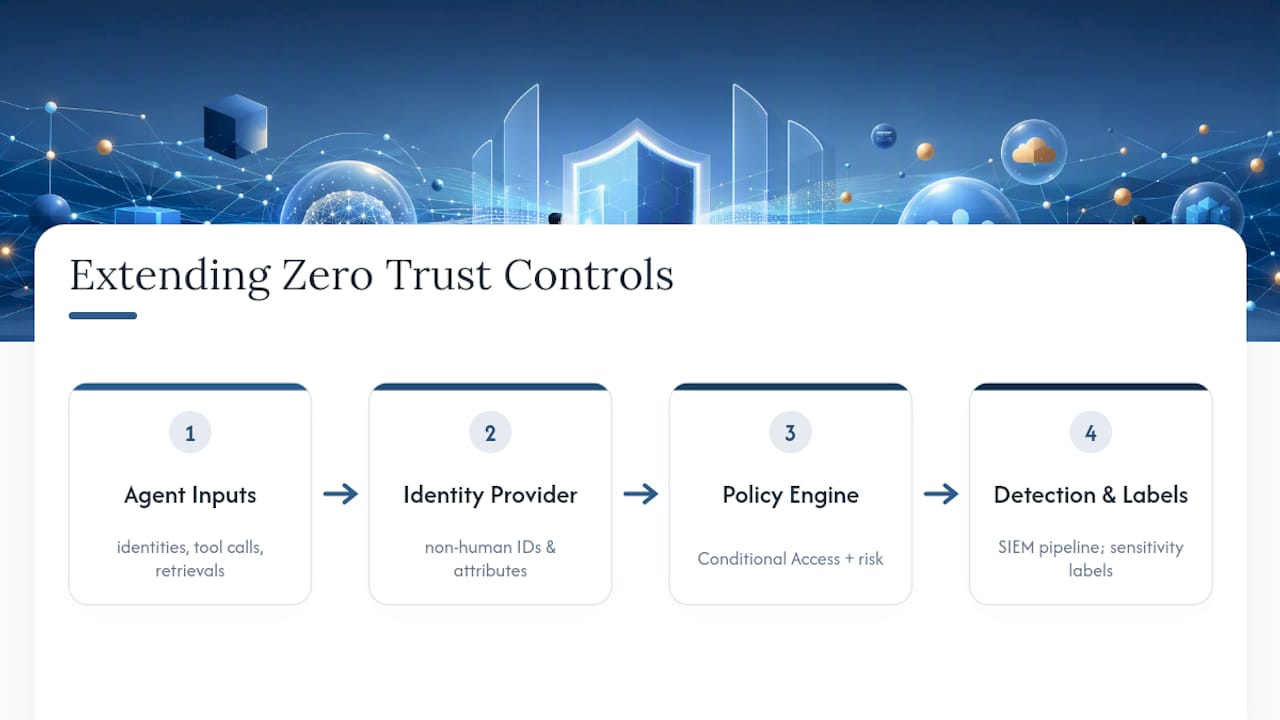
Done this way, securing AI assistants becomes a scope extension of work your team has already done, not a new program competing for budget and headcount against everything else on the security roadmap.
The threats unique to autonomous AI agents
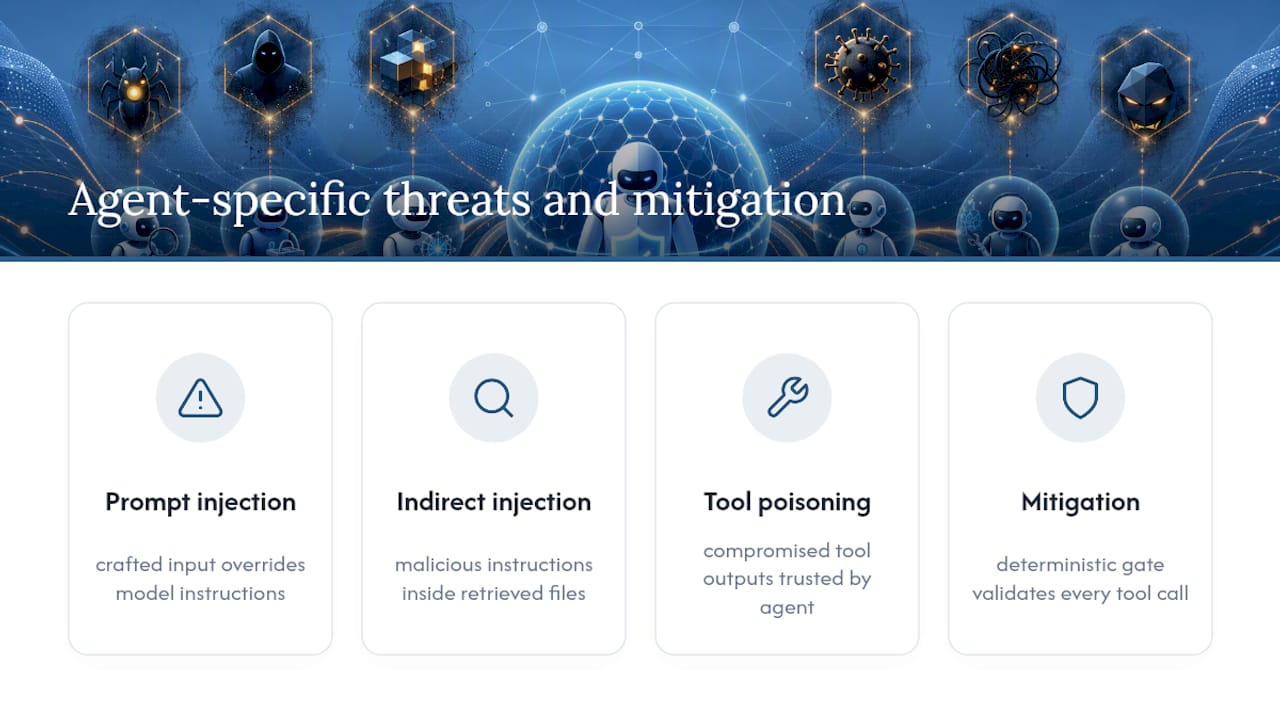
Prompt injection is the threat every security team has heard of by now: an attacker crafts input designed to make the model ignore its instructions and do something else instead. Indirect prompt injection is the more dangerous variant, and the one fewer teams have defended against, because the malicious instruction doesn’t come from the user’s prompt at all. It’s hidden inside a document, email, or webpage the agent retrieves as part of its normal task, and the agent has no reliable way to distinguish “instructions from my operator” from “text that happened to be in a file I was asked to summarize.”
Tool poisoning is the third threat that’s specific to agents rather than chatbots. If an agent has access to a set of tools or plugins, and one of those tools has been compromised or maliciously modified, the agent will trust its output the same way it trusts a legitimate tool, because nothing in the model’s reasoning process distinguishes a poisoned tool from a clean one. A compromised code-review plugin that quietly approves malicious pull requests is a realistic version of this, and it’s invisible to anyone monitoring only the agent’s stated intentions rather than its actual tool outputs.
None of these three threats can be reliably caught by the model itself, no matter how well it’s been trained to resist manipulation. That’s the entire argument for the Policy Enforcement Points covered earlier in this checklist: a deterministic gate outside the model that validates every tool call against explicit rules is what catches an agent that’s been talked into, or tricked into, doing something it shouldn’t. Teams building or instrumenting agent fleets often work with specialized AI agent development services specifically to get this enforcement layer right from the start, rather than retrofitting it after an incident.
Why permission-aware AI updates change the security calculation
Most of what makes AI assistant security hard is the tension between giving leaders useful information and giving an AI system broad access to get it. Permission-aware retrieval resolves that tension directly: a leader gets a daily update built only from what they’re personally allowed to see, without anyone widening an agent’s permissions to make that update possible.
That distinction matters for trust as much as for risk. When every line in a briefing traces back to a real, named source and nothing in it was invented or pulled from data the reader shouldn’t see, leaders stop double-checking the AI and start acting on it. Traceable sourcing and instant offboarding are the same audit trail principle this entire checklist has been building toward, applied to the exact moment a leader asks a question.
See the live demo or talk to us about a pilot.
— Paul
How ClaudeDrive operationalizes this checklist without new dashboards
ClaudeDrive is the practical answer to a problem this checklist raises repeatedly: how do you give leaders the AI-driven updates they want without expanding what any single agent, or any single person, can see? Instead of a general-purpose assistant with standing access to everything connected, ClaudeDrive builds each person’s daily update strictly from what they’re individually allowed to see, right inside the Claude account they already use.

Three things map directly to the controls covered above. Access enforcement happens at the moment of retrieval, not after the fact, the same just-in-time principle this checklist recommends for every privileged agent action. Every line in a briefing is traceable to a real source, meeting the audit trail requirement compliance teams need when someone asks who saw what and why. And offboarding is instant: when someone leaves, their access to every connected source, meeting notes, GitHub, the calendar, ends immediately, with nothing lingering the way a shared standing credential often does.
Connect a few tools, tag what each person is allowed to see, and every leader opens Claude and asks for their update instead of guessing or waiting on someone else to compile one. No new app to roll out, no dashboard to learn. See the live demo or talk to us about a pilot to see how it fits your existing identity and data governance setup.
Sources
- How to Establish Least-Privilege Access for AI Agents and Assistants — Zscaler
- Announcing Zero Trust for AI — Microsoft Security Blog
- NIST AI Risk Management and Zero Trust guidance
- Zero Trust for AI Agents: The Security Checklist — SANS