Centralize Company Updates with an AI Feed in 2026
Discover how to centralize company updates with an AI feed in 2026. Streamline information for real-time visibility and smarter decision-making.
ClaudeDrive
A Yungsten Tech product

Centralize Company Updates with an AI Feed in 2026

An AI-powered centralized update feed is defined as a single, continuously refreshed briefing that pulls from every relevant data source a leader is permitted to see, then delivers it as one clear, traceable summary. Scattered Slack threads, buried email chains, and stale project trackers cost leadership teams hours every week. The ability to centralize company updates with an AI feed solves that directly: one query, one answer, every source cited. The industry term for this architecture is a centralized intelligence feed, and it is now the standard approach for high-growth operations teams that need real-time visibility without adding another tool to their stack.
What does it take to centralize company updates with an AI feed?
The first requirement is a clear map of every channel where company information currently lives. For most high-growth businesses, that means email, Slack, Microsoft Teams, meeting notes, GitHub, a CRM like Salesforce, an HRIS, and at least one project management system. Each of these is a data source. None of them talk to each other by default.

The second requirement is stakeholder alignment before any technical work begins. Operations managers need to agree on which data sources are authoritative, who is allowed to see what, and what a “good update” actually looks like for each leadership role. Without that agreement, the feed produces noise instead of signal.
Centralized communication platforms typically go live within 2–4 weeks when they integrate into existing tools like Microsoft Teams and Slack. That timeline assumes the data sources are already identified and access permissions are defined. Teams that skip the mapping step routinely double that timeline.
Key data sources to connect
The most useful AI-driven company updates draw from four categories of data:
- Operational data: project management systems (Jira, Asana, Linear), GitHub commit logs, and deployment records
- People data: calendar events, meeting notes, HRIS updates, and org chart changes
- Revenue data: CRM pipeline, closed deals, support ticket volume, and customer health scores
- Financial data: budget tracking, expense reports, and headcount approvals
Connecting all four gives the AI enough context to produce a briefing that is actually useful to a CEO or COO, not just a list of completed tasks.
Pro Tip: Map your data sources in a simple spreadsheet before touching any integration. List the source, the owner, the update frequency, and who is allowed to see it. That document becomes your permission model.
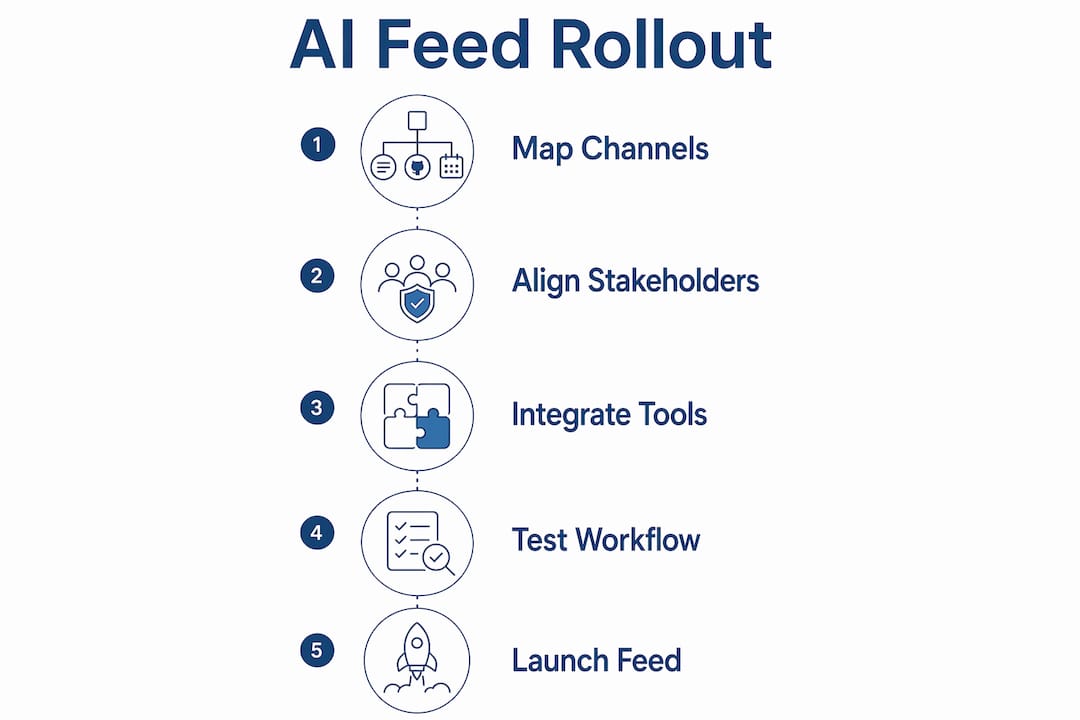
How to implement an AI-driven centralized update feed
A phased rollout is the only approach that works reliably at scale. Successful implementation requires building the central model, connecting existing data sources, running the new system in parallel for 2–3 months, and verifying for breakage before making it the primary source. Skipping the parallel phase is the most common reason rollouts fail.
The five-phase rollout
-
Define the update schema. Decide what each role needs to know daily: the CEO needs revenue, hiring, and product status; the COO needs operational blockers and team capacity. Write this down before connecting anything.
-
Connect your highest-trust data sources first. Start with two or three sources that are already clean and well-maintained. A messy CRM produces a misleading briefing. Fix the source data before feeding it to the AI.
-
Build the permission model. Every person who receives an update should see only what they are authorized to see. This is not a technical detail. It is a governance decision that leadership must make explicitly.
-
Run parallel systems for 2–3 months. Keep your existing update process running alongside the new feed. Compare them daily. When the AI feed consistently matches or beats the manual process for accuracy, you are ready to migrate.
-
Validate, then cut over. Run a structured review with three to five leaders. Ask them to flag any update that was wrong, missing, or misleading. Fix those gaps before the legacy process is retired.
The efficiency gains from AI-enabled content management can be realized quickly once the foundation is in place. The setup work is where the real investment goes.
Headless AI architectures flow signals directly into generative AI tools teams already use, which means the update reaches leaders inside Claude, Teams, or whatever interface they already open every morning. No new login. No new dashboard. That is the right design target for any automated corporate news feed.
Pro Tip: Start with the workflow one leader uses every day, not the one that seems most impressive. A CEO who already opens Claude each morning is a better first pilot than a department that rarely checks any tool.
How do you maintain governance and trust in an AI update feed?
Governance is the difference between an AI feed leaders trust and one they quietly stop reading. The core requirement is that every line in a briefing must be traceable to a real source. Every AI agent decision should be recorded with specific reasoning and source to maintain an auditable trail. That is not a compliance checkbox. It is what makes the update credible.
Audit trails build leadership trust in automated updates and AI governance frameworks, not just regulatory confidence. When a COO reads that a deal closed, they need to know which CRM record produced that line. When an engineering update says a deployment succeeded, the source commit should be one click away.
Governance best practices for an AI-driven update feed:
- Permission-aware delivery: Each leader’s briefing is generated from only the data they are authorized to access. Nothing leaks across organizational lines.
- Source citations on every claim: Every fact in the briefing links back to the original record, meeting note, or system entry.
- Reasoning traces: The feed logs why a piece of information was included, not just what it says. This supports internal review and external audit.
- Change detection: The system flags when a data source goes stale or disconnects, rather than silently omitting that information.
- Human review checkpoints: At least one person reviews the feed output weekly during the first three months of operation.
“Transparency through audit trails is not just a compliance measure. It builds leadership trust in automated updates and AI governance frameworks.” — M-Files on agentic AI
For a detailed look at how teams implement these controls in practice, the practical audit guide from ClaudeDrive covers the full review cycle.
What are the common pitfalls when centralizing company updates?
The most expensive mistake is treating update centralization as a database migration. The biggest pitfall is treating it as a database migration instead of redesigning workflows to make company data queryable by AI. Moving data from one place to another does not create a useful feed. Redesigning how that data is structured and accessed does.
The second most common problem is poor user adoption. Leaders who were not involved in defining the update schema often find the output irrelevant to their actual decisions. The fix is simple: involve the end reader in step one, not step five.
Common pitfalls and how to address them:
- Stale or unreliable source data: An AI feed is only as accurate as its inputs. Audit your data sources before connecting them.
- Overly broad permissions: Giving everyone access to everything creates legal and organizational risk. Define access by role before launch.
- No feedback loop: Leaders who find errors in the feed need a direct way to report them. Build a simple correction process from day one.
- Skipping the parallel phase: Running the new feed alongside legacy processes for 2–3 months is the only reliable way to catch failures before they matter.
- Measuring the wrong outcome: The goal is better decisions, not a prettier dashboard. Track whether leaders are making faster, more informed calls, not whether the feed looks complete.
Organizing internal data into an ontology or living graph allows AI to reason over real company context, improving update relevance and trust. Teams that skip this step end up with a feed that lists facts but cannot connect them. A revenue drop and a support ticket spike are related. The feed should say so.
For practical examples of what well-structured AI-driven company updates look like in practice, the update examples guide from ClaudeDrive is worth reviewing before you finalize your schema.
Key Takeaways
The most effective way to centralize company updates with an AI feed is to map permissions first, run parallel systems for 2–3 months, and embed the output directly into the tools leaders already use.
| Point | Details |
|---|---|
| Map before you build | Identify every data source, owner, and permission level before connecting anything. |
| Phase the rollout | Run the AI feed alongside legacy processes for 2–3 months to catch failures early. |
| Cite every claim | Every line in the briefing must link back to a real, auditable source. |
| Embed in existing tools | Deliver updates inside the tools leaders already open, not a new dashboard. |
| Redesign the workflow | Treat this as a workflow change, not a data migration, or the feed will not stick. |
The dashboard era is over
The conventional wisdom on internal communications has been to build a better dashboard. Add more panels, more filters, more real-time charts. I have watched dozens of leadership teams invest in exactly that, and the result is always the same: the dashboard gets checked for two weeks and then ignored.
The reason is structural. Dashboards require the leader to come to the data. A well-designed AI feed brings the data to the leader, inside the tool they already use, in the format they actually read. That is a fundamentally different relationship with information.
What I find most underappreciated is the governance side. Leaders I have spoken with assume that AI-generated updates are inherently less trustworthy than a human-written summary. The opposite is true when the feed is built correctly. A human summary has no audit trail. An AI briefing built on closed-loop data flows cites every claim and logs every reasoning step. That is more auditable than anything a chief of staff writes in a Friday email.
The shift that matters most is from static documents to ontology-based data graphs that let AI reason over actual business relationships. When the feed knows that a delayed sprint is connected to a hiring gap in engineering, the briefing says something useful. When it is just pulling rows from a database, it says nothing a spreadsheet could not.
My honest advice: start with one leader, one workflow, and three data sources. Get that right before you scale. The leaders who try to connect everything on day one end up with a feed that is technically impressive and practically useless.
— Paul
ClaudeDrive delivers the daily briefing leaders already need
ClaudeDrive is built for exactly this problem. A leader opens Claude, asks for their update, and reads one clear briefing built only from what they are permitted to see. Every line is traceable to a real source. Nothing is invented. Nothing crosses an access line it should not.
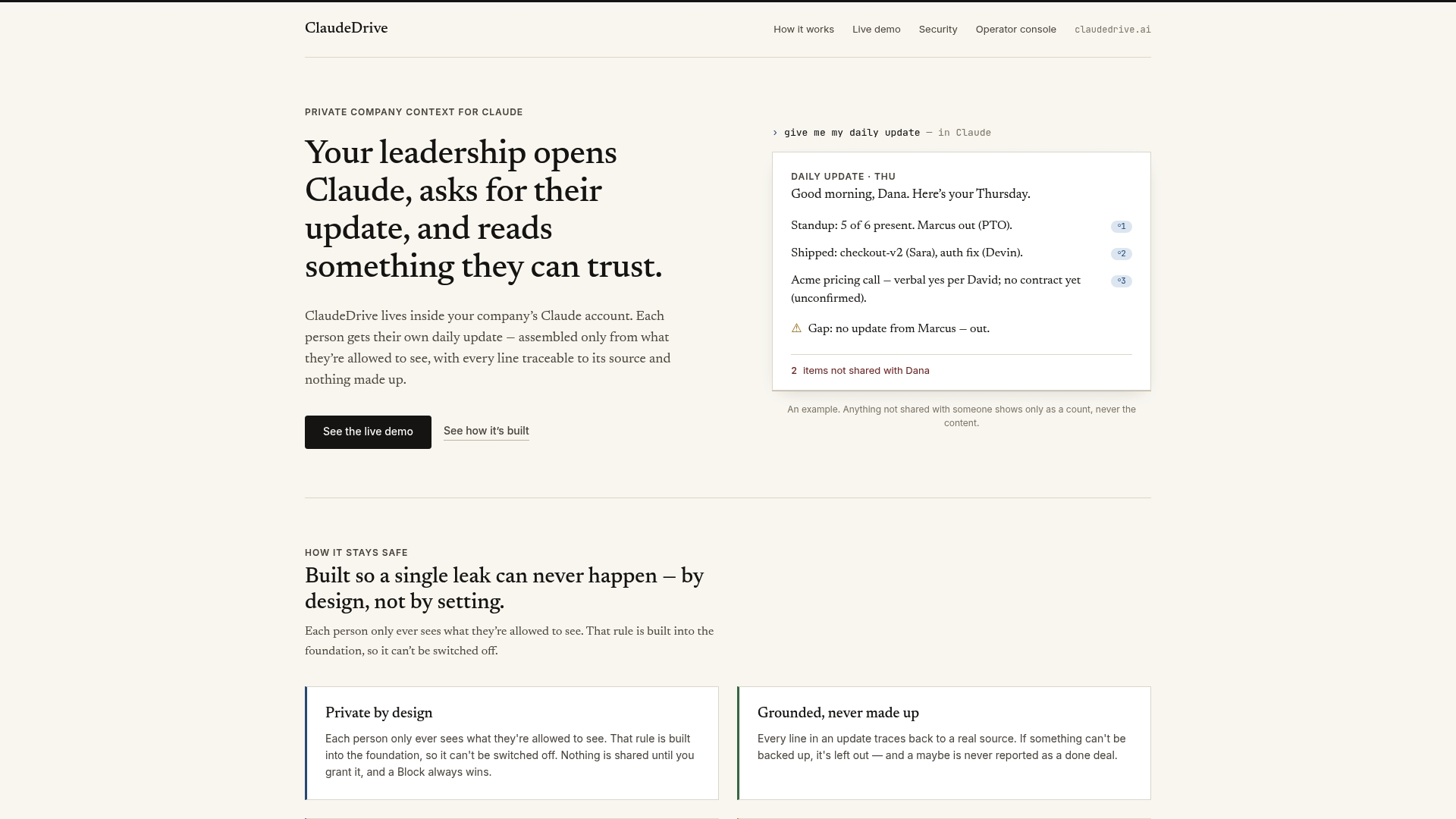
Connect meeting notes, GitHub, the calendar, or your CRM, and each person gets their own private view of what happened. There is no new app to roll out and no wiki to maintain. ClaudeDrive is the private context layer that feeds Claude directly, built by Yungsten Tech for leaders who need a daily update they can trust. See the live demo or talk to us about a pilot.
FAQ
What is a centralized AI update feed?
A centralized AI update feed is a single, automatically generated briefing that pulls from multiple data sources and delivers one clear, cited summary to each leader based on their access permissions.
How long does it take to go live with a centralized update feed?
Most teams go live within 2–4 weeks when integrating into existing tools like Slack or Microsoft Teams, though a full parallel validation phase takes 2–3 months before the feed becomes the primary source.
How do you keep an AI-generated update trustworthy?
Every claim in the briefing must link to a real source, and every AI decision must be logged with its reasoning. That audit trail is what makes the output credible to leadership, not just compliant with policy.
What data sources should connect to an AI company update feed?
The most useful feeds connect operational data (project management, GitHub), people data (calendar, meeting notes, HRIS), revenue data (CRM, support tickets), and financial data (budget tracking, headcount approvals).
What is the biggest mistake teams make when centralizing updates?
The most common failure is treating the project as a data migration rather than a workflow redesign. Moving data to a new location does not make it queryable or useful. The structure and access model must be rebuilt from the ground up.