4 Metrics Leaders Must Require for Claude Enterprise Security
A leader-focused operational checklist for Claude enterprise security: track four key metrics, stage rollout by sensitivity, and verify same-day offboarding.
ClaudeDrive
A Yungsten Tech product

4 Metrics Leaders Must Require for Claude Enterprise Security

Claude enterprise security, in the context that matters to a growing company, means one thing: nobody at your company sees a Claude briefing built from a document they were never allowed to open. That requires permission checks at the moment of retrieval, a citation trail auditors can replay, and a guarantee that offboarding a departed employee actually cuts off their access the same day. If a vendor cannot show you all three, do not connect your documents to Claude yet. ClaudeDrive is built to satisfy exactly this bar.
TL;DR:
- Permission enforcement must occur at retrieval with fail-closed responses to prevent unauthorized document access during AI briefings.
- Vendors should provide source-linked citations on every briefing line, an offboarding SLA, staged rollout metrics, and redacted audit logs to meet security standards.
- Common failure points include stale inherited permissions, over-permissioned service accounts, prompt injection risks, and indexing methods that fail to reject unpermitted content before retrieval.
- Connecting Claude to existing single sign-on systems ensures immediate offboarding and consistent permission management, especially when using standards like SAML or OIDC.
- Encryption must secure data in transit with TLS and at rest with AES-256, but permission enforcement remains the core security factor beyond encryption.
Table of Contents
- Why Permission-Aware Retrieval Matters to Leaders
- Permission Patterns That Break Before You Notice
- What Any Claude Feed Must Prove Before You Approve It
- How to Roll Out a Claude Feed Without Betting the Company
- What Auditors Will Ask for and How to Have It Ready
- How Claude Enterprise Data Gets Encrypted
- Connecting Claude to Your Existing Identity Systems
- Who Gets to Ask Claude What, and How That Gets Verified
- Handling Sensitive Data Under GDPR and HIPAA
- Detecting and Responding to Incidents Involving Claude
- Third-Party Integrations Carry Their Own Risk
- Why Leaders Should Trade Some Speed for Real Assurance
- Getting Claude Enterprise Security Right Without Building It Yourself
- Sources
Why Permission-Aware Retrieval Matters to Leaders
A daily briefing that pulls from the wrong document is not a minor bug. It is a compliance incident with your name on it. When Claude has to synthesize a leadership update from meeting notes, GitHub activity, and calendars, the value only holds if every line traces back to something the reader was actually cleared to see.
The risk shows up quietly. Collaboration stores accumulate stale sharing links and inherited permissions over years, and over-permissioned document stores let AI systems recombine content that no human ever would have manually dug up. A contractor’s old folder access, never revoked, becomes a door an AI briefing can walk through without anyone noticing. Collaboration platforms often carry this same inherited-access risk because sharing settings from three reorganizations ago rarely get cleaned up.
Leaders should track four numbers before trusting any Claude feed:
- Citation quality: what share of briefing lines link to a real, checkable source.
- Refusal correctness: whether the system declines to answer when it should, instead of guessing.
- Stale-source rate: how often it cites a document that has since moved, changed, or been deleted.
- Offboarding latency: the delay before disabling an account cuts off that account’s access.
Pro Tip: Ask your team to show you one real briefing with every citation clicked open. If even one link goes to something you didn’t expect that reader to see, stop the rollout until it’s fixed.
Permission Patterns That Break Before You Notice
Most Claude feed failures trace back to a handful of repeatable mistakes. Fix these before connecting a single document.
- Inherited and stale permissions. Someone leaves a team, their document access gets reassigned instead of revoked, and six months later a briefing surfaces something they shouldn’t have touched.
- Non-human identity overreach. A service account connecting your calendar or GitHub often gets broader scopes than any single employee would ever hold, because nobody audits it the same way.
- Prompt injection through document metadata. Attackers, or just messy internal documents, can embed instructions in file names or headers that manipulate how an AI system responds. Indirect prompt injection through hidden content is a documented attack vector, and structural separators between trusted instructions and untrusted document text meaningfully cut that risk.
- The wrong indexing pattern. Some systems build one giant searchable index across every document and try to filter results afterward. Others check permissions before anything gets pulled. The second approach is the only one that fails safely.
Filtering after retrieval means a permission mistake already happened by the time anyone catches it. Filtering before retrieval means the mistake never gets a chance to occur. That distinction is the entire difference between a system that fails safely and one that fails silently.
What Any Claude Feed Must Prove Before You Approve It
Before you let a vendor connect internal documents to your team’s Claude account, hold them to a short, non-negotiable list.
- Retrieval-time enforcement, fail-closed. Permission checks happen before a document reaches the model, and when a check fails or times out, the system denies access rather than defaulting to open.
- Citation provenance on every line. Each claim in a briefing links to a specific source, not a vague “based on internal documents.”
- Documented offboarding SLA. A revoked account loses access within a stated window, tested on a live account, not just confirmed after the next scheduled resync.
- Staged rollout with per-stage metrics. Sensitivity tiers get enabled in order, with go/no-go criteria at each step.
- A logging policy that redacts, not just retains. Audit logs capture what was accessed and by whom without storing the full sensitive text in a second, less-protected place.
- Named operational ownership. One person or team owns the feed’s permission model day to day, not a committee that reconvenes only when something breaks.
| Requirement | What to ask for | Red flag if missing |
|---|---|---|
| Retrieval enforcement | Fail-closed behavior on permission check failure | Fails open, defaults to showing content |
| Citation provenance | Source link on every briefing line | Vague attribution, no link |
| Offboarding SLA | Written, tested revocation window | Only “next sync” promised |
| Rollout staging | Metrics gate per sensitivity tier | All corpora enabled at once |
| Logging policy | Redacted or ID-based logs | Full sensitive text stored in logs |
| Ownership | Named owner for permission model | No clear accountable person |
Most of this checklist can be verified in an afternoon with your vendor. A document-level permissions guide walks through what “enforced at retrieval” should actually look like in practice.
How to Roll Out a Claude Feed Without Betting the Company
Start with the least sensitive material and earn your way to the rest. This staged approach is the recommended pattern in enterprise document retrieval: begin with public and product documentation, move to internal operations, then department-specific content, then customer records, and only later restricted corpora like HR files or board materials.
- Set sync-lag tolerance per corpus. A public wiki updating once a day is fine. An HR system needs near-immediate permission updates. Decide this upfront, per corpus, not as a blanket policy.
- Define the offboarding SLA and test it live. Disable a real test account and confirm it loses access to restricted material the same day, not after the next full resync.
- Run permission-profile tests with real user types. Test a broad-access admin, a narrow-scope contractor, a manager, and a disabled account. Synthetic tests miss the failures that real account configurations reveal.
- Run a prompt-injection test. Feed a document with embedded instructions designed to override the system’s behavior and confirm it gets ignored or flagged.
- Replay an audit log from the pilot. If you cannot reconstruct exactly what a briefing pulled and why, the audit trail is not ready for scale.
Pro Tip: Run the pilot for at least two weeks with one department before expanding. A single week rarely surfaces the stale-permission edge cases that actually cause problems.
Set a clear go/no-go gate: no expansion to the next sensitivity tier until offboarding, permission-profile, and injection tests all pass cleanly. Hand off ownership to a named operational owner before scaling past the pilot team, not after.
What Auditors Will Ask for and How to Have It Ready
Regulators and internal auditors do not accept “the system said it was fine” as evidence. They require proof that the data behind a decision was legitimately accessible and that the retrieval path was controlled, which means your audit trail needs to answer four questions for any given briefing, on demand, months later.
- Who was the user, and what was their exact permission state at the moment of the query.
- Which documents were retrieved, and what made them eligible under that permission state.
- What model configuration and prompt context produced the final answer.
- Whether a human reviewed or overrode anything before the briefing went out.
An audit-ready retrieval system preserves this provenance metadata all the way through the process so any answer can be reconstructed later, and full audit trail replayability is what auditors actually test for when a regulator calls.
Store the logs themselves with the same care as the documents they describe: tiered storage, restricted access, and a retention schedule. And skip logging the full retrieved text for sensitive corpora. Storing redacted identifiers rather than full document content avoids turning your audit log into a second copy of the exact data you were trying to protect. Loop in legal or compliance before indexing anything HR, legal, or board-related, not after the pilot is already running.
How Claude Enterprise Data Gets Encrypted
Encryption is table stakes, not a differentiator, but leaders should still confirm it explicitly rather than assume it. Data connected to a Claude workflow should be encrypted in transit using TLS, the standard protocol for securing data moving between systems, so nothing is readable if intercepted between your tools and the model.
At rest, documents and briefings should sit behind AES-256 encryption, the same standard used across regulated financial and healthcare systems, with keys managed separately from the data itself. Ask specifically whether your vendor supports customer-managed encryption keys. That distinction matters for companies in regulated industries, since it determines whether your organization or the vendor holds ultimate control over decryption.
Encryption protects data that is stolen or intercepted. It does not protect against a document that was never supposed to be visible to a given employee in the first place. That is a permission problem, not an encryption problem, and no amount of AES-256 fixes a briefing built from the wrong source. Treat encryption as the floor, not the whole security posture, and put your real scrutiny on the permission enforcement layer sitting on top of it.
Connecting Claude to Your Existing Identity Systems
Your company almost certainly already runs single sign-on and an identity provider like Okta, Microsoft Entra ID, or Google Workspace. A Claude feed should plug into that system rather than create a parallel one.
The practical benefit is simple: when someone leaves the company and IT disables their SSO account, that same action should immediately cut off their access to Claude briefings and any connected documents. If your Claude integration keeps its own separate user database, you now have two places to manage offboarding, and the second one is the one that gets forgotten.
Ask your vendor whether they support SAML or OIDC, the two standard protocols for enterprise single sign-on, and whether group memberships and role assignments from your identity provider carry over automatically into document access scopes. A feed that requires you to manually rebuild your org chart inside a separate permissions panel is a feed that will drift out of sync with reality within a quarter.
Who Gets to Ask Claude What, and How That Gets Verified
Authentication answers “who is this,” and authorization answers “what are they allowed to see.” Both need to happen every time someone asks Claude for an update, not just once at setup.
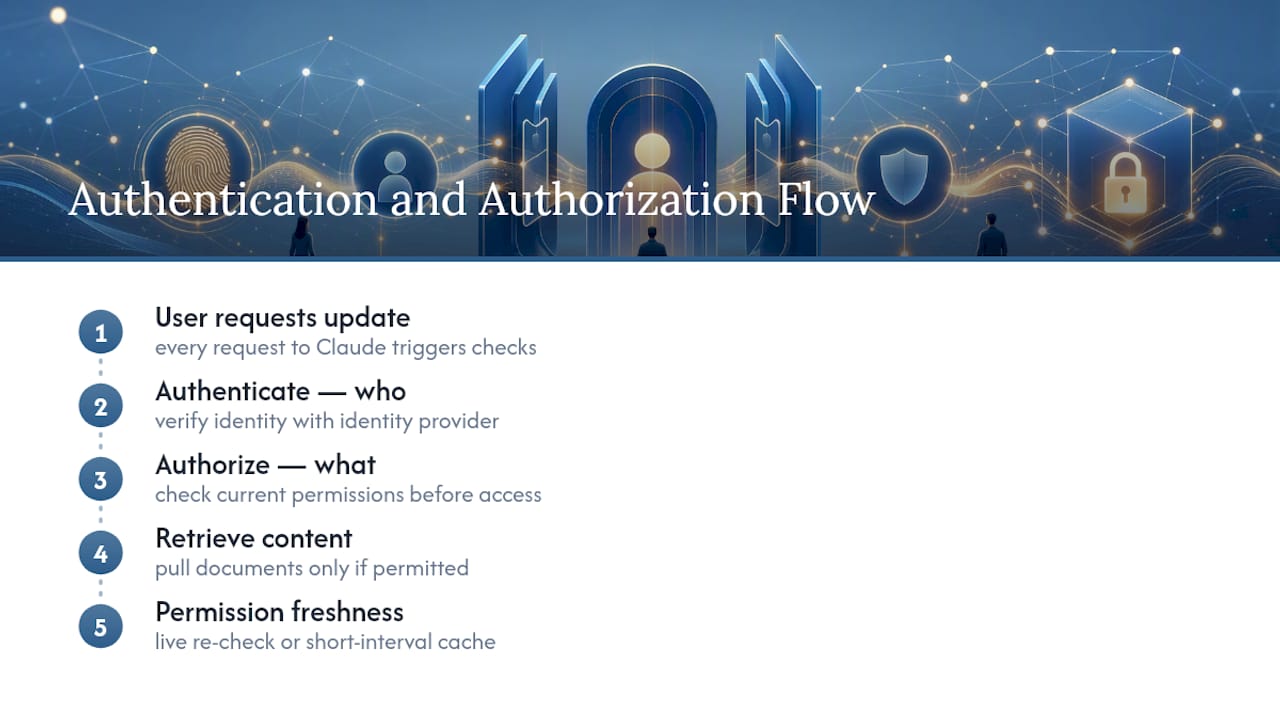
In practice, this means the system checks the requesting user’s identity against your identity provider, then checks what that specific identity is currently permitted to access before pulling any document into the answer. The word “currently” matters. A permission granted six months ago and never revisited is not the same as a permission that reflects today’s org chart.
The mechanism a system uses to keep that check current, whether it re-verifies live or relies on a cache refreshed at short intervals, determines how quickly a permission change actually takes effect. Ask your vendor how fresh that check is. A system that only reconciles permissions once a day leaves a full day of exposure every time someone’s access should have changed.
Handling Sensitive Data Under GDPR and HIPAA
If your company operates in the EU or handles EU resident data, GDPR governs how personal data gets processed, and that includes personal data pulled into a Claude briefing. If you’re in healthcare or handle protected health information, HIPAA sets separate rules around who can access that data and how it must be logged.
Neither regulation was written with AI briefings in mind, but both are built around the same underlying question: can you prove who accessed what, when, and why. That is exactly the audit trail requirement covered earlier, and it applies with extra weight to anything containing personal or health data.
Practically, this means personal data and protected health information belong in their own restricted corpus, gated behind the strictest permission tier in your rollout plan, not blended into a general internal-operations index. Before connecting any HR system, customer database with personal information, or health-related record to a Claude feed, get sign-off from whoever owns compliance at your company. This is not a step to skip for speed. A permission-aware retrieval guide covers how to structure these restricted corpora separately from lower-sensitivity content.
Detecting and Responding to Incidents Involving Claude
An incident response plan for a Claude feed looks a lot like your existing plan for any data system, with one addition: you need to be able to answer what a given briefing showed to a given person, not just what data existed.

Detection starts with the same metrics covered earlier in this guide: a spike in refusal failures, a jump in stale-source citations, or a permission-profile test that suddenly fails should all trigger a review, not wait for a formal incident report. Treat those metrics as your early warning system, not a quarterly report you glance at.
When something does go wrong, the audit trail is what turns a vague worry into a scoped, containable incident. If a briefing surfaced something it shouldn’t have, you need the exact query, the exact permission state at that moment, and the exact documents retrieved. That is what a full-featured audit log is for. Without it, you cannot tell whether the exposure hit one person once or has been happening for months. Have a named owner who gets paged when the metrics trip, and a documented process for revoking access to a corpus immediately if a leak is confirmed, rather than waiting for the next scheduled review cycle.
Third-Party Integrations Carry Their Own Risk
Every tool you connect, meeting notes, GitHub, your calendar, is a new door into your company’s data, and each one deserves the same scrutiny as the document store itself.
The risk concentrates around API keys and service accounts. A connector authenticated with a broad, long-lived API key is a bigger liability than one using short-lived, narrowly scoped tokens, because a leaked broad key exposes everything it touches, while a narrow one limits the damage. Ask any integration vendor what scope their API access requests and whether that scope can be limited to exactly what the briefing needs, nothing more.
A UK-focused architectural guide to enterprise AI security makes a similar point about outdated permissions and inherited access compounding risk as more systems get connected. The more tools you connect, the more this compounds: an integration with GitHub might have write access it never needs, or a calendar connector might pull attendee details from meetings that were never meant to be summarized. A guide to connecting company tools to Claude safely covers how to scope these connections down to read-only, need-to-know access before turning them on.
Why Leaders Should Trade Some Speed for Real Assurance
The tension every leader eventually hits is speed versus proof. Real-time permission checks on every query add latency. Short-lived cached checks are faster but introduce a small window where a revoked permission hasn’t fully propagated yet. There is no version of this that gives you instant answers and zero risk.
My honest read: take the latency. A briefing that arrives two seconds slower because it verified permissions properly is a fine trade. A briefing that arrives instantly but occasionally surfaces something it shouldn’t is not, no matter how good the summary reads. Most companies I’d advise on this get the tradeoff backwards, because latency is visible every single day and a permission failure is invisible until the one day it isn’t.
The checklist and rollout plan in this guide are not bureaucratic overhead. They are the difference between a Claude feed you can defend to a board and one you’re quietly hoping nobody audits. If you want to see what a system built around this checklist actually looks like in practice, see the live demo.
— Paul
Getting Claude Enterprise Security Right Without Building It Yourself
Everything in the checklist above, retrieval-time permission enforcement, source-linked citations on every line, tested offboarding, staged rollout, and a real audit trail, is what ClaudeDrive is built around, not what it bolts on after the fact.

Connect meeting notes, GitHub, and your calendar, and each person on your team gets their own private briefing inside the Claude account they already use. No new app to roll out, no dashboard to learn, nothing to maintain outside of Claude itself. Every line in a ClaudeDrive briefing traces back to a real, allowed source, access controls get enforced at the moment of retrieval rather than checked after the fact, and offboarding an account cuts off access on the same day, not at the next resync. Built by Yungsten Tech, ClaudeDrive is the private company-context layer that feeds Claude, not another tool for your team to adopt.
If you’re weighing whether a Claude feed can meet the bar this guide sets, see the live demo or talk to us about a pilot scoped to one department first.
Sources
- AI data security: hidden risks of AI and data access
- AI governance and audit documentation
- Indirect prompt injection attacks and hidden AI risks
- Enterprise RAG with citation tracking and audit trails