5 Nonnegotiables Leaders Must Require for Context Window Management
Five must haves for leaders to secure context window management: source linked briefings, permission checks at retrieval, freshness controls.
ClaudeDrive
A Yungsten Tech product

5 Nonnegotiables Leaders Must Require for Context Window Management

Context window management is the discipline of deciding which internal documents and tool data reach Claude, and who is allowed to see them, so every leader gets a private, source-linked daily briefing instead of a generic summary. Done right, it replaces status meetings with a briefing you can actually trust. The checklist below is what to demand before rollout.
TL;DR:
- Leaders must verify that each source feeding their briefing has a designated owner and a clear staleness policy to ensure data accuracy.
- Permission checks should occur on every retrieval to prevent unauthorized or outdated information from reaching the leader.
- Each line in the briefing needs to be traceable to a specific, verified source with provenance evidence visible upon request.
- The rollout should include strict controls like source certification, access enforcement, freshness monitoring, and clear ownership roles to prevent leaks and stale data.
- Key metrics to monitor weekly include the percentage of verifiable lines, stale-item rates, and incidents of unauthorized access to ensure system integrity.
Table of Contents
- What Does Context Window Management Actually Mean?
- Why Should Leaders Care About This?
- What Should Leaders Require Before Trusting a Briefing?
- How Do You Roll This Out in Practice?
- Who Owns What Once This Is Live?
- How Do You Know It’s Working?
- What Most Pilots Get Wrong
- See How ClaudeDrive Handles This End to End
- Sources
What Does Context Window Management Actually Mean?
Forget engineering talk about token limits or sliding windows. For a CEO or COO, context window management means something simpler: choosing which internal sources feed a leader’s Claude briefing, and enforcing exactly who is permitted to see each piece of it.
The sources are usually mundane and familiar:
- Meeting notes and transcripts from recurring syncs
- GitHub activity: commits, pull requests, issue threads
- Calendar events and scheduling changes
- Shared files, wikis, and internal documents
What makes this governance rather than plumbing is provenance. Every line in a leader’s briefing should trace back to a real, specific source. A permission-aware retrieval framework checks that permission against the system of record before the line ever reaches Claude, not after. Without that step, you’re trusting a summary you can’t verify.
Why Should Leaders Care About This?
Stale or unauthorized data doesn’t just produce a bad summary. It propagates. A briefing built on last week’s roadmap, or one that surfaces a compensation thread to the wrong person, can trigger a decision that ripples through the organization before anyone catches the error. Data provenance functions as the trust layer for agentic systems precisely because bad inputs at the source become bad actions downstream, and by the time someone notices, the damage is already booked.
The upside is proportional to the risk. Leaders who trust their daily briefing stop calling status meetings to double-check what already happened. Chiefs of staff stop chasing five people for the same update. Decisions move faster because nobody is re-verifying the data before acting on it.
Provenance isn’t a nice-to-have layered on top. It’s the difference between a briefing a leader can act on and one they have to independently confirm, which defeats the purpose entirely.
What Should Leaders Require Before Trusting a Briefing?
Before any team rolls this out, leaders should insist on five non-negotiables. These aren’t technical preferences. They’re the difference between a briefing you can act on and one you have to double-check.
- Source certification. Every connected source needs a named owner and a documented staleness policy. Nobody should be surfacing information from a source nobody’s accountable for.
- Permission enforcement at retrieval, every time. Access checks happen at the moment of retrieval, not once at setup. A permission-aware retrieval approach validates permissions against the real system of record on every single request.
- Line-level provenance. Each sentence in the briefing should be traceable to a specific document, message, or commit. No unsourced claims.
- Quarantine on missing permission data. If a connector can’t confirm who’s allowed to see something, that content gets held back, not indexed by default.
- Freshness controls. Time-to-live windows and change-detection subscriptions keep the briefing from quietly going stale while nobody notices.
Pro Tip: Ask your platform lead one question before launch: “What happens when a connector can’t determine who’s allowed to see this file?” If the answer is “it gets included anyway,” you’re not ready to roll out.
Preserving the original context around each piece of data, rather than stripping it down during cleanup, matters more than most teams assume. Annotating data as it’s collected keeps the business meaning intact instead of normalizing it away.
How Do You Roll This Out in Practice?
Treat this as a phased rollout, not a one-time integration. Here’s the sequence that keeps it manageable:
- Define scope and ownership. Pick the teams, context types, and a small group of pilot leaders before touching a single connector.
- Catalog and certify sources. Every asset gets a named owner and a staleness policy attached to it.
- Verify connectors preserve access rules. If a connector can’t carry over who’s allowed to see what, quarantine that content rather than indexing it blind.
- Enforce permission checks at request time. Validate access on every single retrieval, not just at setup.
- Render provenance in every update. Each line in the briefing needs a visible, checkable source.
- Wire up freshness monitoring. Set TTLs and change-detection subscriptions so stale data gets flagged automatically.
- Build the audit and revocation playbook. Know exactly how access gets pulled the moment someone leaves or changes roles.
- Pilot small, then expand. Run it with a handful of leaders first. Measure what breaks. Then scale.
A short pilot beats a big-bang launch every time. You’ll surface the actual failure modes, connectors that mishandle access rules, sources nobody’s watching for freshness, before they touch your whole leadership team’s briefing.
Who Owns What Once This Is Live?
Rollout stalls when nobody’s clearly accountable for each piece. Three roles need clear decision rights from day one:
- Data owner: accountable for a specific source’s accuracy, certification, and staleness policy.
- Platform or product owner: responsible for connector health, quarantine behavior, and whether permission data is flowing correctly.
- Policy steward: owns the rules for who can see what, and signs off before any new source gets connected.
The chief of staff’s job here is oversight, not implementation. A short weekly check, are all sources still certified, has anything gone stale, have any connectors thrown errors, catches drift before it reaches a leader’s briefing. New sources should go through a lightweight approval flow: the requesting team proposes it, the policy steward confirms access rules translate cleanly, and the platform owner confirms the connector can actually enforce them. Skip that flow and you’ll eventually find a source that leaked something it shouldn’t have.
How Do You Know It’s Working?
Three numbers tell you almost everything. Track them weekly, not quarterly.
| Metric | What it tells you |
|---|---|
| Percent of briefing lines with resolvable provenance | Whether the briefing is verifiable or just plausible-sounding |
| Stale-item rate | Whether freshness controls are actually catching outdated content |
| Unauthorized retrieval incidents | Whether permission enforcement is holding under real use |
Run occasional revocation drills too: pull someone’s access and confirm their next briefing reflects it immediately. Provenance coverage and policy-fingerprint divergence are the two numbers that map most directly to fewer decision errors and fewer “wait, is this still accurate?” follow-up emails.
What Most Pilots Get Wrong
The pilot that fails isn’t the one with a bad connector. It’s the one where nobody defined who owns staleness before launch, so three weeks in, a leader is making a call off a briefing built from a two-month-old roadmap doc, and nobody notices until the decision’s already made.
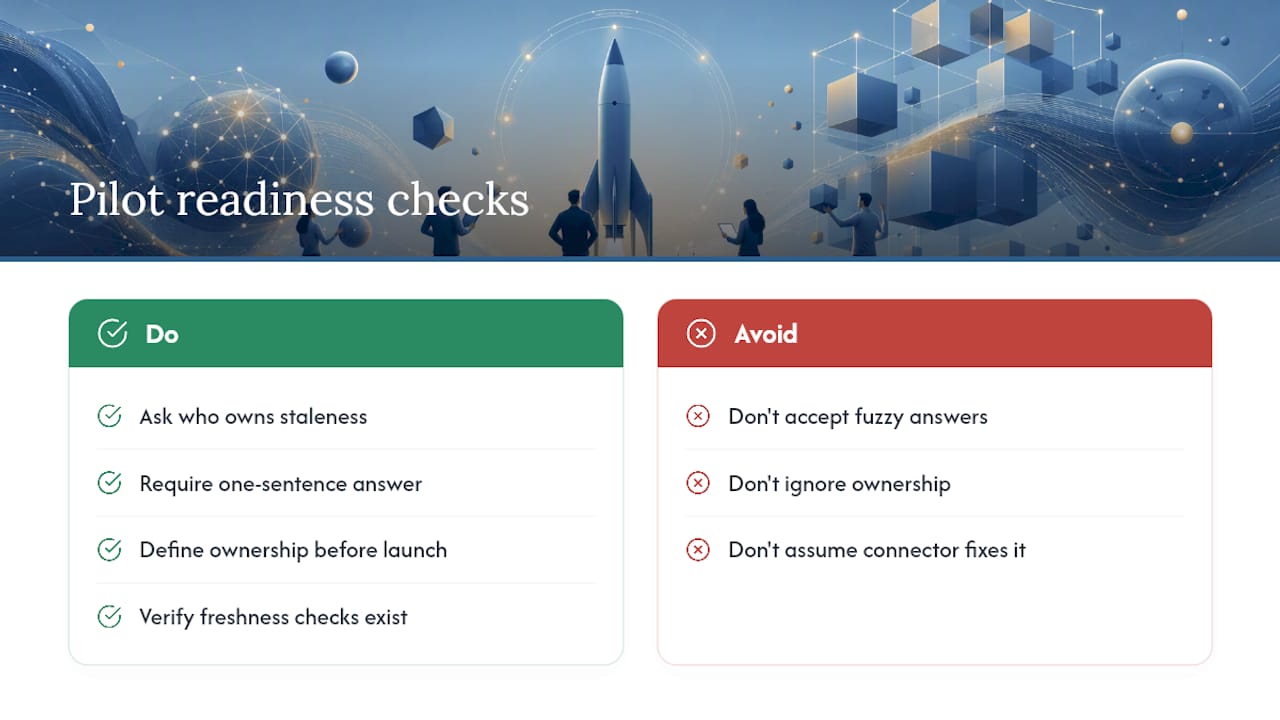
Before green-lighting any pilot, ask your platform lead this: “If a source goes stale tomorrow, who finds out, and how fast?” If the answer takes more than a sentence, the pilot isn’t ready.
Paul covers governance and AI infrastructure for growing companies, with a focus on how leadership teams operationalize trust in AI-driven reporting.
— Paul
See How ClaudeDrive Handles This End to End
Most teams trying to build this checklist from scratch end up stitching together three or four tools and still can’t answer “where did this line come from” with confidence. ClaudeDrive is built specifically so you don’t have to.

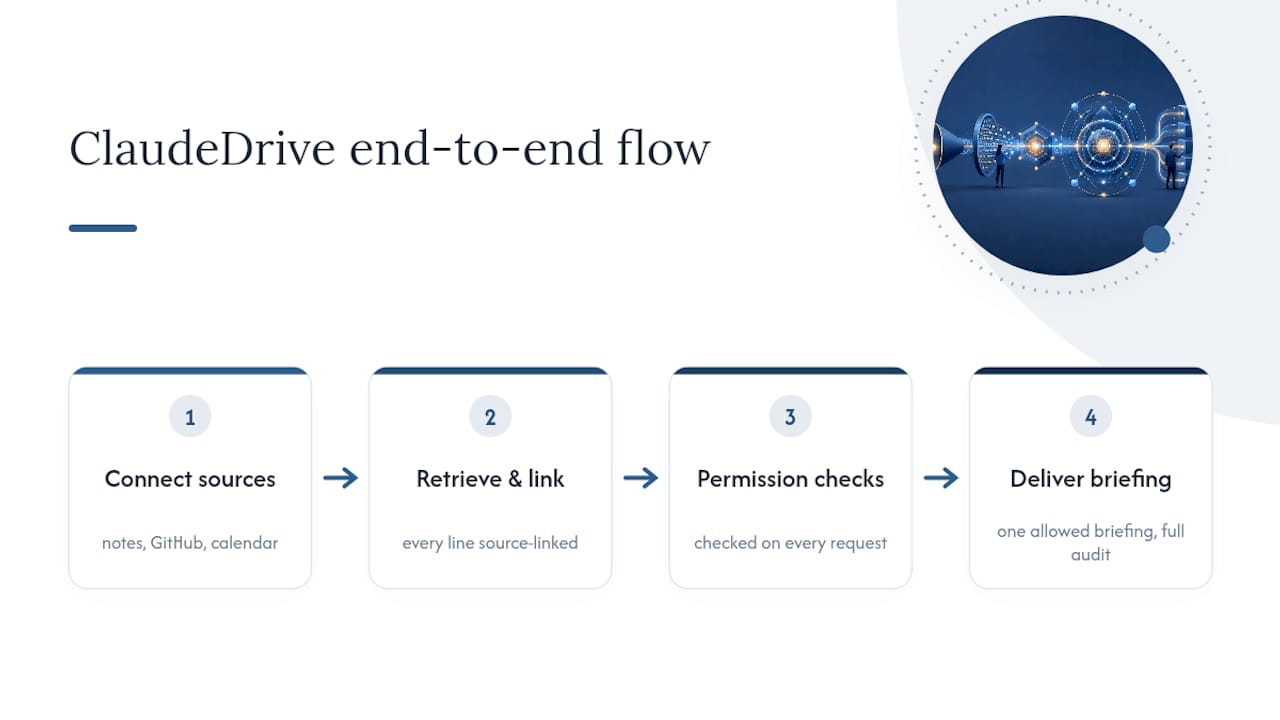
Connect meeting notes, GitHub, and your calendar, and ClaudeDrive handles the rest: every line in a leader’s briefing is source-linked, permission checks run on every request, and nothing crosses a line someone shouldn’t see. There’s no new app to roll out and no dashboard to learn. You open Claude, ask for your update, and read one briefing built only from what you’re allowed to see, with a full audit trail behind it if you ever need to check. For deeper technical grounding on how permission checks should work at retrieval, see this guide on enforcing access control at retrieval.
See the live demo or talk to us about a pilot for your team.
Sources
For deeper background, see Data Provenance: The Trust Layer For Agentic AI, lineage versus provenance, and ClaudeDrive’s guide on AI update traceability for business leaders for measurement frameworks worth adapting to your own rollout.
- Data Provenance: The Trust Layer For Agentic AI
- Never mind clean data — annotate as you collect it
- Permission-aware RAG: identity and access management (IAM)-based access control