Keep Multiple Companies Separate in One AI Account
Discover how to keep multiple companies separate in one AI account with secure access, data isolation, and reliable admin controls.
ClaudeDrive
A Yungsten Tech product

Keep Multiple Companies Separate in One AI Account

Yes, you can keep multiple companies strictly separate inside one AI account — provided the platform enforces three non-negotiable guarantees before you connect a single tool.
- Per-context OAuth scopes. Each connector ties to one company’s context only. Connecting a tool for Company A cannot expose it to Company B by design.
- Retrieval-layer data isolation. Separation enforced at ingestion and retrieval means the assistant never pulls from a shared memory pool. If the platform’s memory is shared across contexts, leakage is likely even when connectors are scoped correctly.
- Admin RBAC and audit trails. You need role-based access controls, per-context logging, and instant offboarding before you trust any platform with two companies’ data.
ClaudeDrive is built around exactly these three guarantees. Open Claude, ask for your morning update, and you get one clear briefing built only from what you’re allowed to see — every line traceable to a real source, nothing crossing a line it shouldn’t.
Table of Contents
- Can you keep multiple companies separate in one AI account?
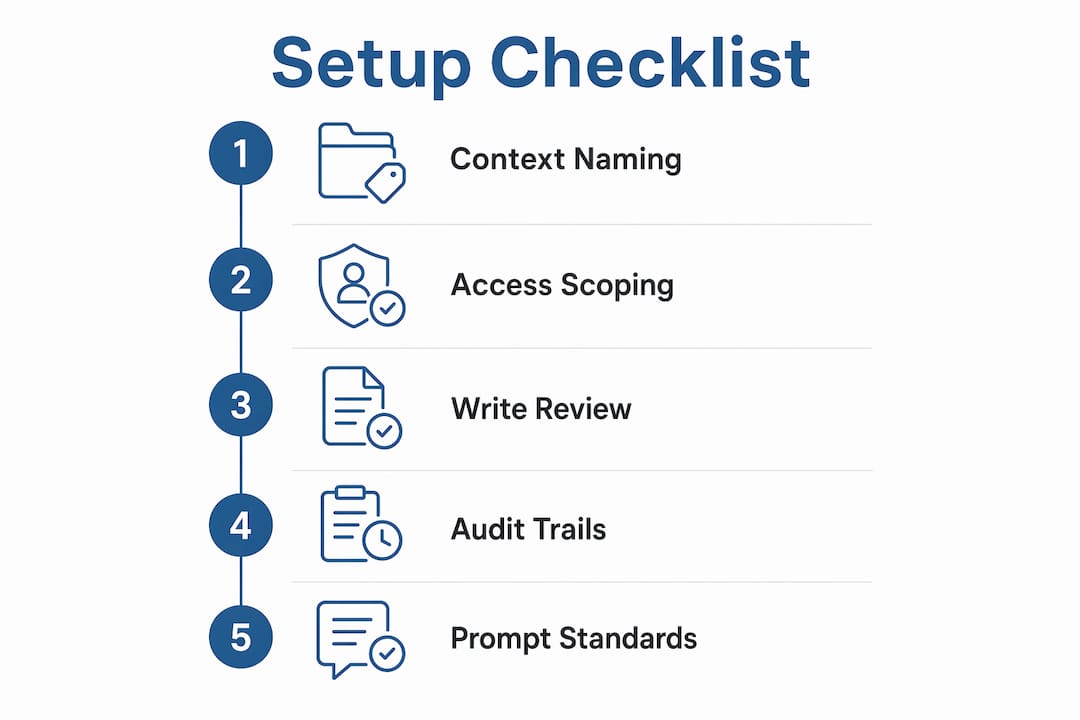
- Day-one admin checklist: how to set this up and verify separation
- What admin controls and governance should leaders insist on?
- Top mistakes leaders make when managing multiple companies in AI
- Typical rollout timeline and cost considerations
- How ClaudeDrive implements multi-company separation for leaders
- Key Takeaways
- The case for one account over many logins
- ClaudeDrive gives leaders a daily update they can trust
- Useful sources and next reads
Can you keep multiple companies separate in one AI account?
The short answer is yes, and the mechanism is simpler than most leaders expect. The platform holds multiple isolated “contexts” or “spaces” under a single login. Each context has its own connectors, its own permission set, and its own retrieval scope. When you ask Claude for a Company A update, the retrieval layer only queries Company A’s authorized sources. Company B’s data is not in scope — not because the assistant is careful, but because the architecture makes it technically unavailable.
Think of it as a control plane with isolated lanes underneath. A single admin dashboard gives you centralized oversight while each company runs its own distinct goals, connectors, and agent actions. You approve, review, and offboard from one place. The data never mingles.
A simple mental model: picture three boxes. Box one is Company A’s context, box two is Company B’s context, and box three is the control plane where you manage both. The control plane can see both boxes. Neither box can see the other. That boundary is enforced at the source, not by a policy you have to remember to apply.

When Claude generates your daily update, each line carries a source label — “from Company A’s Monday standup notes” or “from Company B’s GitHub commit log.” Nothing is synthesized across contexts. Nothing is made up.
Day-one admin checklist: how to set this up and verify separation
Do these steps in order. Skipping one creates the gap where leakage happens.
- Name your contexts explicitly. Create a distinct named space for each company before connecting anything. The name matters — you’ll reference it in every prompt.
- Run per-context OAuth handshakes. Connect each tool (calendar, GitHub, meeting notes) separately inside each context. One OAuth grant per platform per client creates a technical barrier before retrieval even begins.
- Scope each connection. Reference-only tools get read-only access. Reserve write scopes for the specific context where you act, not where you observe.
- Assign roles. Decide who can create connectors, who can approve them, and who can only read updates. Enforce least-privilege defaults from day one.
- Enable audit logging per context. Every retrieval, every agent action, every offboarding event should produce a log entry tied to a specific context.
- Build an offboarding playbook. Document the exact steps to revoke a context’s access in under five minutes. Test it before you need it.
- Verify with a named-context prompt. Ask Claude: “Give me this morning’s revenue note from Company A — show source labels.” If the response includes anything from Company B’s sources, the retrieval layer is not properly scoped.
Pro Tip: Always include the context name in your prompt — “Company A’s pipeline update” rather than just “pipeline update.” Explicit named scoping in every task is the single habit that prevents most cross-context mistakes.
⚠️ Write-scope warning: Any connector with write access should sit behind a human review step. Never grant write scopes to a context you haven’t fully tested in read-only mode first.
What admin controls and governance should leaders insist on?
You should be able to cut any context’s access and pull a full audit trail in under five minutes. If a vendor can’t demonstrate that, the architecture isn’t ready for multi-company use.
The controls that matter most, and the questions to ask:
| Control | What it guarantees | Leader question to ask |
|---|---|---|
| Per-context OAuth scopes | Each tool connects to one company only | “Can I connect the same tool to two contexts with separate grants?” |
| Per-space audit logging | Every retrieval is traceable to a context | “Can I export a log of what Company A’s context retrieved this week?” |
| Real-time offboarding | Access revoked instantly, not on a schedule | “How long between my request and full token revocation?” |
| Source-labeled retrievals | Every update line cites its originating source | “Does the daily update show which document each line came from?” |
| Admin RBAC | Roles control who creates, approves, and reads | “Can I prevent a team member from connecting new tools without approval?” |
The strongest isolation comes from scoping access at the source — specific OAuth grants to specific Google Drive folders, GitHub repos, or calendar accounts — rather than relying on folder-level permissions applied after the fact. Folder permissions can be misconfigured. A scoped OAuth grant is a technical barrier.
For AI-native organizations, a financial control layer that specifies entity ownership, viewing permissions, and approval flows is equally important alongside the AI access layer. These two governance layers should be designed together, not bolted on separately.
Top mistakes leaders make when managing multiple companies in AI
Most cross-context leaks trace back to four predictable errors.
- Over-connecting tools. Connecting every available integration “just in case” expands the blast radius if something goes wrong. Connect only what each context actually needs.
- Relying on shared-memory defaults. Some platforms share a memory layer across all contexts by default. If retrieval isn’t isolated by design, scoped connectors alone won’t protect you.
- Ambiguous prompt language. Asking for “the pipeline update” without naming a context invites the assistant to guess. It will sometimes guess wrong.
- Ungated write access. Granting write scopes without a human review step means an agent can act on the wrong company’s data before anyone notices.
Pro Tip: Require every team member who prompts the AI to include the company name in their request. “The client’s HubSpot” rather than “HubSpot” removes ambiguity entirely and costs nothing.
The corrective action for each is the same pattern: name the context explicitly, scope at the source, and put write actions behind a review step.
Typical rollout timeline and cost considerations
A small multi-company rollout typically runs 1–4 weeks, depending on how many connectors you need and how complex your governance structure is.
| Phase | Typical duration | Who owns it |
|---|---|---|
| Discovery and context naming | a few days | Ops lead or chief of staff |
| OAuth connections and scoping | several days | Ops lead with IT support |
| Permissioning and pilot | about a week | Admin + one pilot team per company |
| Verification and full rollout | about a week | Admin, with leader sign-off |
Cost factors to watch: the number of connectors per context, seat counts under a team plan, whether enterprise audit features carry an additional tier, and professional services if your org structure requires custom permission mapping.
A single account with design-level isolation is almost always more efficient than maintaining separate logins and duplicate subscriptions. You avoid re-authenticating constantly, consolidate billing, and keep all workstreams visible from one control plane.
The exception: if two companies must be legally or regulatorily separated — separate legal entities with conflicting compliance obligations, or a situation where even a shared admin view creates a conflict — separate login accounts are the right call. That’s a governance decision, not a technical one.
How ClaudeDrive implements multi-company separation for leaders
ClaudeDrive is a permission-aware company-context layer that feeds Claude with source-labeled updates and enforced retrieval isolation. You don’t adopt a new assistant. You don’t learn a new dashboard. You connect your tools, tag who’s allowed to see what, and ask Claude for your update.
What leaders get operationally:
- Per-context OAuth connectors for meeting notes, GitHub, calendar, and other work tools — each scoped to one company’s context
- Scoped read vs. write access with write actions gated behind a human review step
- Admin RBAC and audit trails so you can see exactly what each context retrieved and when
- Instant offboarding — revoke a context’s access in one action, with a full log of what it accessed
- Source-labeled lines in every update, so you know which document each claim came from
ClaudeDrive is free for individual use. Team and organizational pricing begins when multi-person or multi-company use starts. Permission-aware updates for each leader, each company, each morning — inside the Claude account you already have.
See the live demo or talk to us about a pilot.
Key Takeaways
Keeping multiple companies separate in one AI account is achievable when the platform enforces per-context OAuth scopes, retrieval-layer isolation, and admin RBAC with audit trails.
| Point | Details |
|---|---|
| Three non-negotiable guarantees | Require per-context OAuth, retrieval-layer isolation, and admin RBAC before connecting any company’s data. |
| Name contexts in every prompt | Explicit context naming in each request is the single habit that prevents most cross-context leaks. |
| Scope at the source | Per-context OAuth grants create a technical barrier; folder-level permissions alone do not. |
| Rollout runs 1–4 weeks | Discovery, OAuth setup, permissioning, and verification are the four phases for a small multi-company deployment. |
| ClaudeDrive as implementation | ClaudeDrive enforces retrieval isolation and source-labeled updates inside Claude, with instant offboarding and admin audit trails. |
The case for one account over many logins
The conventional wisdom — give each company its own login to keep things clean — sounds safe but creates real operational drag. You re-authenticate constantly, billing fragments across accounts, and you lose the unified view that makes a control plane useful in the first place.
The better model is one account with multiple isolated contexts, where separation is enforced by the architecture, not by the discipline of whoever is prompting. That’s a meaningful distinction. Human discipline fails under pressure. A scoped OAuth grant doesn’t.
Three recommendations worth adopting as policy today: require named-context phrasing in every AI prompt across your organization; audit connector lists for each context quarterly and remove anything not actively used; and test your offboarding playbook before you need it, not after.
ClaudeDrive gives leaders a daily update they can trust
If you’re running two or more companies and need each leader to see only what they’re authorized to see, ClaudeDrive is built for exactly that. Design-level retrieval isolation, per-context OAuth connectors, full audit trails, and instant offboarding — all inside the Claude account your team already uses.

No new app. No dashboard to learn. Connect your tools, set who sees what, and each leader gets their own source-linked briefing every morning. The ClaudeDrive console is where you set it up and manage it.
See the live demo or talk to us about a pilot.
Useful sources and next reads
Research and vendor documentation:
- Multi-Client MCP Setup: How One Agency Manages 30 Accounts in Claude — real-world example of per-client OAuth at scale
- Multiple AI Brains: One Account, Separate Spaces — explains retrieval-layer isolation and named-context scoping
- AI-Native Startups Need a Financial Control Layer — governance framing for multi-entity organizations
ClaudeDrive implementation guides:
- Centralize company updates with an AI feed — unified AI interface for executive oversight
- Benefits of scoped AI company updates for leaders — OAuth and authentication patterns per context
- AI briefing executives can trust — source-linked executive briefings inside Claude
Vendor security checklist for procurement:
When evaluating any platform for multi-company AI use, request written confirmation of: per-context OAuth scopes, retrieval-layer isolation (not just connector scoping), per-space audit log export, real-time token revocation on offboarding, and source labels on every retrieved line. Any vendor that can’t answer all five clearly isn’t ready for multi-company deployment.