The Permission-Aware Layer That Feeds Claude Daily
Discover how a permission-aware layer enhances Claude by providing secure, daily briefings tailored for your team's needs without compromising sensitive data.
ClaudeDrive
A Yungsten Tech product

The Permission-Aware Layer That Feeds Claude Daily

A permission-aware company-context layer feeds Claude — it gives leaders daily, source-linked briefings inside their team’s Claude account built only from what they’re allowed to see. Every line traces back to a real record. Nothing leaks across access lines. No new app to roll out, no dashboard to maintain.
Talk to us about a pilot at ClaudeDrive.
Key Takeaways
A permission-aware context layer feeds Claude with source-linked, access-controlled briefings — giving leaders trusted daily updates inside Claude without a new app or dashboard.
| Point | Details |
|---|---|
| Enforce access at retrieval | Permission checks must run when a record is pulled, not only at login, to prevent cross-role data exposure. |
| Require source citations | Every briefing line should trace to a specific record and retrieval timestamp — ask to see a live example. |
| Run a two-week pilot first | Start with one leader and three connected sources, as described in the phased rollout, then audit citations and access boundaries before expanding. |
| Govern the catalog weekly | Assign a chief of staff or admin to review sources, ownership, and access profiles on a recurring cadence. |
| ClaudeDrive fits this job | ClaudeDrive enforces permissions at retrieval, cites every line, and runs entirely inside your existing Claude account. |
Table of Contents
- Why every executive needs a permissioned feed inside Claude
- What guarantees must any solution feeding Claude provide?
- How does a daily briefing workflow actually run?
- Phased rollout for a small to mid-sized company
- How should you evaluate a vendor for this job?
- What does day-to-day governance actually look like?
- What security and compliance checks should you require before rollout?
- The case for a context layer over a replacement
- ClaudeDrive delivers the permissioned feed your leadership team needs
- Sources
Why every executive needs a permissioned feed inside Claude
The problem isn’t that Claude is untrustworthy. The problem is that without a governed context layer, Claude answers from whatever it can reach — and in a shared team account, that can be more than any one person should see.
Security reporting has documented how internal AI assistants amplify inherited permissions, exposing sensitive records at scale when repositories aren’t governed. A small growth company has an exposure surface similar to that of an enterprise — HR comp data, investor terms, unreleased roadmap items — just with fewer people watching.
The outcome leaders actually want is simple: open Claude in the morning, ask for your update, and read something accurate and complete for your role. Forbes analysis confirms that when AI fuses data from multiple sources — calendar, GitHub, meeting notes, HR systems — the central challenge is making sure each person sees only what they’re entitled to see. That guarantee doesn’t come from Claude itself. It comes from the layer feeding it.
Metacto’s guidance on executive AI trust makes the point plainly: trustworthy outputs are proportional to the quality of business context the AI receives. A permission-aware feed is what makes that context both rich and safe. For permission-aware updates to work at the leadership level, the layer must enforce access at retrieval time, not just at login.
What guarantees must any solution feeding Claude provide?
Before you evaluate a vendor, agree on what “trustworthy” actually requires. These are the non-negotiables:
- Permission enforcement at retrieval time. Access checks happen when a record is pulled, not just when a user logs in. A document restricted to the CFO never surfaces in the COO’s briefing.
- Source-level provenance on every line. Each sentence in a briefing cites the exact record it came from. Citation-first architectures refuse to answer when no approved source supports the claim.
- Immutable retrieval logs and prompt-response traces. Every retrieval, every inference, every briefing is logged and cannot be altered after the fact.
- Least-privilege agent identities. MIT Technology Review’s governance guide recommends treating each agent as a non-human principal with constrained, auditable credentials — no long-lived tokens, no broad scopes.
- Runtime detokenization controls. Sensitive fields (compensation, legal terms) are masked at the point of delivery unless the requesting user holds explicit access.
These aren’t enterprise-only requirements. Even very small companies with limited teams and product lines need clean access separation.
Pro Tip: Ask any vendor to show you a sample audit trail that links a single briefing line to the exact source record and the timestamp of retrieval. If they can’t produce it in five minutes, the trail doesn’t exist.
How does a daily briefing workflow actually run?
The sequence is shorter than most leaders expect. Here’s a minimal end-to-end path:
- Connect your sources. Link calendar, meeting notes, GitHub, and shared file storage. Each connector brings in structured metadata alongside content.
- Run automated discovery. The layer scans connected sources, catalogs what exists, and flags records without an assigned owner or classification.
- Assign ownership and classification. A chief of staff or admin tags each source: who owns it, what sensitivity level it carries, who is allowed to retrieve from it.
- Define access by role. Map each leader’s role to the sources they’re permitted to see. The COO’s profile differs from the CTO’s. Neither sees HR comp data unless explicitly granted.
- Gate new sources before ingestion. MIT Technology Review notes that many AI incidents start with adversarial or poisoned content hidden in sources — review and approve each new connector before it enters the retrieval corpus.
- Run a pilot briefing for one leader. The CEO or COO opens Claude, asks for their daily update, and reads a briefing built only from their permitted sources. Every line carries a citation.
- Audit the pilot output. Confirm that no restricted records appeared, that every citation resolves to a real source, and that the log captures the full retrieval chain.
- Expand to the full leadership team. Once the pilot passes audit, roll access profiles out to each leader. Each person gets their own private view.
The flow is: source → permission layer → Claude. Claude never touches a record the layer hasn’t already cleared for that user.
Phased rollout for a small to mid-sized company
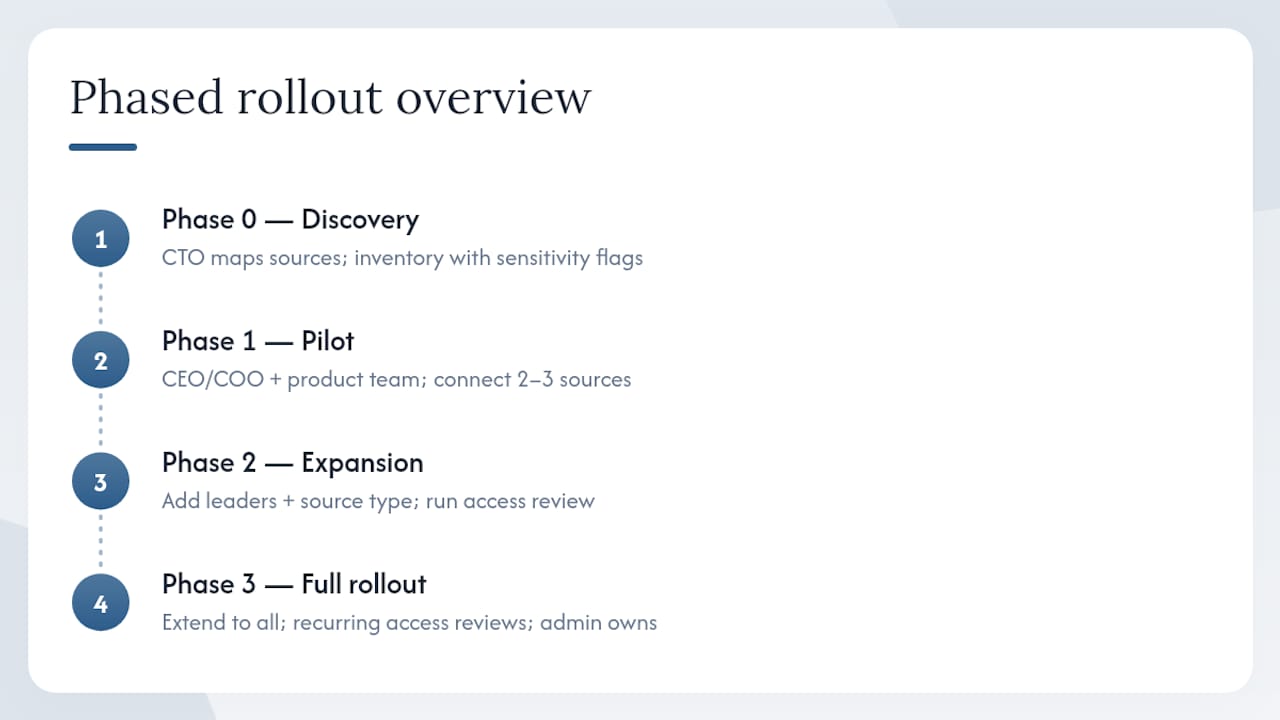
A realistic deployment runs across four phases. Ownership and timing matter more than tooling.
Phase 0 — Discovery and inventory (Days 1–5). The CTO or a technical admin maps every source the company uses: where meeting notes live, which GitHub repos matter, what file shares exist. Output: a source inventory with owners and sensitivity flags.
Phase 1 — Pilot onboarding (Days 6–14). One leader (typically the CEO or COO) and one team (say, the product team) go live. Connect two or three sources, define access profiles, run the first briefings. The chief of staff owns the daily check that citations resolve correctly.
Phase 2 — Measured expansion (Weeks 3–5). Add two or three more leaders and one additional source category. Run an access review at the end of this phase. Confirm offboarding works: remove a test user and verify their access disappears immediately.
Phase 3 — Full team rollout (Weeks 6–8). Extend to all leaders and relevant contributors. Establish a recurring cadence for access reviews and catalog updates. The admin owns this ongoing.
Cost friction points to anticipate: connector licensing for third-party tools, admin time for initial classification (typically a few hours, not days for a sub-80-person team), and one engineering touchpoint to validate the source-gating configuration. TechTarget’s reporting on ERP and AI context reinforces that metadata and ownership mapping — not just raw access — are what make downstream outputs safe and meaningful.
How should you evaluate a vendor for this job?
The criteria that matter to a CEO or COO aren’t the same ones an engineer would optimize for. Score any vendor on these:
- Traceability. Can every briefing line be linked to a specific source record and retrieval timestamp? See a live example before you commit.
- Permission enforcement model. Does access get checked at retrieval time, or only at login? The former is the only safe design. See ClaudeDrive’s access-control design guide for what this looks like in practice.
- Integrations. Calendar, meeting notes, GitHub, and file shares are the minimum for a leadership briefing. Ask which connectors are production-ready versus experimental.
- Rollout friction. How many engineering days does onboarding require? A solution that needs a three-month implementation isn’t a fit for a 30-person company.
- Auditability. Are logs immutable? Can you export them? What’s the retention period?
- Ongoing maintenance burden. Who runs access reviews? How are new sources approved? If the answer is “your team figures it out,” that’s a hidden cost.
- Pricing model. Subscription SaaS with a per-team tier is the norm. Confirm whether connectors are included or licensed separately.
ClaudeDrive meets each of these criteria directly: permission checks run at retrieval, every briefing line carries a source citation, connectors cover calendar, meeting notes, GitHub, and file shares, and the entire experience lives inside Claude — no new app, no separate dashboard. Audit workflows are built in from day one.
What does day-to-day governance actually look like?
A permission-aware feed requires a living catalog and a small set of recurring tasks. Here’s how to structure it:
| Control | Owner | Cadence |
|---|---|---|
| Source catalog review (new sources, ownership changes) | Chief of staff or admin | Weekly |
| Access profile review (role changes, offboarding) | Admin | On every personnel change + monthly sweep |
| Audit log sampling (spot-check citation accuracy) | Chief of staff | Bi-weekly |
| Classification updates (sensitivity re-tagging) | Source owner | Quarterly or on content change |
| Automated discovery run (detect new repositories) | CTO or admin | Weekly |
Security Magazine’s operational guidance identifies automated discovery, continuous mapping, operational classification, and enforceable runtime guardrails as the four pillars that prevent internal AI from turning non-transparency into exposure. For a sub-80-person team, these tasks total a few hours per month once the initial catalog is built.
What security and compliance checks should you require before rollout?
Before signing a contract, confirm these assurances in writing:
- Enforced data-layer access controls. Permission checks happen at the retrieval layer, not just at the application layer.
- Immutable retrieval logs. Logs cannot be modified after the fact. Ask for the retention period and export format.
- Traceability to source records. Every output can be traced to the specific record and retrieval event that produced it, per Databricks’ traceability framework.
- Scoped service identities. The system uses constrained credentials per task, not a single broad service account, consistent with MIT Technology Review’s agentic governance recommendations and NIST access-control guidance.
- SOC 2 Type II or equivalent. Ask for the current report or a timeline to certification.
Suggested contract clauses: audit rights (your team can inspect logs on request), SLA for offboarding and data deletion (48 hours is a reasonable floor), security incident notification (24-hour window), and written confirmation that audit trails are immutable. Google’s Secure AI Framework (SAIF) and NIST guidance both treat these controls as baseline, not advanced — any vendor positioning them as premium features is a signal to probe further. For protecting high-sensitivity content like investor or HR data, see ClaudeDrive’s privacy guide for leaders.
The case for a context layer over a replacement
The instinct to replace Claude with a custom assistant is understandable — you want control. But it trades one problem for three: you now own the model, the interface, and the trust problem. A permission-aware context layer solves the trust problem without touching the model or the interface your team already uses. Leaders open Claude, ask their question, and read a briefing built only from what they’re allowed to see. That’s the outcome. The layer is what makes it reliable.
The pilot is the fastest way to see whether a vendor’s guarantees hold. Two weeks, one leader, three connected sources. Either the citations resolve and the access lines hold, or they don’t.
ClaudeDrive delivers the permissioned feed your leadership team needs
ClaudeDrive connects your meeting notes, calendar, GitHub, and file shares to Claude — and enforces who sees what at the moment of retrieval. Every briefing line cites its source. Nothing surfaces that the reader isn’t cleared to see. Offboarding is immediate. No new app, no dashboard, no wiki to maintain.

The entire experience lives inside the Claude account your team already has. A pilot typically takes about two weeks and requires minimal engineering time. For initial pilots, the recommended setup is one leader and three connected sources, as outlined in the rollout phase guidance. See the live demo or talk to us about a pilot at the ClaudeDrive Console.
Sources
- The Copilot Problem: Why Internal AI Assistants Are Becoming Accidental Data Breach Engines | Security Magazine
- How can a company keep AI outputs traceable back to approved sources and records? | Databricks
- From guardrails to governance: A CEO’s guide for securing agentic systems | MIT Technology Review
- The biggest access-control challenge in AI: managing multisource data in enterprises | Forbes
- Why AI Source Citations Are Becoming Mandatory