How to Build an AI Project Status Digest Workflow
Discover how to streamline your project status reporting with an AI digest workflow that saves time and enhances decision-making for leaders.
ClaudeDrive
A Yungsten Tech product

How to Build an AI Project Status Digest Workflow

A permission-aware AI project status digest workflow can deliver executive-ready TL;DRs, shipped items, blockers, and risk signals, with traceable sources, in under five minutes of leader time per day. The recipe is straightforward: pull data from your connected PM tools, synthesize with an auditable model, and distribute audience-specific extracts to the right people. PMI’s research on AI in project management frames this well: treat AI as intelligence augmentation for routine summarization, and keep human judgment where the stakes are high.
For leaders ready to pilot now, the first run needs exactly six elements:
- TL;DR: one-line progress, one-line top risk, both sourced
- Shipped: deliverables and milestones with date and source link
- In progress: active items with owner and last-touched date
- Blockers: owner name and days stuck
- Risk score: 1–5 with escalation hint
- Source citations: every line traces back to a named task, file, or channel
Pick one pilot project, connect several relevant data sources such as task board, calendar, and chat channels, and schedule deliveries daily or weekly. That’s the whole pilot.
Pro Tip: Before you write a single prompt, map your data sources on paper. Knowing which tool owns the ground truth for each digest field prevents duplicate evidence and contradictory claims later.
Key Takeaways
A permission-aware AI project status digest workflow delivers executive-ready briefings with traceable sources when you enforce citation-first prompts, pin model versions, and run human review for the first two weeks.
| Point | Details |
|---|---|
| Start with three data sources | Connect your task board, calendar, and one chat channel before adding more sources. |
| Enforce citations on every line | Require a task ID, file name, or channel reference for each digest claim to prevent hallucination. |
| Run human review for two weeks | A PM and one stakeholder should verify every digest line and track the correction rate before scaling. |
| Pin your model version | Monitor provider advisories and test any model update against known scenarios before promoting it to production. |
| ClaudeDrive removes the build burden | Leaders get sourced, permission-aware digests inside Claude with no new dashboard, instant offboarding, and a full audit trail. |
Table of Contents
- What must an AI project status digest actually contain?
- Which workflow patterns actually work in practice?
- How do you go from pilot to production?
- What prompts and templates should you use?
- How do you keep digests trustworthy and auditable?
- ClaudeDrive delivers this workflow without a new dashboard
- What metrics tell you the workflow is actually working?
- What to expect in the first eight weeks
- Sources
What must an AI project status digest actually contain?
The digest format that works for leadership is not a wall of task IDs. It’s a structured briefing where every field answers a specific question a leader would otherwise have to ask.
| Section | What it answers | Required fields |
|---|---|---|
| Executive TL;DR | Where are we and what’s the top risk? | One-line progress + one-line risk + source |
| Shipped / Done | What was delivered this period? | Item name, date, owner, source link |
| In Progress | What’s actively being worked? | Item name, owner, last-touched date |
| Planned / Due Soon | What’s due soon? | Milestone, due date, owner |
| Blockers | What’s stuck and for how long? | Item, owner, days blocked |
| Risk & Impact | What could derail the project? | Risk description, score (1–5), escalation hint |
The TL;DR earns its credibility only when the claims are sourced. A one-liner that states progress clearly and includes source references is trustworthy. That distinction is what separates a digest a leader will act on from one they’ll second-guess.
Audience tailoring matters more than most teams expect. A leadership digest should surface high-level milestones and risk scores. A team digest should include item-level links, owner handles, and last-touched timestamps. A client update should strip internal jargon and lead with progress percentage and next deliverable date. AI-generated reports provide more consistent information across projects than manual processes because the model applies the same structure every time, regardless of who wrote the source data.
The budget and schedule fields are worth adding once the pilot is stable. Risk score and blocker age are the two fields leaders act on most; get those right first.
Which workflow patterns actually work in practice?
Three patterns cover most real-world needs. They differ in cost, auditability, and depth of synthesis.
Pattern A: Scheduled pull with deterministic aggregation
No model call. An n8n workflow pulls tasks from Asana, buckets them by due status, and posts a formatted Slack Block Kit message on a schedule. This n8n template demonstrates the core connector and pagination trade-offs: lookback windows, per-assignee loads, and caps on links per section. It’s cheap, fast, and fully auditable because there’s no model to hallucinate. The limitation is that it can’t synthesize a TL;DR or flag a risk pattern across items.
Pattern B: Hybrid structured pull plus AI summarization
This is the most practical pattern for most teams. Deterministic aggregation handles counts, owners, and dates. A single model call (OpenAI or Gemini) generates the TL;DR and risk summary from the structured data. Open-source implementations combining Jira, Asana, and ClickUp data with model summarization and multi-channel distribution show how this works end-to-end. The model only touches the synthesis layer; the raw data stays deterministic and auditable.
Pattern C: Agentic multi-source digest
The most capable pattern, and the one that requires the most governance. Microsoft’s Project Delta Digest agent searches across emails, Teams chats, meetings, and OneDrive files to produce a leadership-ready briefing with source citations and audience-adjusted outputs. This pattern catches context that a task board alone misses, like a risk mentioned in a meeting that never made it into Jira. The trade-off: stronger sandboxing and explicit citation enforcement are required to keep it auditable.
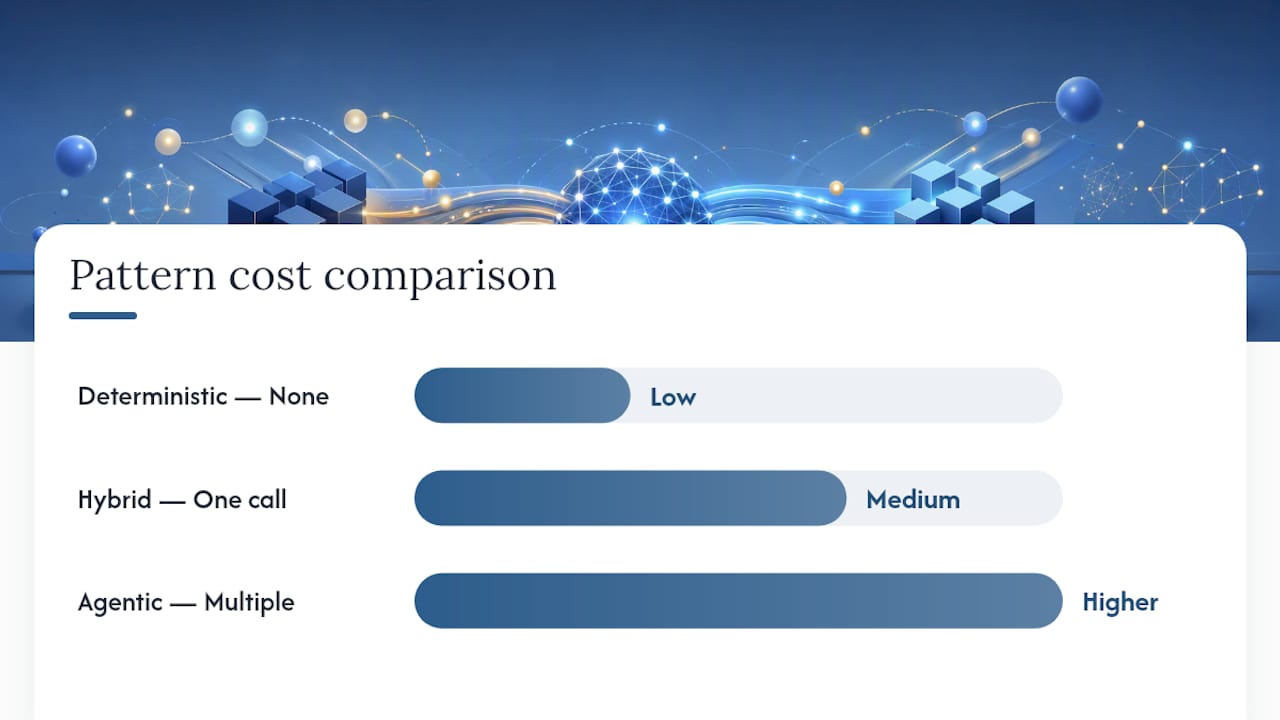
| Pattern | Model call | Cost | Auditability | Best for |
|---|---|---|---|---|
| Deterministic (n8n) | None | Low | Highest | Daily task counts, Slack digests |
| Hybrid (pull + AI) | One call | Medium | High | Weekly exec summaries, TL;DRs |
| Agentic (multi-source) | Multiple | Higher | Requires enforcement | Leadership briefings, client rollups |
For integration priorities: start with your task board (Asana, Jira, or ClickUp), add your calendar, then one chat channel (Slack or Microsoft Teams). GitHub is worth adding for engineering-heavy projects where commit and PR data tells a story the task board doesn’t. Gmail or SendGrid handles email distribution once the digest is ready.
Pro Tip: Avoid pulling from more than five sources in your pilot. Token limits and duplicate evidence compound quickly. Add sources one at a time after the baseline is stable.
How do you go from pilot to production?
This is a six-step rollout, not a big-bang deployment.
-
Define pilot scope. Pick one project with a willing PM and two or three stakeholders. Connect Asana or Jira, your calendar, and one Slack channel. Write down your success criteria before you start: 90% of digest lines have a valid source link, stakeholders rate accuracy 4/5 or higher, and the PM spends under 10 minutes reviewing each digest.
-
Build extractors and aggregations. Pull tasks, bucket by status, and compute blocker age deterministically. Do not add a model call yet. Verify the raw output matches what the PM would write manually for five known scenarios.
-
Add the TL;DR prompt. One model call, one output: a two-sentence summary with source citations in parentheses. Test against the same five scenarios. Flag any line the model generates that cannot be traced to a source field in the structured data.
-
Run a two-week human review. Require a PM and one stakeholder to review every digest. Mark each line as correct, incorrect, or unverifiable. Track the correction rate. If more than 10% of lines need correction, tune the prompt before proceeding.
-
Production checklist. Scale connectors to all active projects, automate scheduling, pin the model version, set rate limits, and instrument a thumbs-up/down feedback loop on each digest line. Document the rollback plan if a model update changes output behavior.
-
Governance and offboarding. Each person’s digest shows only what they’re permitted to see. When someone leaves the team, their access is removed immediately and the audit trail is preserved. Per-person privacy controls are not optional in a multi-stakeholder digest; they’re what keeps sensitive project data from leaking across organizational lines.
Pro Tip: Run a blind comparison for two weeks: send the AI digest to half your stakeholders and the manual report to the other half, then ask both groups the same three questions about project status. The gap in accuracy and coverage is your ROI case.
What prompts and templates should you use?
These are copy-and-paste starting points. Every template enforces citation and owner fields by design.
TL;DR prompt:
You are a project status assistant. Given the structured project data below, write exactly two sentences: one summarizing overall progress and one identifying the top risk. Every claim must end with a source reference in parentheses (task ID, file name, or channel + date). Do not add any information not present in the data.
Executive summary template (6 lines):
Momentum: [one-line progress statement] (source) Shipped: [item 1, date] (source) | [item 2, date] (source) Top risk: [risk description, score 1–5] (source) Blocker: [item, owner, days stuck] (source) Ask: [one specific decision or action needed from leadership] Next milestone: [name, due date] (source)
Team standup template:
Yesterday: [item, owner, ISO date] (link) Today: [item, owner] (link) Blocker: [item, owner, days stuck] (link)
Client update template:
Progress: a qualitative statement of completion status as of the most recent update Milestone status: [name] [on track / at risk / delayed] Top risk: [description, score] (source) Next deliverable: [name, date] Sign-off needed: [yes/no, action]
The formatting constraint that matters most: cap each section at five bullets, and require every line to end with a source reference. A digest that runs longer than one screen loses the executive audience. Format examples for TL;DR, team, and executive digests show how these templates look in practice across different project types.
How do you keep digests trustworthy and auditable?
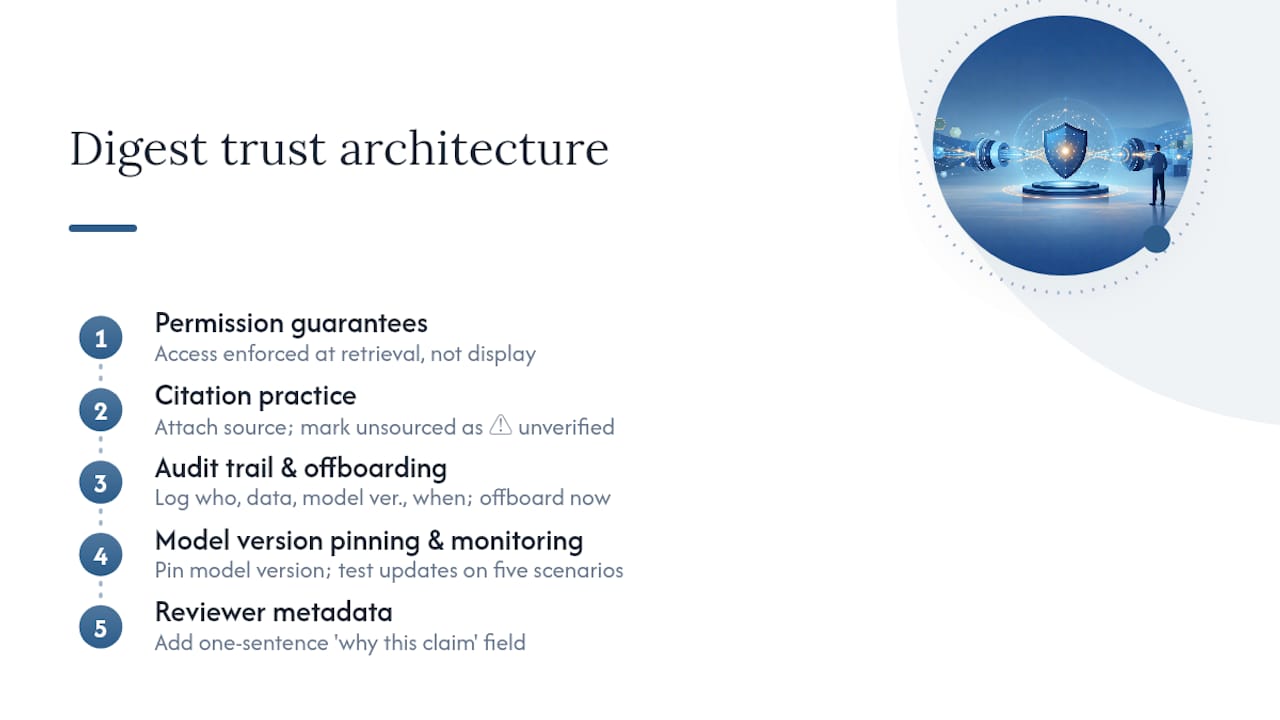
The trust architecture of a digest workflow has four layers, and skipping any one of them creates a liability.
Permission guarantees. Each digest line must trace back to a source the reader is allowed to see. If a leader’s digest includes a line about a budget figure, that line should only appear if the leader has access to the budget data. This is enforced at retrieval time, not at display time.
Citation practice. Attach a source reference (file name, channel, date, or task ID) to every claim. Mark any line that cannot be sourced as ⚠️ unverified. This single practice eliminates most hallucination risk because the model cannot generate a claim without a corresponding source field in the input data.
Audit trail and offboarding. Every digest generation event should be logged: who received it, what data was included, which model version ran, and when. When someone leaves the team, their access is removed immediately. The audit trail practices that matter most are change history and instant offboarding, not just read logs.
Model version pinning and monitoring. Pin the model version in production. When a provider releases an update, test it against your five known scenarios before promoting it. OpenAI’s decision to slow Astra model development over security concerns is a concrete example of why leaders need to monitor provider advisories: a capability shift in the underlying model can change digest behavior in ways that aren’t immediately visible. For teams handling sensitive data, agentic AI security controls provide a practical framework for sandboxing and access governance.
A systematic review of AI methods in project management found that real-world validation and communications use cases remain less studied than cost estimation and scheduling. That gap is exactly why citation-first workflows matter: the evidence base for digest quality is still being built, and human review fills the gap.
Pro Tip: Add a “why this claim” metadata field to each digest line: a one-sentence extraction of the evidence used. Reviewers can validate a line in seconds instead of chasing the source manually.
ClaudeDrive delivers this workflow without a new dashboard
Most teams that build a project status AI digest workflow from scratch spend weeks on connectors, permissions, and distribution logic before they get to the actual digest quality. ClaudeDrive takes a different path.

Leaders open Claude, ask for their update, and read a sourced briefing built only from what they’re permitted to see. Connect meeting notes, GitHub, your calendar, and your PM tools. Each person gets their own private view: no cross-contamination, no sensitive data leaking to the wrong stakeholder, no new app to learn. Every line in the digest traces back to a real source. Instant offboarding means a departing team member’s access is cut the moment you remove them, and the audit trail stays intact.
For teams already using Claude Team or Enterprise, ClaudeDrive is the context layer that makes the daily update trustworthy, not another assistant to manage. See the live demo or talk to us about a pilot to see how it fits your current stack.
What metrics tell you the workflow is actually working?
Post-launch, track these four categories. They tell you whether the digest is accurate, complete, used, and operationally sound.
The escalation metric is the one most teams ignore and the one that proves ROI. If blockers are being flagged in the digest but owners aren’t acting within 24 hours, the distribution or the urgency signal needs tuning, not the model.
Coverage gaps usually trace back to missing connectors or permission mismatches. When a milestone disappears from the digest without being completed, that’s a data source problem, not a model problem. Track sources connected versus sources planned as a separate operational metric.
What to expect in the first eight weeks
The first two weeks are almost entirely about connectors and noise. Permissions mismatches will cause items to disappear from digests without explanation. Citation enforcement will surface fields that weren’t being populated in your task board. Expect to spend more time fixing source data quality than tuning prompts.
Weeks three and four are when prompt drift becomes visible. Human reviewers start flagging lines that are technically sourced but misleadingly framed. A task marked “in review” gets summarized as “complete.” Schedule weekly prompt reviews during this period, not monthly. Edge cases accumulate faster than most teams expect.
By weeks five through eight, the workflow is stable enough to scale. Add connectors one at a time, automate distribution, and start measuring the time your PMs no longer spend writing manual status reports. That delta is your primary ROI number.
The blind spot that trips up most pilots: assuming that a sourced digest line is a correct digest line. A model can cite a real task and still mischaracterize its status. Citation-first workflows reduce hallucination risk significantly, but they don’t eliminate the need for human review until the accuracy metrics prove otherwise. Build the review process into the workflow from day one, not as an afterthought.
Sources
These references give you the technical grounding and governance framing to design a credible pilot.
- AI in project management
- Post a daily Asana project status digest to Slack | n8n workflow template
- RayeesYousufGenAi/project-status-reports
- OpenAI says it slowed Astra model development over security concerns