How to Run a Daily AI Briefing for Your Sales Team
Transform your sales team's performance with daily AI briefings that reduce prep time from 30 minutes to under five, leading to faster results.
ClaudeDrive
A Yungsten Tech product

How to Run a Daily AI Briefing for Your Sales Team

A daily AI briefing gives each rep the exact talking points, risk flags, and next actions they need before the day’s first call, cutting prep time from 30-plus minutes to under five. The business outcome is cleaner handoffs, faster pipeline movement, and a team that walks into every conversation already knowing the account. Apollo’s 2026 survey found that 97% of go-to-market leaders have adopted AI in some form, and 33% rank end-to-end workflow automation as their top priority. A daily briefing is the clearest expression of that priority.
Three things to do today:
- Connect your core data sources. CRM opportunity records, calendar entries, and meeting transcripts are the minimum. Without all three, the briefing reads like a summary, not a plan.
- Pick one delivery channel and a fixed schedule. Slack, email, or a CRM note, sent 30–60 minutes before the team’s first call block. Decide once and hold it.
- Define permission and audit guardrails before day one. Agree on who can see which accounts, require source links on every briefing line, and log every output. ClaudeDrive is built for exactly this: permission-aware, source-linked daily briefings delivered inside Claude, with no new app for the team to learn.
Key Takeaways
A daily AI briefing that reps actually trust requires a unified data layer, strict permission controls, and source-linked output delivered inside the rep’s existing workflow.
| Point | Details |
|---|---|
| Connect three sources first | CRM records, calendar entries, and meeting transcripts are the minimum for a useful briefing. |
| Pilot one pipeline only | Start narrow to speed adoption and make measurement clean before expanding. |
| Require source links on every line | Traceability is the single biggest factor in rep adoption; no line should deliver without a citation. |
| Measure prep time from day one | Track time-to-prepare per rep at baseline, week 4, and week 12 to prove pilot impact. |
| ClaudeDrive handles permissions and delivery | Source-linked briefings inside Claude, with per-user access controls and instant offboarding, no new app required. |
Table of Contents
- Which data sources does the briefing need to be useful?
- How do you design the nightly workflow that produces the briefing?
- What exactly should the AI synthesize into each briefing?
- Which channels and formats give briefings the best read rate?
- What governance controls keep briefings accurate and trustworthy?
- How do you measure whether the briefing is actually working?
- Copyable templates and prompt patterns for day one
- What does a 30/60/90 day rollout look like with ClaudeDrive?
- Why permissioned briefings are the only kind worth running
- ClaudeDrive gives your sales team a briefing they can trust
- Sources
Which data sources does the briefing need to be useful?
The briefing will fail if it reads from only one system. Disconnected sources produce incomplete context and weak recommendations, which reps stop trusting within days. A unified read layer that queries CRM, calendar, and transcripts together is the foundation.
| Data Source | What it feeds into the briefing |
|---|---|
| CRM opportunity records | Deal stage, amount, owner, close date, last activity |
| Calendar entries | Who’s attending, meeting type, time zone, prep window |
| Meeting transcripts & call notes | Conversation context, objections raised, commitments made |
| Activity logs / sequence events | Email opens, call attempts, task completions |
| Enrichment & intent signals (ZoomInfo) | Firmographics, buying intent, contact verification |
| Shared documents / proposal drafts | Version status, open items, pricing discussed |
Each row maps to at least one briefing line. The CRM record gives the headline and deal context. The transcript gives the last conversation’s tone and any open questions. The calendar tells the agent who’s in the room and how much time you have. Intent signals from tools like ZoomInfo, which now integrates directly with Microsoft 365 Copilot and Dynamics 365, show whether the account has been researching competitors or pricing pages in the past week.
Watch for these integration problems: missing timestamps on call notes (the agent can’t sequence events), duplicate transcript entries from Zoom and Gong both recording the same call, and nonstandard transcript formats that strip speaker labels. Fix these at the connector level before the pilot starts.
Pro Tip: Set up a read-only data layer from day one. The agent should query across sources without writing back to any of them during the pilot. This keeps the data clean and makes it easy to audit what the briefing actually saw.
How do you design the nightly workflow that produces the briefing?
The core sequence is consistent across successful implementations: trigger, gather context, synthesize, apply governance, deliver, and log. Here it is as a numbered workflow:
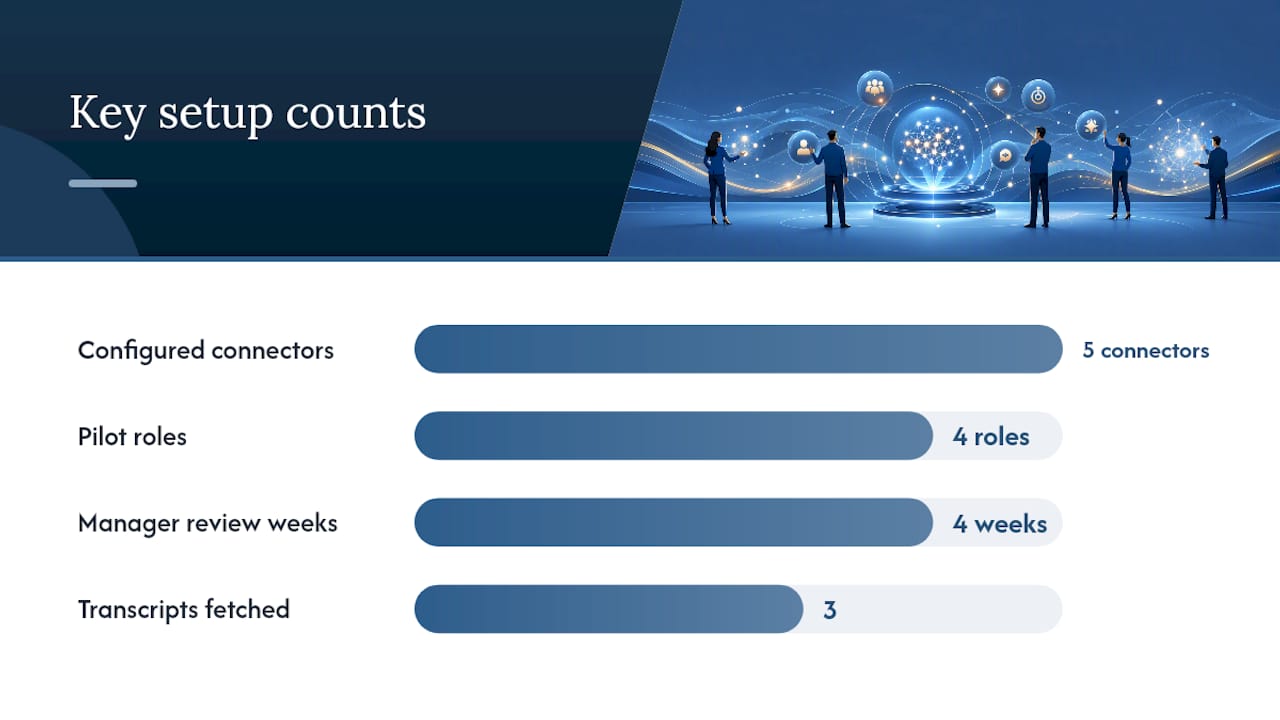
- Trigger. A scheduled job fires at a fixed time (recommended: 6:30–7:00 AM local time for the rep, or 30–60 minutes before the team’s first call block). For multi-timezone teams, trigger per rep’s local calendar, not a single global time.
- Gather context. The agent pulls that day’s calendar events, then queries the CRM for each meeting’s associated opportunity, account, and owner. It fetches the three most recent transcripts and any open tasks.
- Synthesize the brief. The agent combines those inputs into a structured output: headline, account summary, talking points, risk flags, and next action. Every line carries a source pointer.
- Apply governance rules. Confidence scoring runs. Lines flagged low-confidence are held for manager review. Permission checks confirm the rep is allowed to see each piece of data.
- Deliver and log. The brief goes to the rep’s chosen channel. The full output, including which sources were queried, is written to an immutable audit log.
Role matrix for the pilot:
- Platform admin: Configures connectors (Salesforce, Zoom, Gong, Zapier, Slack), sets permission scopes, owns the audit log.
- RevOps lead: Defines the synthesis prompt, sets risk flag taxonomy, reviews output quality weekly.
- Manager: Reviews flagged briefs before delivery during weeks 1–4. Signs off on CRM writes if any are introduced later.
- Rep: Reads the brief, marks it useful or not, and flags hallucinations via a one-tap reaction in Slack.
Two gotchas to avoid: calendar update events can re-trigger the workflow and send duplicate briefs, so deduplicate on meeting ID, not event timestamp. And keep the pilot to a single pipeline and a single delivery channel. Trying to cover enterprise and SMB deals simultaneously in week one produces noisy briefs that nobody trusts.
Pro Tip: Start with one pipeline and one channel. Speed of adoption and measurement both depend on keeping the surface area small at the start.
What exactly should the AI synthesize into each briefing?
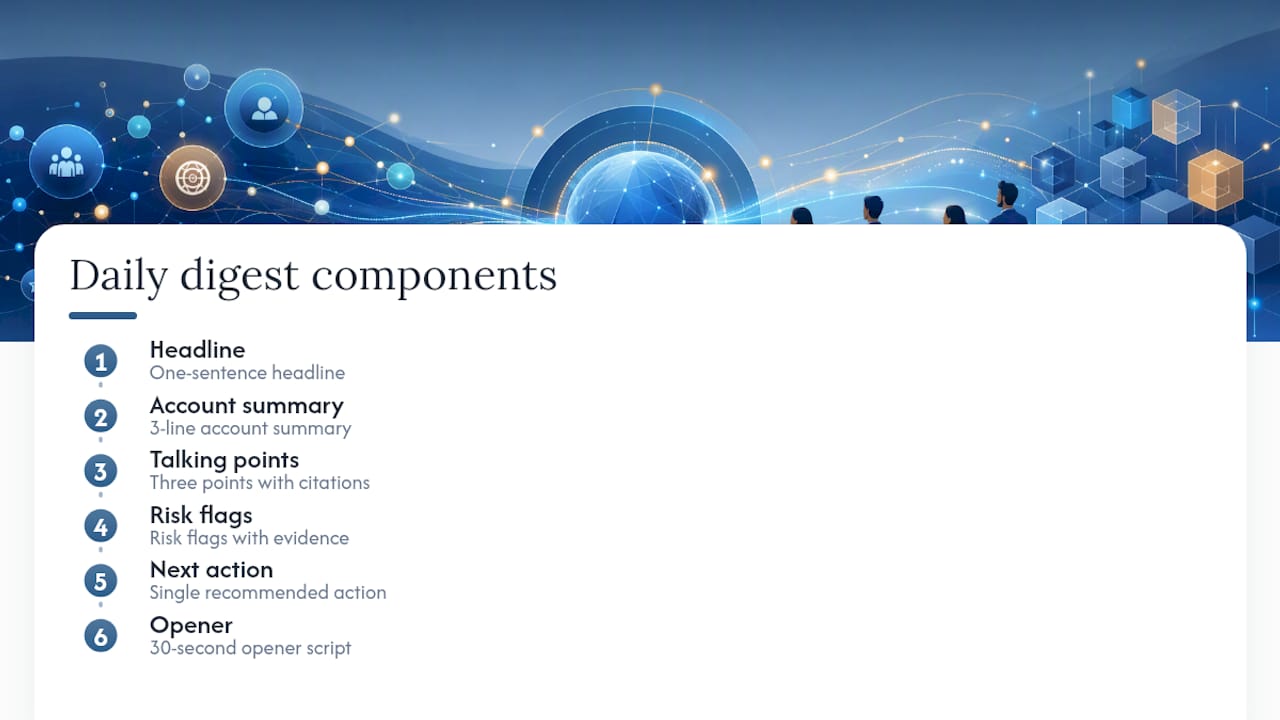
A well-structured brief has six labeled sections. Reps should be able to scan it in 90 seconds and walk into the call ready. Practitioner guidance is consistent: filter to account-specific signals, attach a traceable source to every line, and keep cognitive load low.
Standard briefing elements:
- Headline. One sentence: account name, deal stage, meeting time, and the single most important thing to know today. Example: “Acme Corp / Proposal Stage / 10:00 AM — Champion went dark for 8 days; re-engage on ROI framing.”
- 3-line account summary. Company size, industry, current deal amount, and last meaningful interaction.
- Top 3 talking points. Each tied to a source (transcript timestamp or CRM note). Matched to deal stage: discovery points focus on pain, demo points focus on fit, proposal points focus on value and timeline.
- Risk flags with evidence. Budget unknown (source: no budget field in CRM, last updated 14 days ago). Stalled decision-maker (source: no executive contact in last 3 calls). Scope creep (source: transcript 2026-08-10, rep committed to custom integration not in the proposal).
- Recommended next action. One sentence, specific and time-bound. Example: “Send a one-page ROI summary to the CFO before 2:00 PM today.”
- Suggested script snippet. A 30–45 second opener the rep can read or adapt. Keep it conversational, not scripted-sounding.
Audio adds value for reps who commute or prep in the car; text-only works better for reps who annotate and share briefs with their manager.
Pro Tip: Write risk flags in plain language with the evidence attached. “Budget unknown — no field value in Salesforce, last touched 14 days ago” is more useful than “budget risk identified.”
Which channels and formats give briefings the best read rate?
Delivery channel determines whether the brief gets read. The right answer depends on where the team already runs their day.
| Channel | Best for | Trade-off |
|---|---|---|
| Slack | Teams that live in Slack; easy threading and reactions | Briefs can get buried in busy channels; use a dedicated #daily-brief channel |
| Reps who start the day in their inbox; easy to forward to manager | Lower open rates for internal mail; no inline source links | |
| CRM note (Salesforce) | Teams that open the CRM before every call | Requires reps to navigate to the record; no push notification |
| Text / SMS | Field reps or high-mobility teams | No formatting; source links don’t render well |
| Audio (Zoom / podcast feed) | Commuters; reps who prep on the go | Harder to annotate; no quick scan |
Scheduling by role:
- Rep: Daily digest at 7:00 AM, plus a call-specific brief 30 minutes before each meeting.
- Manager: A rolled-up pipeline brief at 7:30 AM showing flagged deals and any briefs held for review.
- CRO: A weekly digest on Monday morning summarizing pipeline velocity, win rate by cohort, and briefing adoption rate.
Align the initial channel with where the team already works. A Slack-first team that gets briefings in email will ignore them. A CRM-first team that gets Slack pings will find them disruptive. AI briefings delivered inside the rep’s existing workflow consistently outperform those that require a tool switch.
What governance controls keep briefings accurate and trustworthy?
Governance is what separates a briefing reps trust from one they ignore after week two. High-trust briefings link every claim to a concrete source and timestamp; that traceability is the single biggest factor in rep adoption.
Governance checklist:
- Permission scoping. Each rep sees only the accounts and opportunities they own or are explicitly shared on. No cross-rep data leaks. Managers see their team’s deals; the CRO sees the full pipeline.
- Connector enrollment. Only the platform admin can add or remove a data connector. RevOps approves the data sources list.
- Read-only access. The agent queries data; it does not write back to Salesforce, Gong, or any source system during the pilot.
- Confidence flags. Label each synthesized line: High (direct quote from transcript or CRM field), Medium (inferred from activity pattern), Low (extrapolated from thin data). High lines auto-deliver. Medium lines deliver with a flag. Low lines go to the manager review queue.
- Source links. Every briefing line carries an exact pointer: transcript timestamp, CRM record ID, or document version. No line without a source.
- Audit trail. Every output is logged with the sources queried, the rep it was delivered to, and the timestamp. Immutable; accessible to the platform admin.
- Instant offboarding. When a rep leaves the team, their access to the briefing system is revoked within one business day. Their briefs stop generating; their historical outputs remain in the audit log but are no longer accessible to them.
For access control and permissioning guidance that goes deeper, the principle is the same: who’s allowed to see what is decided at configuration time, not at query time.
Pro Tip: Require manager sign-off for any automated write into Salesforce until the pilot reaches your target trust score. Read-only first, write-back later.
How do you measure whether the briefing is actually working?
Measurement starts on day one. Without baseline numbers, you can’t prove the pilot worked or justify the rollout.
Metrics to track:
- Time-to-prepare per rep (baseline vs. week 4 vs. week 12)
- Number of manual prep tasks eliminated per week
- Win rate change by cohort (briefed vs. unbriefed deals, same pipeline)
- Pipeline velocity for briefed deals (days in stage)
- Rep satisfaction score (1–5 scale, weekly survey)
- Hallucination incidents reported (rep-flagged errors per 100 briefs)
30/60/90 pilot timeline:
- Days 1–30 (Trust). Connect CRM, calendar, and transcripts for one pipeline. Deliver briefs to 3–5 reps. Manager reviews every output. Goal: zero hallucination incidents in week 4; rep satisfaction score above 3.5.
- Days 31–60 (Accuracy and adoption). Remove manager review for High-confidence lines. Expand to 10–15 reps. Measure prep time reduction. Goal: 50% of reps report using the brief before every call.
- Days 61–90 (Impact). Add intent signals and enrichment data. Measure pipeline velocity and win rate by cohort. Goal: briefed deals move through stages at least 15% faster than the control group.
Daily briefings consistently outperform weekly reports on adoption and impact, because the feedback loop is tight enough to catch problems before they compound.
Rep trust survey (run at day 30 and day 60):
- “How often did you read the briefing before a call this week?” (1–5 scale)
- “How accurate were the talking points?” (1–5 scale)
- “Did the brief surface anything you wouldn’t have caught on your own?” (Yes / No / Sometimes)
- “What would make the brief more useful?” (open text)
RevOps runs the survey; the manager reviews results with the platform admin. If satisfaction stays below 3.5 at day 60, pause the rollout and audit the data sources before expanding.
Copyable templates and prompt patterns for day one
These are ready to hand to RevOps. Adjust the variables in curly braces for your stack.
Daily digest prompt pattern:
You are a sales briefing assistant. For each meeting on {rep_name}'s calendar today, pull the associated opportunity from Salesforce, the three most recent call transcripts from Gong, and any open tasks. For each meeting, output: (1) a one-sentence headline, (2) a 3-line account summary, (3) three talking points with source citations, (4) risk flags with evidence, (5) one recommended next action, (6) a 30-second opener script. Label each line with its source. Do not include any information {rep_name} is not permitted to see.
Pre-call brief prompt pattern:
For the meeting with {account} at {meeting_time}, owned by {owner}: summarize the last three interactions, identify the top risk, and suggest the single best opening question. Cite the transcript or CRM record for each point.
Deal watchlist prompt pattern:
List all opportunities in {pipeline} that have had no activity in 10 or more days, where the close date is within 30 days. For each, show the last contact, the risk reason, and a suggested re-engagement action.
Sample briefing output (what the agent should produce):
Acme Corp | Proposal | 10:00 AM with Sarah Chen (CFO) Account: 400-person SaaS company, $85K deal, Q3 close target. Last interaction: Discovery call Aug 10 — CFO asked about integration timeline; no follow-up sent. Talking points: (1) Integration completes in 6 weeks per your Aug 10 call [Gong, 00:14:32]. (2) Competitor was mentioned; address with the comparison one-pager [Salesforce, Opportunity Notes, Aug 12]. (3) ROI model shows 3x return in year one [Proposal v2, Aug 9]. Risk: No executive sponsor confirmed [CRM: no contact above Director level logged]. Next action: Ask Sarah to introduce the CTO before the proposal review. Opener: “Sarah, last time we talked you asked about the integration timeline. I’ve got a concrete answer for you today, and I want to make sure we cover the ROI numbers before the end of the call.”
Audio checklist: Keep spoken briefs under three minutes. Read source attributions aloud. Use a consistent persona voice. End with the next action, not the risk.
What does a 30/60/90 day rollout look like with ClaudeDrive?
This playbook maps each implementation step to a specific capability so your technical team knows exactly what to configure.
| Playbook step | ClaudeDrive capability | Owner | Success signal |
|---|---|---|---|
| Connect CRM, calendar, meeting notes | Native connectors for Salesforce, Zoom, Gong; Zapier for custom sources | Platform admin | All three sources returning data in test query |
| Set permission scopes per rep | Per-user access controls enforced at retrieval; no cross-rep data visible | Platform admin + RevOps | Rep A cannot see Rep B’s accounts |
| Configure source-linking | Every briefing line carries an exact source pointer (record ID, transcript timestamp) | RevOps | Zero unlinked lines in pilot output |
| Deliver inside Claude | Briefing surfaces in the rep’s Claude account; no new app | Platform admin | Rep opens Claude, asks for update, reads brief |
| Manager review gate | Flagged lines routed to manager before delivery | Manager | 100% of Low-confidence lines reviewed in week 1 |
| Audit trail | Immutable log of every output, source queried, and recipient | Platform admin | Log accessible and complete at day 30 review |
| Instant offboarding | Revoke access; rep’s briefs stop generating within one business day | Platform admin | Offboarded rep cannot retrieve any brief |
| Expand to full team | Add pipelines, enrich with ZoomInfo intent signals, add Microsoft 365 Copilot data | RevOps | Adoption above 80%; satisfaction score above 4.0 |
Pilot success criteria to graduate to full rollout:
- 80% of reps read the brief before at least 4 of 5 calls per week
- Rep satisfaction score at or above 4.0 out of 5
- Prep time per rep reduced by at least 50% versus baseline
- Fewer than 2 hallucination incidents per 100 briefs
- Manager sign-off completed for governance review
ClaudeDrive covers the permission model, source-linking, in-Claude delivery, and audit trail out of the box. The Claude daily briefing guide walks through the configuration steps in detail.
Why permissioned briefings are the only kind worth running
The briefing market is splitting into two camps: generic AI summaries that pull from whatever data the tool can reach, and permissioned, source-linked briefings that enforce who sees what and prove every line. The first camp looks impressive in a demo. The second camp is what actually gets adopted.
Reps are not going to trust a briefing that occasionally surfaces another rep’s deal notes, or that cites a talking point with no evidence behind it. One bad brief in week two and adoption collapses. The governance controls described in this article are not optional overhead; they are the product. A briefing without source links and permission scoping is just a hallucination delivery system with a nice interface.
The other thing leaders underestimate is the cost of tool switching. Every time a rep has to leave their workflow to read a brief, you lose them. The teams that get the highest adoption rates deliver the brief exactly where the rep already is, whether that’s Slack, their CRM, or Claude. No new login, no new dashboard, no new habit to form.
Start with the smallest possible pilot, measure trust first, and expand only when the numbers say the rep believes what they’re reading.
ClaudeDrive gives your sales team a briefing they can trust
The playbook above works. The harder part is running it without adding another tool, another dashboard, or another onboarding cycle for your team.

ClaudeDrive connects your meeting notes, calendar, and Salesforce records, then delivers each rep a private, source-linked briefing inside the Claude account they already use. Every line traces back to a real source. Nothing leaks across permission lines. No new app to roll out. When a rep leaves, their access is gone the same day. The permission-aware briefing model is live and running for teams today.
Talk to us about a pilot. Bring your current data sources and your target pipeline, and we’ll show you what the briefing looks like on day one.
Sources
- Only 6% of Go-to-Market Leaders Think AI Will Replace Their Teams, Apollo Report Finds
- How AI helps sales teams stop losing context between calls and follow-ups - TNGlobal
- ZoomInfo data now integrated with Microsoft Copilot Studio and available in Microsoft 365 Copilot, Dynamics 365, Excel and Word
- meeting-brief (With Lantern)
- How To Build an AI Sales Briefing Agent