How to Plan and Execute as a Company Leader
Discover how company leaders can effectively plan and execute with daily briefings that enhance visibility, accountability, and decision-making.
ClaudeDrive
A Yungsten Tech product

How to Plan and Execute as a Company Leader

A permissioned, source-linked daily briefing inside Claude gives leaders reliable, auditable visibility into plans, progress, blockers, and P&L impact — closing the gap between what was decided and what is actually happening.
Every morning, the question is the same: are we on track? The honest answer requires more than a status meeting. It requires a briefing built only from what you are allowed to see, with every line traceable to a named source. That is what a well-structured plan-and-execute system delivers.
A leader-grade daily briefing covers:
- Top plans — owner, ETA, and current status
- Daily progress snapshot — quantified where possible (tickets closed, revenue moved, milestones hit)
- Blockers and risks — with a specific ask attached
- Decisions needed — owner and deadline
- P&L impact or estimated delta — even a directional figure counts
- Source links — every line points to a named document, commit, or meeting note
Pro Tip: In your first meeting on this topic, decide three things: the pilot workflow, the accountable owner, and the baseline metric you will measure against. Everything else is detail.
Key Takeaways
Permissioned, source-linked daily briefings inside Claude give leaders auditable visibility into plans, progress, and P&L impact — and a narrow 90-day pilot is the fastest path to proving that value.
| Point | Details |
|---|---|
| Start with a baseline | Capture hours, decision lag, and P&L delta before the pilot starts — without it, ROI is unverifiable. |
| Source-link every line | A briefing line without a named source and version is an opinion; citation coverage above 90% is the pilot target. |
| Enforce access server-side | Server-side permission enforcement with fail-closed behavior prevents cross-team leakage and satisfies audit requirements. |
| Use the 90-day playbook | Define outcome, pick one workflow, instrument actions, prove ROI — then expand to the next workflow. |
| ClaudeDrive as the pilot path | ClaudeDrive delivers permissioned, source-linked briefings inside Claude with no new app, instant offboarding, and versioned audit trails. |
Table of Contents
- What should a daily plan-and-execution briefing contain?
- Who sees what — access controls and governance for leaders
- Which tools should you connect first?
- A practical 90-day playbook: pilot to org rollout
- What security guarantees should leaders require?
- What metrics should leaders track from these briefings?
- What does a pilot cost and how long does it take?
- What does the leader experience actually look like?
- Why leaders should make permissioned briefings a priority now
- ClaudeDrive delivers permissioned daily briefings inside Claude
- Sources
What should a daily plan-and-execution briefing contain?
The benefits of traceable internal AI updates come down to one principle: every assertion in a briefing must link to a named source with a timestamp. Without that, a leader cannot tell whether a status line reflects yesterday’s standup or last quarter’s roadmap doc.
A well-formed briefing template looks like this:
| Briefing Line | Example | Source Type |
|---|---|---|
| Top plan | “API v2 launch — Owner: J. Park — ETA: June 14” | Roadmap doc, versioned |
| Progress snapshot | “12 of 18 acceptance tests passing as of 9 AM” | GitHub CI run |
| Blocker | “Staging environment down; need DevOps approval by noon” | Incident ticket |
| Decision needed | “Approve $14K infra spend to unblock deploy” | CFO memo |
| P&L delta | “One-week slip = ~$40K deferred ARR” | CRM pipeline |
The evidence principle is non-negotiable. CIOs report that AI outputs can change without any code change, which means versioning data, prompts, and outputs is the only way to explain what the assistant said and why. A briefing line without a source and a version is an opinion, not a report.
Who sees what — access controls and governance for leaders
Plain guarantees leaders should demand before any rollout:
- No cross-team leakage — a finance briefing never surfaces in an engineering view
- Instant offboarding — a departed employee retrieves nothing from restricted sources within minutes of access removal
- Every line traceable — source document, version, and timestamp attached to each briefing assertion
- Audit trail — a log of who requested what briefing and when, reviewable on demand
The recommended governance model assigns an owner and a defined audience to each briefing type. Read access and approval rights map to role attributes enforced server-side, not client-side. Server-side orchestration with centralized enforcement is the safer pattern for multitenant deployments because it reduces the surface area where a misconfiguration can leak data across teams. Under ungated configurations, research found that a majority of injection probes retrieved cross-tenant data under ungated configurations; server-side gating eliminated that in the same probe set.
For keeping sensitive information private in AI systems, the rule is simple: stage corpora by sensitivity, test offboarding before go-live, and treat permission failures as a hard stop, not a fallback.

Pro Tip: Define your acceptable revocation delay in writing — “access removed within 15 minutes of offboarding” — and treat it as a governance parameter with a named owner, not an IT assumption.
Which tools should you connect first?
Data management preparedness has declined even as AI adoption accelerated, which means source quality determines briefing quality. Connect the highest-signal sources first and expand only after the pilot proves accuracy.
- Meeting notes — captures decisions, owners, and blockers in real time; maps directly to every briefing line
- Calendar — surfaces upcoming deadlines and meeting patterns; flags scheduling conflicts before they become blockers
- Ticketing or issue tracker — quantifies progress and blockers; the most reliable daily signal for engineering and product teams
- GitHub or commit log — shows what shipped, what is in review, and what stalled; essential for technical plan tracking
- CRM or ops dashboard — connects execution to revenue; the fastest path to a P&L delta line in the briefing
- Product release notes or changelog — closes the loop between what was built and what was promised
Before engineering starts any integration, a leader should approve a short checklist:
- Scope: which data fields are in, which are out
- Owner: who is accountable for each source connection
- Data reach: does this source touch sensitive corpora (HR, legal, investor)?
- Revocation delay: how quickly can access be cut if needed?
A practical 90-day playbook: pilot to org rollout
A narrow, instrumented 90-day roadmap — define outcome, pick one workflow, capture baseline, instrument actions, prove ROI — is the method that moves a pilot from experiment to durable capability.
Phase 1: Days 1–30 — Define and baseline
- Pick one high-frequency workflow (weekly leadership sync, sprint review, or sales pipeline review)
- Define the outcome in measurable terms: hours saved per week, or a specific P&L delta
- Capture the pre-pilot baseline — time spent, decision lag, escalation frequency
- Assign an accountable owner for the briefing and for each data source
- Approve the integration list and revocation policy
Phase 2: Days 31–60 — Embed and instrument
- Embed the daily briefing in the leader’s existing Claude workflow
- Instrument every briefing line for source traceability and version
- Set a weekly review cadence: accuracy audit, citation coverage check, adoption rate
- Tune signal quality — remove noise sources, add missing ones
Phase 3: Days 61–90 — Prove and expand
- Measure ROI against the baseline captured in Phase 1
- Formalize the governance model: owners, audit cadence, escalation path
- Document the operating model for the next team
- Plan expansion to the second workflow
BCG found that fewer than 14% of companies have clearly defined P&L impact for all AI initiatives, which is why baseline capture in Phase 1 is not optional. Without it, the pilot cannot survive a budget review.
| Role | Responsibility | Acceptance Criteria |
|---|---|---|
| Leader sponsor | Approves scope, reviews weekly metrics | Briefing read rate above 80% by Day 60 |
| Product/engineering owner | Builds and maintains integrations | All lines source-linked |
| Data owner | Approves source scope and revocation policy | Offboarding test passed before go-live |
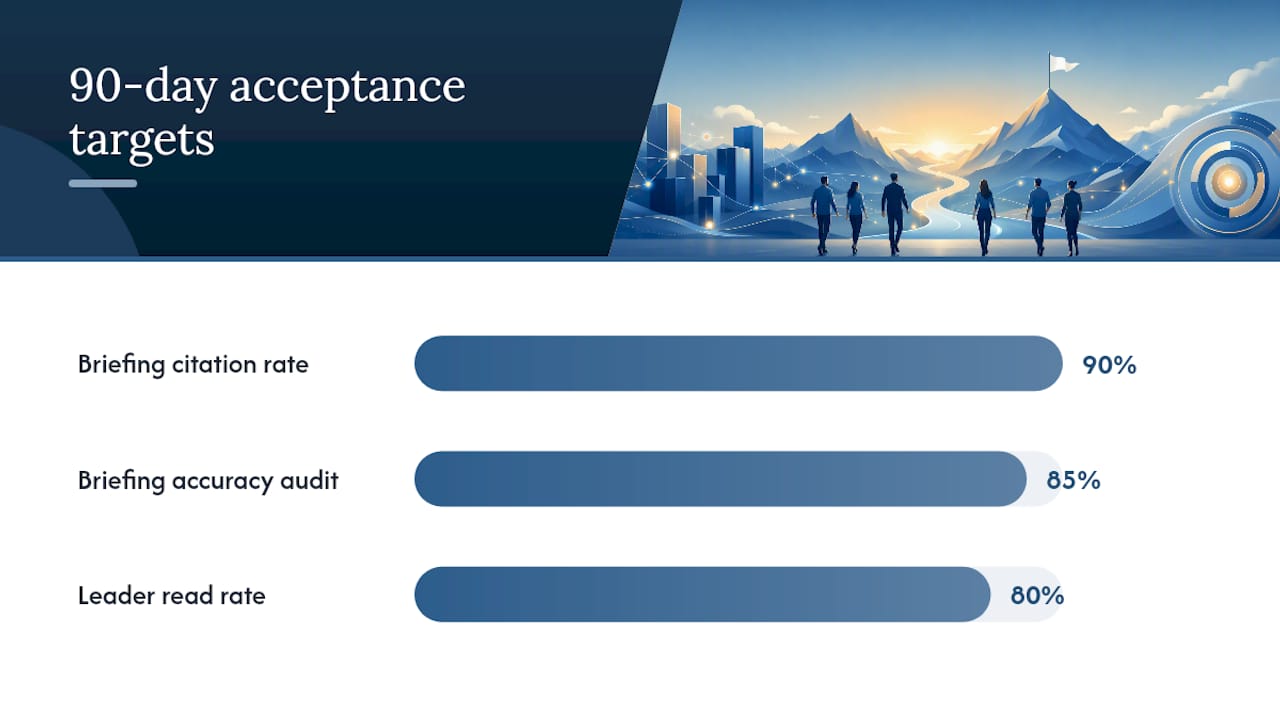
| Briefing owner | Monitors accuracy and citation coverage | Citation rate above 90%, accuracy audit above 85% |
What security guarantees should leaders require?
Four guarantees belong in every approval memo:
- Permissioned retrieval only — the assistant never surfaces content the requester is not allowed to see
- Versioned audit trails — every briefing line carries a source, version, and timestamp, reviewable after the fact
- Fail-closed on permission failures — if a permission check times out, the assistant refuses and logs the event rather than defaulting to open access
- Retention and log review — audit logs are retained for a defined period and reviewed on a set cadence
The realistic trade-offs leaders must accept: real-time permission checks add latency; more sensitive corpora require more frequent checks, which costs more. Predicate pushdown (filtering at the data layer before retrieval) improves performance but requires the data source to support it. Where freshness matters most — live pipeline data, active incident tickets — the extra cost of real-time checks is usually worth it.
A useful callout for an approval memo: “If a permission check times out, the assistant refuses and logs the event. No partial results are returned.” That single sentence covers the most common audit question about permissioned retrieval architecture.
What metrics should leaders track from these briefings?
Five metrics cover the full picture:
- Briefing adoption — daily open/read rate; target above 80% within 60 days
- Citation coverage — percent of briefing lines with a source link; target above 90%
- Accuracy audit — sampled match rate between briefing assertion and source document; target above 85%
- Time-to-decision — days from blocker surfaced to decision made; compare against pre-pilot baseline
- Measured delta — hours saved per week or revenue impact vs. baseline
| Metric | Pilot Target | How to Read It |
|---|---|---|
| Adoption rate | Above 80% by Day 60 | Below 60% means the briefing is not fitting the workflow |
| Citation coverage | Above 90% | Gaps signal missing integrations or source mapping errors |
| Accuracy audit | Above 85% | Below 80% requires source quality review before expansion |
| Time-to-decision | Shorter than baseline | Flat or longer means blockers are surfaced but not acted on |
| P&L delta | Positive vs. baseline | The number that survives a budget review |
For more on AI update engagement metrics, the key distinction is adoption vs. engagement: a leader who opens the briefing daily but never acts on a decision ask is not getting value.
What does a pilot cost and how long does it take?
Typical timeline:
- Discovery week — source audit, access mapping, baseline capture
- 4–6 week pilot build — integrations, permission model, first briefings
- 2–4 week instrument and tune — citation coverage, accuracy audits, signal quality
- 2–4 week ROI validation — measure against baseline, document findings
Primary cost drivers:
- Number of integrations — each source connection adds build and maintenance cost
- Sensitivity level — real-time permission checks for sensitive corpora add infrastructure cost
- Professional services — source mapping, baseline definition, and governance documentation are often underestimated
- Seat or subscription model — scales with the number of leaders receiving briefings
Budget framing: a minimal pilot covering one workflow and two to three integrations is a one-time build cost plus a recurring subscription. An enterprise rollout covering five or more workflows, sensitive corpora, and formal audit requirements adds professional services and ongoing governance overhead. The one-time vs. recurring split matters for how you present it to a CFO.
What does the leader experience actually look like?
The flow from the leader’s seat:
- Open Claude in the morning (or receive a scheduled digest)
- Ask: “What’s my update for today?”
- The assistant gathers only the sources you are permitted to see
- Each line in the briefing carries a source link and a version timestamp
- Decisions and asks are surfaced with owners and deadlines attached
- You act, escalate, or defer — and the audit log captures the request
A sample daily brief:
- Plan: API v2 launch on track — J. Park, ETA June 14 (Roadmap v3.1, June 9)
- Progress: 12 of 18 acceptance tests passing as of 9 AM (GitHub CI, June 10)
- Blocker: Staging environment down; DevOps approval needed by noon (Incident #4421)
- Decision ask: Approve $14K infra spend to unblock deploy — CFO memo attached
- P&L note: One-week slip = ~$40K deferred ARR (CRM pipeline, June 10)
A private view shows only what that leader is permitted to see. A team-shared briefing aggregates across permitted sources for a defined group. The difference between private and shared briefing models is an access configuration, not a separate product.
Why leaders should make permissioned briefings a priority now
AI agents cannot substitute for leadership discipline — clear ownership, measurable milestones, and active engagement are prerequisites. A briefing system that surfaces the right information to the right person at the right time does not replace that discipline. It makes it easier to maintain.
The opportunity cost of not having this is specific: leaders spend time in status meetings that a well-structured briefing would replace, decisions lag because blockers are not surfaced until the weekly sync, and P&L impact goes unmeasured because no one defined the baseline. The narrow pilot approach — one workflow, one owner, 90 days — is the way to prove value without betting the organization on it.
The common pitfall is skipping the baseline. Without a pre-pilot measurement, the ROI claim is an opinion. With it, the briefing either earns its keep or it does not.
ClaudeDrive delivers permissioned daily briefings inside Claude

ClaudeDrive is the production-ready option for leaders who want permissioned daily briefings without building the infrastructure themselves. Connect meeting notes, GitHub, and your calendar; tag who sees what; and each leader gets a private, source-linked update inside the Claude account they already use. Every line is traceable. Nothing leaks across team lines. Offboarding is instant. There is no new dashboard to learn.
For teams evaluating build vs. buy: if your pilot scope covers more than two integrations, requires real-time permission checks, or needs a formal audit trail from day one, the 90-day build cost typically exceeds a year of subscription. See the ClaudeDrive Console and talk to us about a pilot.
Sources
Research:
- As AI makes projects harder to track, will CIOs need new controls?
- OGX (arXiv) — server-side orchestration, ABAC, and API surface
- CEOs: Cost, revenue and benefits of AI — BCG press
- The Agentic Execution Gap: Why AI Agent Initiatives Fail — Erik R. Miller
- Company knowledge RAG: permissions, leakage, and source boundaries — AI Expert
ClaudeDrive resources: